
Build complaint-specific templates, map intake into notes, and use AI with embedded coding and discharge steps to hit 1–2 minute charts.
If you want charting to take about 1–2 minutes per visit, start with the chief complaint, not a blank note. I’d strip the workflow down to four parts: complaint-based templates, intake-to-note mapping, AI draft help, and built-in coding and discharge steps.
Here’s the short version:
The main idea is simple: when I build the chart around the complaint, I cut clicks, reduce note-to-note variation, and make same-visit chart closure more likely.
| Area | Basic charting | Complaint-based workflow |
|---|---|---|
| Note start | Blank or generic template | Complaint-specific draft |
| Time per visit | Several minutes | About 1–2 minutes |
| Data entry | Repeated in multiple places | Intake flows into the note |
| Note style | Varies by provider | More standardized |
| Coding | More manual review | Pre-filled suggestions + audit checks |
Bottom line: I’m not trying to chart less. I’m trying to chart with fewer steps and make each common urgent care visit follow a cleaner path.
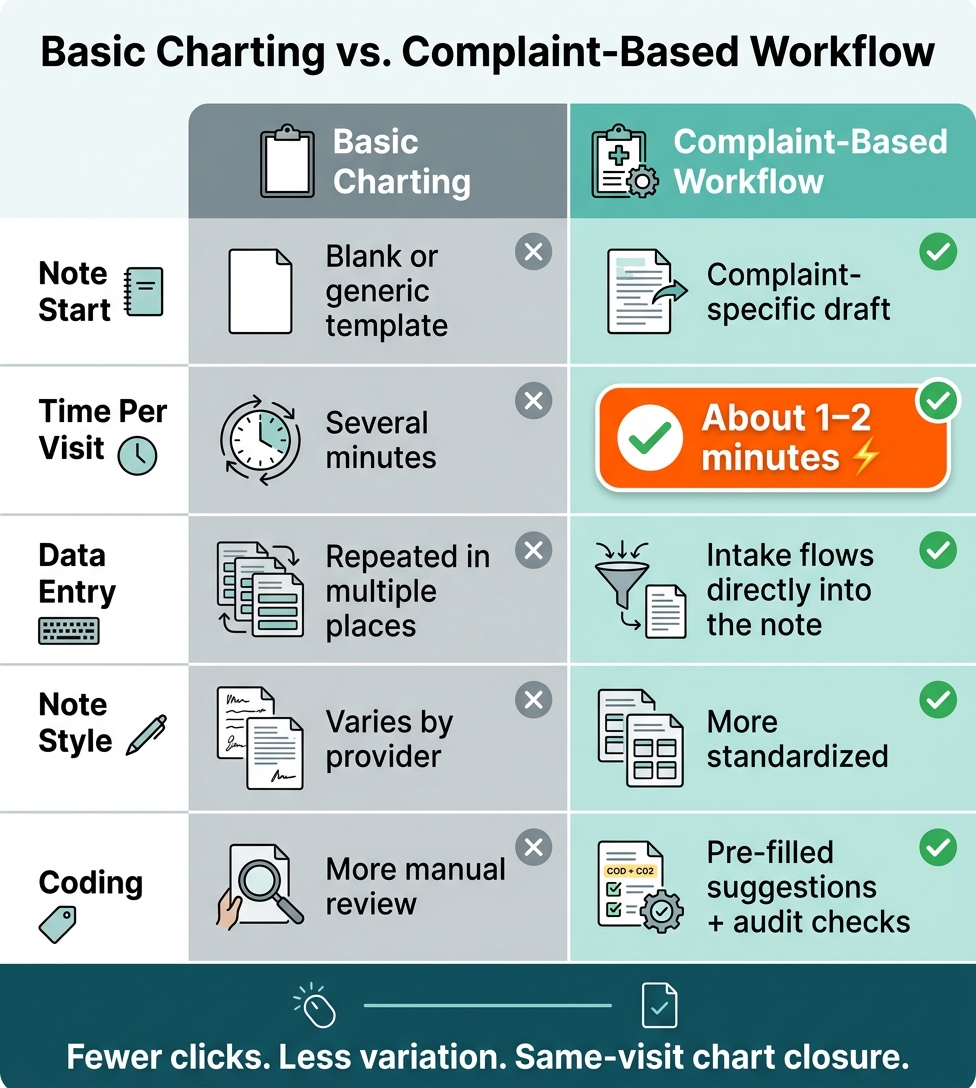
Basic Charting vs. Complaint-Based Workflow: Key Differences
Once the complaint-driven note is chosen, the next time-saver is the template itself. Build a separate template for each high-volume complaint so the provider only sees the fields that matter. That keeps the note SOAP-aligned and ready to review.
Each common complaint needs its own field set.
A sore throat template should bring ENT and neck findings to the top. An ankle injury template should track mechanism of injury and the exam details that fit that case. A UTI template should show urinary symptom fields. And a cough template should pull in respiratory findings.
The goal is simple: show the complaint-specific exam fields and default unrelated systems to normal. That way, the provider isn't digging through a long, cluttered note just to document one issue. And yes, all unrelated exam systems should default to normal.
For physical exam findings, checkboxes and dropdowns make charting faster and more consistent. Instead of typing the same details over and over, providers can move through normal and abnormal findings with a few clicks.
A setup like this works well:
That structure helps billing accuracy and cuts down on manual entry.
"Everything defaults to normal except what's relevant for [the complaint]... If I want to customize it further, I can simply open up the exam, review the normal and abnormal options, and update as appropriate." - Crystal Palsha, Ottehr
Map intake answers straight into the HPI and ROS using append logic. For exam, MDM, and patient instructions, use replace logic so the note stays clean and tied to the complaint.
Once that template is set up, smart phrases and AI can fill repeatable sections even faster.
Once the complaint template is loaded, smart phrases and AI can finish the note with far fewer clicks.
Smart phrases work best for note sections that barely change from visit to visit: normal exam findings, standard discharge instructions, and other repeatable blocks. Instead of typing those parts again and again, the provider can trigger a short phrase and expand the full text on the spot.
The simplest setup is also the one that tends to work best: build one phrase for each repeatable block. That cuts down on repetitive typing without making the workflow messy.
Templates give the note its structure. Smart phrases and AI fill in the repeatable text. The provider speaks through the visit, and AI drafts the HPI, assessment, and instructions.
It helps to say key negatives and the clinical thinking out loud. That gives the AI more to work with, so it can draft a stronger MDM with fewer edits.
For more complex visits, AI scribing can save a lot of time because spoken details move straight into the encounter note.
AI can also save meaningful time on medications and allergies. Use transcript-matched medication and allergy suggestions, verify each match, and flag any unconfirmed dose.
Use these tools together so the note draft, code suggestion, and audit check happen in one pass.
Ottehr's Global Templates cover about 50 of the most common urgent care complaints. Use the same append-or-replace setup to keep intake data intact while standardizing the rest. The AI ambient scribe drafts the HPI, assessment, and instructions from the spoken encounter. The AI coding assistant then suggests specific ICD-10 and CPT codes, and Audit Review flags coding concerns before sign-off. That means the note, codes, and compliance check can close out in one pass.
"The AI coding assistant will consider all aspects of the note, including test results and procedures to much more accurately suggest specific codes... and there is now an Audit Review that flags coding concerns that may result in a denial or audit." - Daniel Abrams, Ottehr
From there, embed decision prompts and discharge steps directly into the same workflow.
Once the note is structured, the next move is to build decision support right into the visit flow. That way, the workflow doesn't stop at documentation. It carries from intake all the way through discharge.
Put decision-rule prompts inside the template itself so they show up while the provider is charting, not off in a separate checklist. In plain terms: the same complaint template that builds the note should also guide the decision and discharge step.
For sore throat visits, place Centor-style criteria in the MDM section so the clinical reasoning is documented during charting. For ankle injuries, add Ottawa Ankle Rule prompts to the MDM too. For UTI and cough visits, show the right return precautions and follow-up instructions in Patient Instructions. When these prompts sit inside the template, the note becomes the prompt. Use complaint templates with prewritten HPI, exam, MDM, diagnosis, and instruction sections.
Once the template helps guide the diagnosis, that same visit structure should also kick off orders and discharge steps.
Discharge is often where charting bogs down. A simple fix is to build complaint-specific order sets and prescriptions so providers can choose from saved options. Pair each option with prewritten patient instructions that include return precautions and follow-up steps. CPT and E&M codes are mapped before sign-off, so billing is ready.
Track a small set of operational metrics to make sure the workflow is actually saving time.
Once the template, AI, and decision-support pieces are set up, the workflow starts to feel repeatable. The 2-minute chart comes down to one simple rule: build the workflow around the complaint, then let the template, intake, coding, and discharge logic handle the rest.
A single complaint choice can produce the core parts of the note in seconds.
If a visit doesn’t cleanly match one template, AI ambient scribing can draft the HPI, diagnoses, and instructions from the encounter conversation. That helps keep charting fast without giving up accuracy.
Start by looking at your clinic’s volume and pinpointing the visit types you see most often. Since 98% of urgent care visits are for common issues like respiratory infections, UTIs, and minor injuries, it makes sense to tackle those high-volume complaints first.
That approach lets you put a clear, standardized workflow in place for the visits that make up most of your day. Then, for more complex or less common edge cases, use AI-assisted documentation to keep things moving without losing clinical accuracy.
A 2-minute chart workflow works best for common urgent care visits with one clear issue, like sore throats, UTIs, minor injuries, or coughs.
It’s not a good fit for complex cases. That includes visits with more than one complaint, non-routine needs, or urgent symptoms like severe bleeding or chest pain. In those situations, providers should shift from standard templates to AI-assisted documentation so the full history, diagnoses, and care instructions are recorded with care.
Teams can keep clinical accuracy on track by using AI inside supervised workflows with clear, deterministic guardrails. In practice, that means clinicians stay in control. They review AI-generated drafts, then make live edits during patient visits.
For medications, allergies, and other clinical details, providers check highlighted suggestions and choose from autocomplete options instead of typing everything as free text. That helps keep documentation aligned with standardized medical and billing codes.

Tell us what you need and we'll get back to you soon.