
Move symptom capture and registration upstream with AI triage and digital intake to cut check-in and triage wait times.
If I want to cut urgent care crowding, I need to fix intake and triage before the provider visit starts.
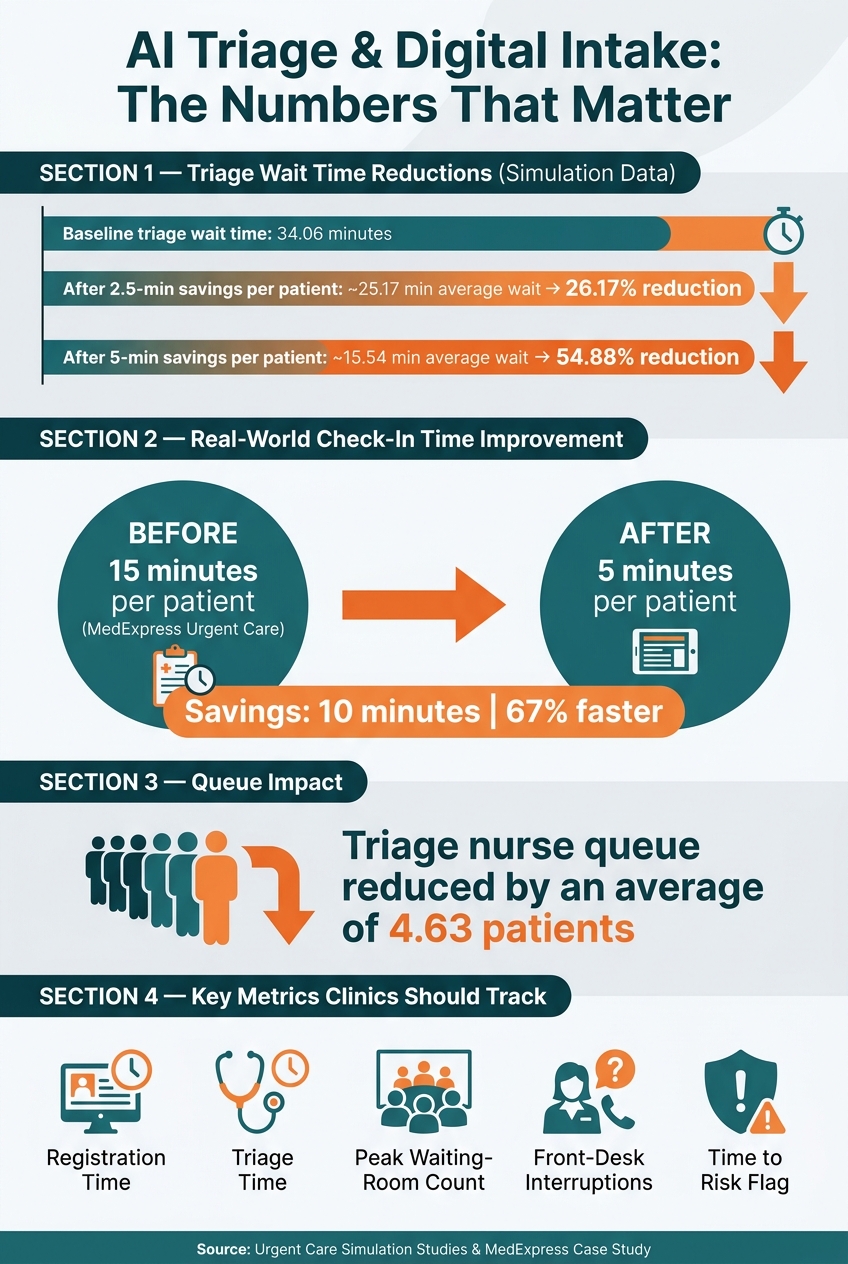
Here’s the short version: AI triage and digital intake help me move symptom review, registration, and queue decisions upstream. That means staff get key details sooner, high-risk patients can be flagged earlier, and the front desk spends less time on repeat data entry. In one simulation, saving 2.5 minutes per patient cut average triage wait time by 26.17%. Saving 5 minutes cut it by 54.88%.
What stands out to me most:
I also see a clear rollout path: start with digital intake, connect it to the EHR, test AI flag rules on a small scale, and compare wait times before and after go-live. A case in the article shows check-in dropping from 15 minutes to 5 minutes per patient, and another simulation showed triage wait time falling from 34.06 minutes to 15.54 minutes.
Bottom line: if I want fewer packed waiting rooms, I should stop treating intake as a front-desk task and start treating it as the first step in patient flow.
Urgent care slowdowns often begin before a patient ever sees a clinician. Check-in, insurance verification, symptom capture, and triage can each hold up the visit. And when one step drags, the rest of the process tends to drag with it.
That backup has a ripple effect. More patients stay in the waiting room, staff get pulled in too many directions, and providers end up doing work that should've happened earlier. This is where AI intake can ease pressure before the waiting room starts to fill. AI triage and digital intake push key steps upstream, so staff can work from better information sooner.
Check-in, scheduling, and queueing are usually the first choke points in urgent care flow.
When symptom data is missing at check-in, providers have to spend part of the visit gathering basic clinical details that should've been collected during registration. That eats into exam time and slows the full visit down.
The issue gets worse when intake forms don't match the visit type or chief complaint. In those cases, the gap doesn't stay at the front desk. It follows the patient into the exam room and adds more work for clinical staff.
Once patients enter a fixed line, staff have less room to shift priorities as acuity changes. That means both lower-risk and higher-risk patients can end up waiting longer than they should.
Real-time tracking boards help teams see who should move next and make those adjustments as conditions change.
Manual registration and duplicate data entry create extra friction at the front desk. They also increase the chance of mistakes, which can slow insurance verification, rooming, and claims processing.
These bottlenecks point to one practical fix: move symptom capture, risk review, and registration upstream. AI triage and digital intake gather that information before check-in, so staff can respond sooner. In practice, that shows up in three areas: symptom assessment, registration, and queue routing.
AI-supported intake tools collect structured data before a patient even reaches the front desk. That includes the chief complaint, symptom onset, pain level, associated symptoms, relevant medical history, age, and medications.
NLP turns free-text answers into structured clinical categories, while preset alert rules notify staff when responses cross risk thresholds. So if a patient reports chest pain and shortness of breath, the system can flag that case for immediate nurse review. Meanwhile, lower-acuity patients can stay in the standard queue. That helps staff decide who needs to move ahead of the waiting room line.
The time savings can add up fast. In an urgent care simulation, a digital symptom-capture tool that saved just 2.5 minutes per patient cut average triage wait time by 26.17%. A 5-minute saving drove that drop to 54.88%.
AI supports clinical judgment; clinicians make the final triage call.
That same upstream shift also speeds up check-in.
When patients register before arrival, the front desk moves from data entry to verification. Patients can fill out demographics, upload insurance card images, and sign consent forms online before they walk in.
For returning patients, prefilled fields remove repeat entry. Automated data sync then sends completed intake straight into the chart. The result is less manual error, shorter lobby delays, and more time for front-desk staff to deal with exceptions instead of routine typing.
Once intake is done, routing can change on the fly.
A static first-come, first-served line treats every patient the same, no matter their acuity. Dynamic routing changes the order in real time based on urgency, visit type, and the next step in the visit. That keeps higher-acuity patients from getting stuck behind routine visits.
Virtual waiting rooms also help by keeping patients out of the lobby until they’re called. And real-time status updates cut down on crowding at the front desk.
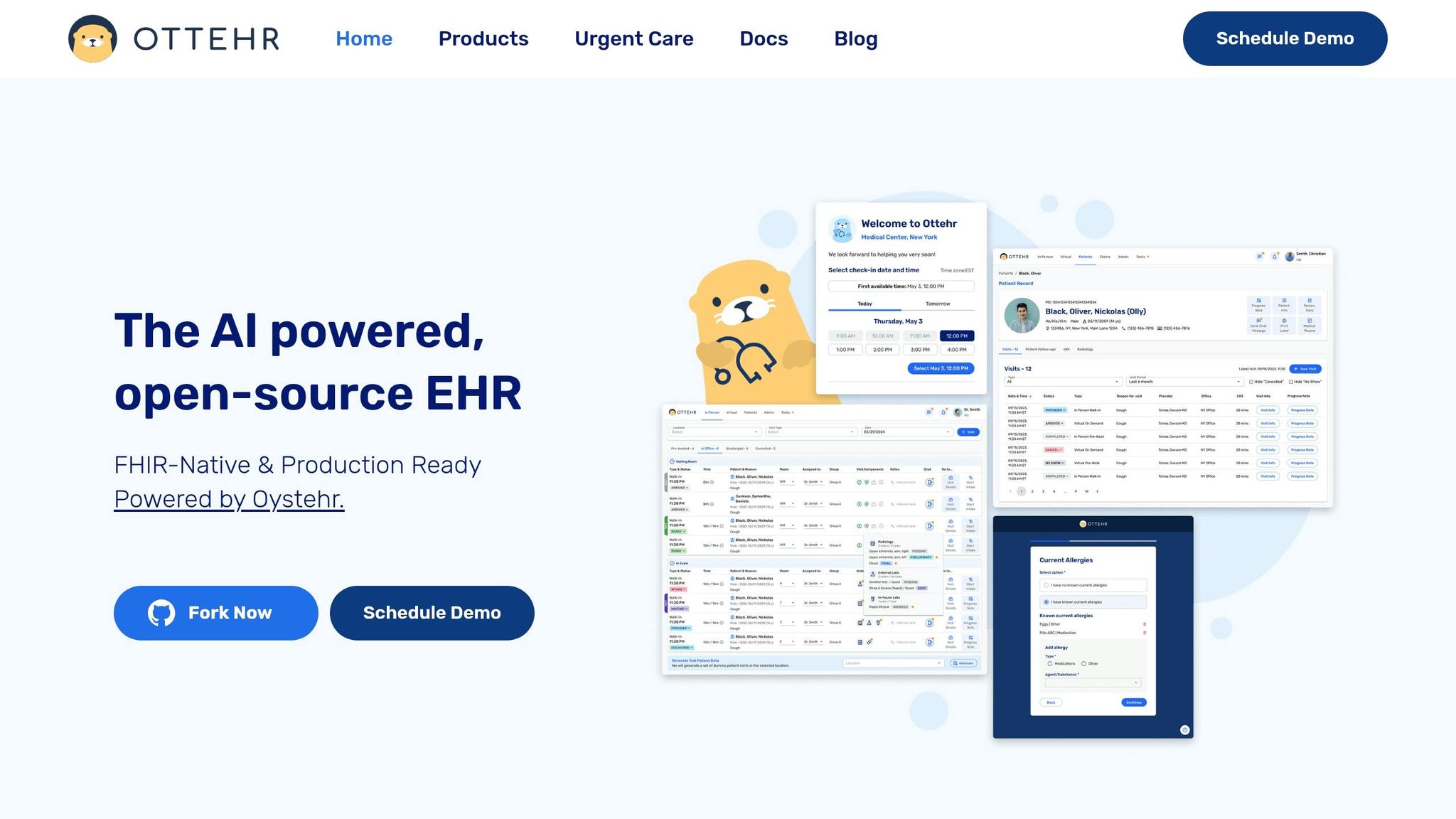
Inside one EHR, intake, triage, and routing run as one workflow instead of a chain of separate handoffs. Ottehr keeps intake, triage, and follow-up in the same chart. That change matters most when intake data becomes chart data.
Ottehr uses a FHIR-native data model on the Oystehr backend, so registration, symptom, and consent data go into the chart in a standard format as soon as the patient submits them. Once the chart is built, AI can turn that intake into visit notes the care team can use.
Configured appointments can trigger the right intake forms and insurance checks. Returning patients see prefilled name, insurance, and medical history fields in the portal, which cuts down on errors and form abandonment. The provider then opens a chart that’s already filled in with intake data.
Ottehr's AI HPI chatbot captures symptom history in the portal and turns it into a ready-to-use note. That data flows straight into the clinical record before the visit even starts.
The AI ambient scribe cuts down on post-visit charting. The AI coding assistant helps with billing in Ottehr Clinical plans.
Once intake and documentation are in place, the next slow point is getting patients through the visit without things slipping through the cracks. The tracking board gives staff a real-time view of each patient’s status and adjusts to cancellations and staffing changes.
SMS messages keep patients in the loop, and payment processing, diagnostic orders, and results all stay inside the same workflow. That means fewer loose ends and fewer tasks living in separate systems.
AI Triage & Digital Intake: Wait Time Reductions in Urgent Care
When intake happens earlier, the payoff usually shows up fast: shorter lines, faster rooming, and less chaos at the front desk.
In one urgent care simulation, a digital symptom assessment tool cut triage waiting time from 34.06 minutes to 15.54 minutes. That's a 54% reduction. It also reduced the triage nurse queue by an average of 4.63 patients. Those gains came from three simple shifts: faster registration, earlier risk flagging, and better queue routing.
To measure the impact, clinics should track:
These changes can also help clinics move more visits per hour or per day without adding staff. MedExpress Urgent Care, for example, reduced average check-in time from 15 minutes to 5 minutes per patient after putting an automated intake system in place.
That said, results don't happen by accident. They depend on a careful rollout.
Start in stages. Map the current workflow from end to end, from walk-in arrival or online scheduling through registration, triage, rooming, provider evaluation, discharge, and payment. Then use EHR timestamps and short time-and-motion checks to see where delays actually pile up. In many clinics, the drag points are manual registration forms, insurance checks, or unstructured nurse triage.
Once the bottleneck is clear, begin with digital intake. That can include online pre-registration, mobile or kiosk check-in, and structured forms that collect demographics, insurance, and chief complaint before the patient arrives. From there, connect that intake data straight into the EHR through FHIR or HL7 so staff don't have to type in the same details twice.
Before turning on AI risk flagging, clinicians should review and tune the thresholds against real cases. Keep the default settings cautious, make sure high-risk flags line up with clinical judgment, and spell out clear escalation paths for red-flag symptoms.
It's smart to test the process on one shift or at one location first. Compare mean wait time, door-to-provider time, room turnaround, concurrent waiting-room count, and front-desk interruptions per 100 visits before and after go-live. Then use what the data shows to tune the AI settings and workflow before rolling it out more broadly.
Overcrowding often starts long before a provider sees the patient. That's why upstream intake, AI triage, and EHR-connected routing matter so much.
AI-powered triage can surface high-risk patients earlier. Digital registration cuts front-desk friction. And a connected platform like Ottehr brings intake, triage, documentation, tracking, messaging, and payments into one workflow, giving urgent care teams a clearer view of patient flow so they can handle high volume safely and with less waste.
AI triage helps set care priority during intake with clinical acuity screening.
As patients go through digital registration, they answer targeted questions based on the reason for their visit. Those answers help flag symptoms and gauge risk.
If a patient reports a clinical red flag, such as chest pain or severe bleeding, the system alerts staff and moves that patient to the front of the queue. Routine arrivals continue through the standard workflow.
Track patient experience, financial results, and day-to-day performance. Key KPIs include check-in time, door-to-door time, wait times, denial rates, self-service adoption, data accuracy, and fewer manual entry errors.
You should also measure point-of-service collections, revenue per visit, clean claim rates, satisfaction scores, appointment completion, and workflow drop-off points. That gives you a clear view of whether digital intake is improving patient flow and cutting bottlenecks.
Use a phased rollout. Start by auditing your current workflows, then test the setup in one department or for one task before you expand. That gives you room to spot friction early, collect team feedback, and fix issues before they spread.
Just as important, train staff to work alongside the technology rather than treat it like a replacement. When the system connects with your EHR, feeds into live tracking boards, and follows clear step-in protocols, teams spend less time re-typing information and juggling manual handoffs. That frees them up to focus on patient support, insurance flags, and clinical escalations.

Tell us what you need and we'll get back to you soon.