
Speed urgent-care charting with the EHR command palette: CTRL+K shortcuts, AI scribing, templates and macros that cut documentation time.
The Ottehr Command Palette is a time-saving tool for urgent care providers. By pressing CTRL + K, you can quickly access navigation, clinical tasks, and AI-powered tools like ambient scribing and coding assistance - all in one interface. This feature reduces charting time, improves accuracy, and helps providers focus more on patient care. Key benefits include:
Providers report saving 4–5 hours of documentation time per shift and reducing after-hours charting significantly. Whether it's using shortcuts like /vital to insert data or chaining commands for complex workflows, the command palette transforms how urgent care providers handle EHR tasks.
The Ottehr Command Palette is an AI-powered navigation tool designed to streamline workflows within the EHR platform. Instead of navigating through endless menus, users can access clinical tasks, documentation tools, and patient records with a simple keyboard shortcut. This searchable interface brings everything together in one place, addressing the need for speed and accuracy in urgent care settings.
Built on an AI-native framework, the palette integrates tools like the AI HPI chatbot and ambient scribe, which are tailored to the fast-paced nature of urgent care. Its foundation on a FHIR-native, open-source framework allows practices to customize shortcuts and workflows to fit their unique needs.
The platform simplifies charting by offering quick access to templates (such as 14-point ROS or Progress Notes) and encounter management tasks like scheduling follow-ups or switching service categories - all without leaving the current screen. Let’s dive into the key features that make this tool essential for urgent care.
The command palette combines AI-driven shortcuts, search capabilities, and task automation to support quick and precise charting. Key features include:
Urgent care providers often manage 40–50 patients per shift, dedicating just 10–12 minutes per patient for care and documentation. The command palette eliminates the need for tedious menu navigation, enabling providers to stay focused and efficient.
Since the majority (98%) of urgent care visits involve common conditions like URIs, UTIs, or minor injuries, the palette allows providers to instantly access standardized templates and workflows. Instead of repeatedly entering the same information, pre-built templates and the ambient scribe handle the documentation, allowing providers to move quickly to the next patient. This efficiency is vital during high-pressure shifts, where interruptions - averaging 15–20 per shift - can cost about 3 minutes each to regain focus.
The open-source design of Ottehr adds another layer of adaptability. Clinics can tailor the command palette to their specific workflows, whether it’s for Workers Comp cases or follow-up encounters. This level of customization is rarely seen in traditional EHR systems, making it an ideal solution for the unique challenges of urgent care.
Accessing the command palette in Ottehr is simple and saves time. Just press Ctrl + K (or Cmd + K if you're using macOS) to bring it up instantly, no matter where you are in the platform. Whether you're on the Tracking Board, reviewing a patient chart, or jotting down provider notes, this shortcut works seamlessly across the platform. For mobile users, there's also a real-time ambient scribe feature available.
Once activated, the palette is ready to streamline your workflow, as explained below.
After launching the command palette, you'll see a search-focused interface with autocomplete functionality. Simply start typing the name of a screen, task, or piece of data, and the system will instantly display relevant options. For instance, typing "HPI" will direct you to the History of Present Illness section, while "allergies" pulls up a structured database linked to ICD-10 codes.
This interface prioritizes accuracy. When entering clinical details like allergies, medications, or diagnoses, you must choose from the autocomplete suggestions rather than typing free text. This approach ensures proper alignment with billing codes, such as ICD-10 for diagnoses and NDC for medications. If you're inputting vitals, the system even converts measurements automatically - for example, showing weight in both kilograms and pounds.
The command palette also allows you to navigate Ottehr's three core sections: "Intake", "Actions", and "Provider." Since the December 2025 update (v1.22), these areas are unified under a single interface, letting you switch between them without losing your place. This feature is especially handy during busy shifts when you need to quickly toggle between patient intake and documentation.
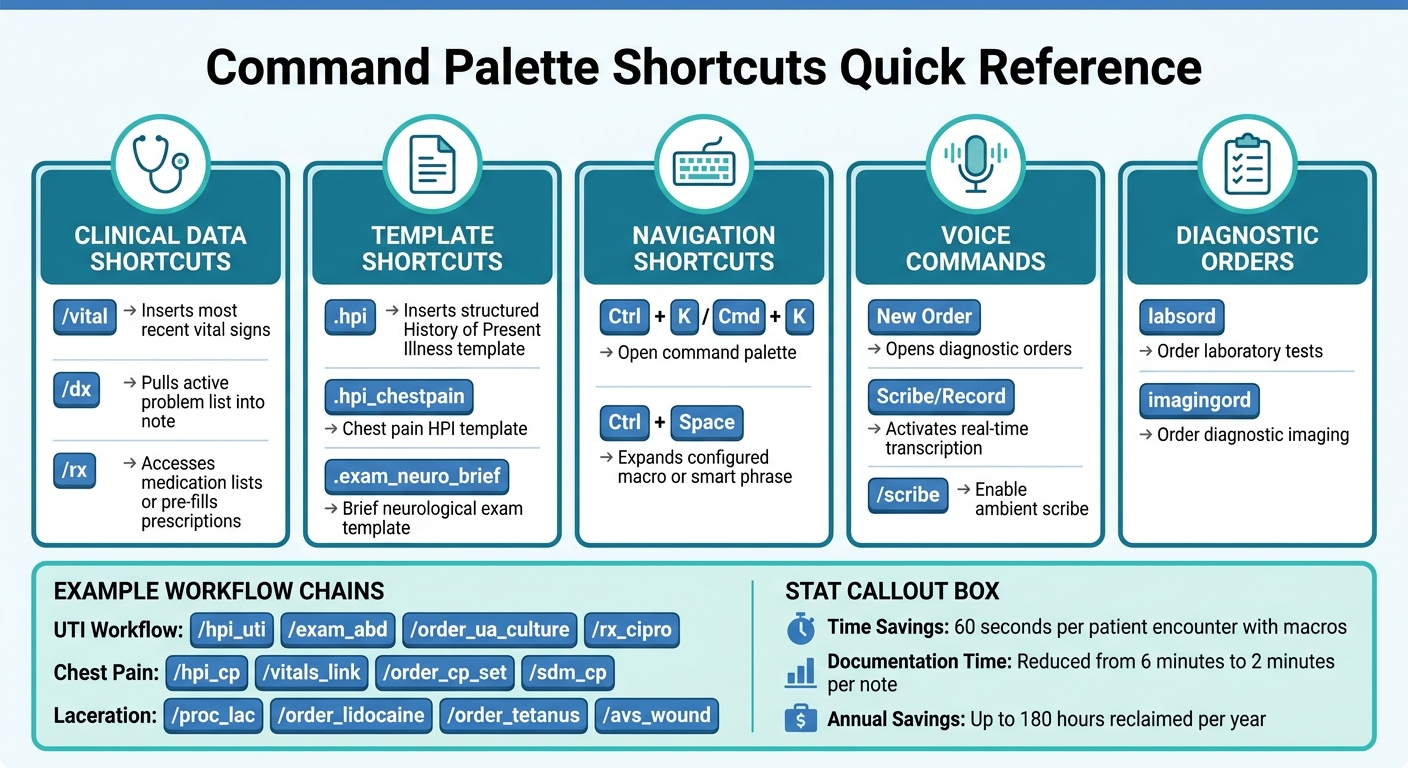
Ottehr Command Palette Shortcuts Quick Reference Guide
These shortcuts highlight how specific commands can speed up your charting workflow, helping you complete tasks more efficiently.
Slash commands are a game-changer for pulling structured data into your notes. For example, typing /vital instantly adds vital signs, /dx inserts the active problem list, and /rx pulls medication lists into your note. These commands work seamlessly across all note types, saving you from switching between screens or scrolling through charts.
For templated sections, dot phrases like .hpi can quickly insert a History of Present Illness template. You can also mix and match smaller phrases like .hpi_chestpain or .exam_neuro_brief to create modular notes. This method offers flexibility, allowing you to tailor notes to each patient while keeping your documentation consistent. Pressing Ctrl + Space expands any macro or smart phrase you've set up.
With the /scribe command or voice activation, you can enable real-time transcription powered by AI. Choose between Push-to-Talk for short dictations or Toggle Recording for continuous transcription. This feature enhances accuracy and is especially helpful during busy shifts.
Commands like labsord and imagingord simplify the process of ordering labs or diagnostic imaging. Voice commands, such as saying "New Order", can also open the diagnostic orders screen directly. This eliminates extra clicks and allows you to focus more on patient interactions.
The /rx shortcut not only retrieves active medications but also helps pre-fill prescriptions directly from the command palette. You can even set up "micro-order sets" to bundle common prescriptions, labs, and patient education into a single sequence. For instance, a diabetes workup could include all necessary steps in one command. This reduces errors and speeds up the prescribing process.
Efficient medication management goes hand-in-hand with accurate coding. Autocomplete shortcuts powered by AI can help you select verified billing codes, ensuring accuracy and saving time. Together, these tools help urgent care providers document faster and more precisely, giving them more time to focus on patients.
| Command Type | Example Shortcut | Function |
|---|---|---|
| Clinical Data | /vital |
Inserts the most recent vital signs |
| Clinical Data | /dx |
Pulls the active problem list into the note |
| Clinical Data | /rx |
Accesses medication lists or pre-fills prescriptions |
| Templates | .hpi |
Inserts a structured History of Present Illness template |
| Navigation | Ctrl + Space |
Expands a configured macro or smart phrase |
| Voice | "New Order" | Opens the diagnostic orders screen via voice |
| Voice | "Scribe/Record" | Activates real-time transcription or dictation |
The command palette isn't just about shortcuts - it’s a tool for creating powerful, automated workflows that save time and streamline tasks. With the Ottehr Command Palette, you can chain multiple commands into a single sequence, allowing you to handle tasks like documentation, transcription, coding, and diagnostic orders all at once. This means fewer clicks and more efficiency.
Here’s an example: typing /hpi_cp /vitals_link /order_cp_set /sdm_cp can pull a chest pain HPI template, dynamically insert the latest vital signs, queue up cardiac order sets, and add shared decision-making text - all in one go.
For urgent care providers managing a high volume of patients, pre-configured bundles, or "micro-order sets", are game-changers. Take a UTI workflow, for instance: the command /hpi_uti /exam_abd /order_ua_culture /rx_cipro documents the patient’s complaint, adds a focused abdominal exam, orders a urinalysis with culture, and pre-fills a prescription for ciprofloxacin. What normally would take numerous clicks is condensed into a single command, freeing up time for more pressing tasks.
These command sequences are designed to simplify workflows, making them faster and more efficient.
Automating repetitive tasks with command sequences doesn’t just save time - it also reduces mental strain. Research shows that providers often spend two hours documenting for every hour of patient care. Tools like ambient listening technologies and AI-driven documentation can cut this time by 50% to 72%. When paired with Ottehr’s AI tools - such as the HPI chatbot and coding assistant - you essentially create an automated documentation system that works behind the scenes while you focus on your patients.
"The only real time leverage you get comes from ruthless customization of text expansion, data pulling, and workflow automation."
– Residency Advisor
The benefits go beyond individual encounters. Standardized sequences for common scenarios - like laceration repairs (/proc_lac /order_lidocaine /order_tetanus /avs_wound) or diabetes follow-ups (/snapshot_dm2 /hpi_dm2 /exam_dm2 /order_dm2_labs) - ensure documentation is consistent and error-free. This not only protects revenue but also reduces the need for after-hours charting.
Advanced users report saving around 60 seconds per patient encounter by using macros alone. Add in smart phrases and dynamic data links, and the time savings multiply. Over a year, a fully optimized system with order sets and voice integration can reclaim as much as 180 hours. That’s time that can be reinvested into patient care - or simply into a better work-life balance.
One of the easiest ways to gauge the impact of the command palette is by comparing how long it takes to complete charting before and after its introduction. Start by tracking your charting time for two weeks to establish a baseline - record the minutes spent per encounter. Then, after implementing the command palette, repeat the tracking to see how much time you’ve saved.
Another key metric to monitor is the same-day encounter close rate (SDECR), which measures how often charts are closed during clinic hours. For example, in April 2025, Valley Medical Group introduced text macros to simplify documentation. According to Medical Director Dr. Steven Esrick, this change cut the average time spent per note from six minutes to just two minutes.
"A practice cannot submit a medical claim until the encounter is closed. Faster documentation supports faster claims submission, processing, and reimbursements." - athenahealth
Additionally, consider the impact on "pajama time" - the hours spent charting outside of regular work hours. On average, clinicians currently spend 13.3 hours per week working after-hours, with 25% dedicating 16 hours or more to documentation. By tracking after-hours EHR logins before and after adopting the command palette, you can measure how much personal time is regained.
Finally, confirm these improvements by diving into detailed metrics provided by Ottehr's RCM Reporting tools.
Once you’ve identified time savings, use Ottehr’s reporting tools to gain a deeper understanding of your workflow efficiency. The Practice KPIs report offers a complete view of clinical performance, including documentation trends, task completion times, and productivity benchmarks. This tool helps you monitor how quickly encounters are being closed and pinpoint any bottlenecks in your process.
The Tracking Board provides real-time updates on visit statuses and lets you jump directly to the "Review and Sign" screen from progress notes. This minimizes unnecessary clicks, speeding up the charting process. Another feature to track is encounter accelerator usage - how often you rely on macros, templates, and order sets. Regular use of these tools ensures you’re maximizing your efficiency.
A great example comes from HarmonyCares, which adopted EHR efficiency tools in July 2025 for over 200 providers. In just one week, the organization slashed charting time per encounter by more than 70% and achieved best-practice benchmarks for same-day encounter close rates and template usage. These results show how actively monitoring metrics and fine-tuning workflows can lead to significant time savings and improved efficiency.
For urgent care providers juggling tight schedules, every moment counts. The Ottehr command palette isn’t just a handy navigation tool - it’s a game-changer for workflow efficiency. By integrating universal search, AI-driven tools, and customizable templates into one seamless, keyboard-focused interface, it streamlines charting and helps clinicians reclaim precious time.
Research highlights that documentation tools can cut the time spent on a single note from six minutes to just two minutes. This shift in how providers interact with EHR systems allows more focus on what matters most: patient care.
"Command palettes are incredible tools, and their speed and versatility transform users into power users." - Tim Boucher, Superhuman
From using CTRL + K to navigate charts, automating orders through tailored workflows, or tapping into ambient scribes, the command palette keeps the process smooth and efficient. It lightens the mental workload, reduces errors, and ensures clinicians can prioritize patients over navigating software.
Start by mastering a few essential shortcuts, track how much time you save, and then dive into advanced features like custom macros or AI-assisted coding. The command palette isn’t just a tool - it’s a way to transform your workflow and enhance the quality of care you deliver every day.
The EHR command palette offers powerful tools like SmartPhrases, SmartLinks, and Macros to help you set up shortcuts tailored to your workflow. These features allow you to automate repetitive tasks and save time.
For instance, you can create dot phrases - short abbreviations that expand into templates or trigger specific workflows. This is especially handy for documentation, as it reduces the need for manual input.
For those comfortable with advanced configurations, integrating macros or external tools can take efficiency to the next level. These setups can streamline documentation further and enhance productivity across various applications.
Mastering shortcuts can transform the way you work by saving time and simplifying repetitive tasks. Start with the basics: Ctrl+X to cut, Ctrl+C to copy, Ctrl+V to paste, and Ctrl+F to find text. These are essential for navigating and editing quickly.
You can also explore shortcuts for inserting the current date or time, or using tools like dot phrases to automate documentation. Once these become second nature, you'll be ready to dive into more advanced, system-specific commands that further boost productivity.
To figure out how much time you're saving on charting, track how long it takes to complete documentation tasks both before and after using features like the command palette or shortcuts. Keep a log of start and end times for charting tasks over a sample period - say, one week - and calculate the difference. Some systems might even have built-in tools that automatically track how long charting takes. Reviewing these metrics regularly can give you a clear picture of how your efficiency is improving.

Tell us what you need and we'll get back to you soon.