
FHIR-native EHRs remove data silos and interfaces, enabling real-time interoperability and AI-ready workflows for multi-site urgent care.
If your urgent care network is adding sites, a FHIR-native EHR is no longer optional. Once you move past one location, custom interfaces, split patient records, delayed lab data, and manual reporting start to slow growth, add cost, and create more work for staff.
Here’s the short version: legacy EHRs store data one way and share it another way, which leads to translation work, one-off integrations, and more failure points. FHIR-native EHRs use the same data model for storage and exchange, which makes cross-site access, live reporting, AI documentation, labs, imaging, referrals, telehealth, and billing much easier to run across a network.
What this article shows:
Quick comparison
| Area | Legacy interface-heavy EHR | FHIR-native EHR |
|---|---|---|
| Data sharing | Custom translation between systems | Same structure for storage and exchange |
| New site setup | Rebuild interfaces by site | Use APIs and shared data model |
| Reporting | Batch exports and spreadsheet cleanup | Live network-wide reporting |
| AI tools | Extra mapping work | Structured data already in place |
| Cross-site care | Records may stay split | Shared patient record across locations |
I see the core point as simple: when urgent care grows, EHR architecture starts to shape staffing, patient flow, billing, and launch timelines. If the data model is wrong, every new site adds more friction.
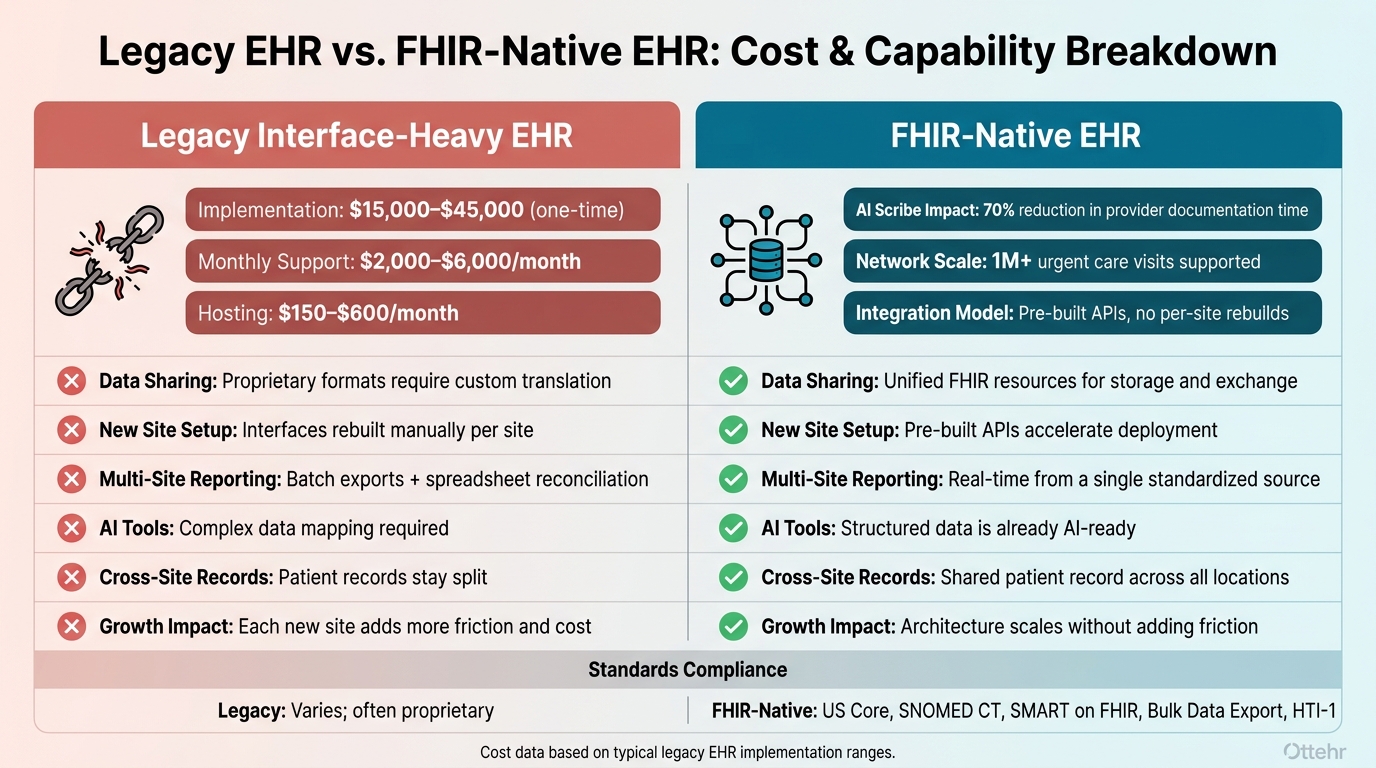
Legacy Interface-Heavy EHR vs. FHIR-Native EHR: Cost & Capability Breakdown
This architecture gap usually shows up in the day-to-day work first.
The issues often look minor at the start. A patient visits one location, then goes to another, and the second site can't see their history. Staff have to type registration data in again by hand. Lab results show up late because the external connection wasn't built for real-time delivery. Referrals get tracked in spreadsheets, and some fall through the cracks.
That's the pattern many teams deal with every day. Every new lab, imaging center, pharmacy, or payer link turns into a custom point-to-point integration. Then the network grows, and so does the interface load. When one connection fails, the impact doesn't stay in one place. Staff feel it, patients feel it, and revenue takes a hit at the same time.
Once each connection is custom-built, growth becomes slower and more expensive.
Implementation and configuration for a legacy EHR usually costs $15,000 to $45,000 as a one-time expense, with support costs of $2,000 to $6,000 per month - and that's before adding the custom interface work needed for each new site or partner connection. Hosting fees add another $150 to $600 per month, so the total cost of ownership climbs fast.
But the bigger issue isn't just the price tag. It's the time drain. Opening a new site often means rebuilding every interface from scratch. That slows launch timelines and keeps IT teams stuck maintaining connections instead of helping the business grow. A big share of that cost comes from translating data between the EHR and every outside connection.
The difference stands out in four core areas.
| Capability | Legacy Interface-Heavy EHR | FHIR-Native EHR |
|---|---|---|
| Data sharing | Fragmented; proprietary formats require translation | Unified; FHIR resources are the core model |
| Onboarding a new site | Slow; interfaces replicated manually per site | Fast; pre-built APIs accelerate deployment |
| Multi-site reporting | Batch exports or spreadsheet reconciliation | Real-time from a single standardized source |
| AI-enabled workflows | Difficult; requires complex data mapping | Native; structured data is already AI-ready |
That's why the next section matters: a FHIR-native EHR core removes these one-off connections.
This difference shows up fast in day-to-day work. FHIR-native architecture removes the translation layer between storage and exchange, so every integration uses the same FHIR resources. That one choice clears out a major bottleneck for multi-site growth.
FHIR APIs can send updates in real time across sites, labs, imaging centers, pharmacies, and referral partners. When a lab result arrives, a discharge is finished, or a referral goes out, connected systems can act right away instead of waiting for staff to sort things out by hand. Every site works from the same patient record, which cuts down on duplicate tasks and missed handoffs.
Referral tracking can also connect straight to the EHR, keeping out-of-network handoffs visible without spreadsheets or fax.
When data moves cleanly across the network, automation stops being a nice idea and starts being usable.
Structured FHIR data makes AI tools usable at scale. If the record is already structured, an AI scribe can write straight back into it. The same goes for coding assistants and other tools that need to read and write structured encounter data.
In one FHIR-native implementation, AI scribe and post-visit automation cut provider documentation time by 70%. For a growing urgent care network, that kind of time savings adds up as new providers and locations come online, easing provider workload without piling on admin work.
That same structured data also helps billing and reporting work better.
When every location, provider, and service line writes to a single source of truth, network-wide reporting becomes a real-time function instead of a manual cleanup job. Leaders can track volume, wait times, productivity, and patient flow from one source.
The same structured record also supports revenue cycle coordination. Documentation, coding, eligibility, and claims stay connected in one workflow, so intake and billing move with less delay as the network expands. Real-time insurance validation at intake and automated claims submission cut the admin work that grows with each new site.
Ottehr takes those architecture gains and turns them into day-to-day workflow gains. It’s an AI-powered, open-source, FHIR-native EHR built for urgent care networks, and it supports the full patient visit inside one connected system.
Here’s what that looks like inside Ottehr.
From electronic paperwork and scheduling to a digital front door with SMS messaging and a patient portal, intake data flows into the same FHIR record. During the visit, providers get full charting, customizable templates, and integrated diagnostic orders. Lab and radiology results flow straight back into the patient chart without manual re-entry. E-prescribing, radiology integration, SMS, payments, and RCM tools help sites grow without piling on extra systems. Telehealth visits happen in the same system too, so there’s no second platform to reconcile.
Ottehr’s headless architecture keeps every location on one shared FHIR record. In plain terms, a provider at one site can pull up a patient’s full history from another site without making a phone call or chasing down a fax. Because each module uses the same FHIR record, opening new sites doesn’t mean creating new data silos. Ottehr has supported more than 1 million urgent care visits and includes standardized API access and full EHI export.
Ottehr offers AI, Clinical, and RCM tiers to support documentation, billing, and network growth. The ambient scribe writes directly into the FHIR record, while the HPI chatbot gathers patient history before the visit. That means providers start the encounter with structured data already in the chart. The result is less manual charting and more consistent documentation from one location to the next.
| Urgent Care Workflow | Ottehr Capability | Outcome |
|---|---|---|
| Digital Intake | AI HPI chatbot | Patient history enters the chart before the visit. |
| Cross-Site Scheduling | Shared scheduling workflow | Availability stays visible across locations. |
| Telehealth | Integrated video and virtual waiting room | In-person and virtual visits managed in the same system. |
| AI Documentation | Ambient scribe and coding assistant | Faster chart closure and billing-ready documentation. |
| Lab & Radiology Results | Direct results integration | Results link to the patient chart without manual re-entry. |
| Revenue Cycle | RCM module with eligibility and claims support | Centralized revenue cycle operations across sites with fewer denials. |
| Network Reporting | Single shared FHIR data store | Live KPI visibility across locations. |
These are the capabilities urgent care leaders should check when evaluating a platform for multi-site growth.
Once you see the day-to-day upside of FHIR-native architecture, the next step is simple: find out whether a platform can actually do what it claims.
Start with the big question. Is FHIR the system’s core data model, or is it just a translation layer bolted on afterward? If it’s the second option, every integration needs custom translation work, and that cost stacks up with each new site.
Different teams should check that same architecture claim from their own angle:
| Stakeholder | What to Verify |
|---|---|
| IT | Does the platform support SMART on FHIR, Bulk Data export, subscriptions, and current certification requirements? |
| Clinical | Can workflows be customized per site without waiting on a vendor roadmap? Can third-party AI tools be integrated without rebuilding core infrastructure? |
| Revenue Cycle | Does the architecture support real-time reporting from one shared data source? Is it ready for HTI-1 compliance and MIPS/MVP reporting? |
| Operations | What is the realistic total cost of ownership - including hosting ($150–$600/mo), implementation ($15,000–$45,000), and ongoing support ($2,000–$6,000/mo)? |
It also helps to confirm that the platform lines up with US Core and supports terminology standards like SNOMED CT. That step can prevent data mapping issues as the network adds more sites.
After selection, the rollout plan should protect current operations while tackling the most frustrating workflows first.
Skip the big-bang replacement. A phased, modular rollout lets teams fix immediate bottlenecks without throwing patient flow off course during expansion. Start with digital intake and automated insurance validation. Those two areas often produce fast, visible gains at the front desk without changing core clinical documentation. Once intake is steady, add AI documentation tools and clinical charting. After that, move into cross-site reporting and full revenue cycle coordination. Each step gives staff room to get comfortable before the next module goes live.
Data migration, terminology mapping, and user training should move in parallel. Training people on one tool at a time, instead of dumping the whole system on them at once, cuts the burden on staff. Running new FHIR-native modules alongside a legacy system during the transition also helps limit downtime as the organization grows.
Legacy EHR models built around interfaces were made for single-site operations. Once an urgent care group starts adding locations, providers, and service lines, those models create the same problems that drag growth down: data silos, costly point-to-point interfaces, broken-up patient records, and reporting that depends on manual reconciliation across systems.
FHIR-native architecture removes those limits at the data-model level. Real-time interoperability, AI-ready clinical workflows, and centralized revenue cycle coordination all rely on a setup where every module - intake, charting, labs, billing, and other connected workflows - uses the same protocol. For multi-site urgent care, FHIR-native architecture keeps growth manageable.
A FHIR-native EHR is built from the ground up with FHIR (Fast Healthcare Interoperability Resources) as its main data model and framework.
Instead of saving data in a proprietary format and converting it later, it stores information directly as FHIR resources. That means integrations can use the same protocol as the system’s core data, which cuts down on translation layers and supports real-time interoperability and API-driven workflows.
A FHIR-native EHR is built on FHIR from day one. It’s not a legacy system with FHIR bolted on later.
That matters because the core data model and APIs are already set up for FHIR-based workflows. Data can move in real time without extra transformation steps or middleware getting in the way.
By contrast, FHIR-enabled systems often rely on outside translation layers to make old architecture work with newer standards. A native setup also maps data straight into structured fields, which cuts down on manual entry and duplicate transcription.
Start by mapping your current clinical workflows - from intake through billing - to spot bottlenecks. That gives you a clear picture of where time gets lost, where handoffs break down, and where staff run into friction.
Then roll out changes in phases instead of switching everything at once. A phased approach helps cut disruption and makes it easier to fix issues before they spread across the whole practice.
Put FHIR-based connections to external systems like labs, pharmacies, and payers near the top of the list. During rollout, start with internal tools and patient-facing workflows, such as digital intake and scheduling. After those pieces are running well, expand into more complex clinical service lines.

Tell us what you need and we'll get back to you soon.