
How legacy urgent care EHRs hide costs—slower charting, denials, duplicate entry, rework, and missed follow-up that squeeze margins.
Urgent care revenue cycle margin often slips long before a claim is denied.
Legacy EHR costs rarely show up as one neat budget line. Instead, they get scattered across labor, the revenue cycle, and patient access. On paper, that can make them look normal. Once you measure them, though, the drag becomes a lot harder to ignore.
Part of the issue is that each role feels the problem in a different way. Front-desk staff may see delays in patient access. Billers may see more claim issues. Clinicians may feel it most in charting time. That split view is one reason the cost stays buried for so long.
The first clear signal is often charting time.
At urgent care volume, small delays add up fast. If each encounter adds just five extra minutes of nonclinical work, that turns into about 8.3 labor hours across 100 visits.
The numbers that bring this into focus are pretty specific:
HFMA benchmarks put clean claims near 98%, denials below 5%, and A/R at 30 to 40 days. If your numbers land outside those ranges, start by looking at EHR workflow. That’s usually the easiest leak to spot, because slower charting tends to show up first.
The first margin leak is provider time. In urgent care, every extra minute spent charting chips away at throughput. Legacy EHRs often add more friction than they remove, with extra clicks, rigid templates, and field-by-field navigation that slow note closure and eat into same-day visit capacity.
When charting drags, providers see fewer patients per hour. And when notes and coding fall behind, charge capture lands later too. That means less same-day revenue and less room in the schedule.
You can spot this leak by watching chart-close time, shift-end signing, and charge-capture lag.
A practical fix is to make documentation easier to complete in the flow of care. Configurable templates can trim back unnecessary clicks. AI-assisted documentation can help speed up note creation. And FHIR-based integrations can connect systems more cleanly, so staff spend less time jumping between screens and more time moving visits forward.
Billing and coding errors often begin with one simple problem: staff have to re-enter visit data across disconnected systems before a claim goes out. In urgent care, that can lead to missed modifiers, incorrect visit levels, or procedure codes that aren't complete.
It’s the kind of issue that sounds small on paper but causes trouble fast. A front-desk detail gets entered one way, the clinical note says something else, and billing has to piece it all together later. That’s where errors slip in.
Every corrected or resubmitted claim adds more staff time, slows cash flow, and puts more pressure on margins while reimbursement stays flat and care delivery costs keep climbing.
In most cases, the damage shows up early in the form of rework, denials, and slower cash. You’re not just losing time. You’re paying people to fix work that should’ve been right the first time.
A few signs tend to show up again and again:
If your team keeps touching the same claim more than once, that’s usually a red flag.
The best way to deal with this is to catch errors before submission with an integrated EHR and RCM workflow built for urgent care.
Purpose-built integrated EHR and RCM tools reduce rekeying, catch errors earlier, and cut labor tied to claim cleanup. Instead of making staff jump between systems and patch together missing details, the workflow does more of the heavy lifting upfront.
When billing data has to be re-entered across systems, the next margin leak is duplicate work.
The issue goes well beyond claims.
During a single urgent care visit, staff may jump between the EHR, lab, imaging, fax, payment, and billing systems. If those tools don’t sync, someone has to re-enter results, orders, or payments by hand - or stop and reconcile mismatched data later. In a fast-moving clinic, that kind of swivel-chair work slows everything down.
The first areas to crack are usually outside lab results, imaging orders, e-fax routing, and payment posting. Why those first? Because urgent care runs on speed, and staff don’t have time to copy the same information from one screen to another.
Legacy EHRs drive up labor costs and slow cash flow when teams have to move data across disconnected tools. Each manual handoff adds time, creates more room for errors, and pushes downstream billing further out.
A few signs tend to show up early:
The most direct fix is to consolidate with a modern healthcare platform.
Platforms built on FHIR-native architecture can help lab results, diagnostic orders, e-prescribing, and claims data move between systems automatically, without forcing staff to enter the same information again by hand. Ottehr, for example, is built as a FHIR-native EHR that integrates diagnostics, radiology, e-prescribing, SMS/fax communication, and revenue cycle management within a single platform.
That means less rework before the burden lands on staff.
Legacy EHRs chip away at margin by forcing work outside the EHR. The issue isn’t just time spent inside the system. It’s all the extra labor the system creates around each visit. When role-based workflows aren’t in place, staff end up patching the process with spreadsheets, phone calls, shared inboxes, and manual status checks.
Here’s what that looks like in practice. A patient checks in with the wrong insurance member ID. The front desk sees the error only after an eligibility failure, calls the payer, updates the registration record, alerts billing, and then helps clean up the error downstream. One bad data point can set off work across the front desk, clinical team, and billing team. That rework slows the visit, eats up staff time, and spills into every handoff that follows.
Those manual steps have a direct labor cost. If a front-desk employee spends 10 minutes fixing registration data, a nurse spends 8 minutes tracking down an order, and a biller spends 12 minutes auditing that same chart, that adds up to 30 minutes of paid labor that generates no additional revenue for one visit.
Here’s a simple way to estimate the monthly cost of that rework:
Monthly rework cost = encounters per day × avoidable minutes per encounter ÷ 60 × working days × loaded hourly labor cost
Using 100 encounters per day, 12 avoidable minutes per encounter, 26 operating days, and a loaded administrative labor cost of $28 per hour, the monthly rework cost comes to approximately $15,558.
These KPIs show where paid labor is getting burned on cleanup instead of care:
The clearest fix is to replace ad hoc coordination with structured, role-based workflows. Front-desk staff should handle registration exceptions. Clinical staff should own intake and result workflows. Billing teams should work from a queue of coding or claim issues instead of chasing people for updates.
A modern urgent care workflow should rely on role-based queues, automated reminders, exception routing, and real-time reporting so that only unusual or incomplete cases need human review. Clean encounters should move ahead on their own, while unresolved tasks stay visible until the right role closes them out.
Even when visits are completed correctly, weak follow-up still leaks revenue.
Legacy EHRs often treat discharge like the finish line, when it should be the handoff to what comes next. Once a patient leaves, the workflow stops. There may be no automated trigger to send pending lab or imaging results to the right person, no built-in reminder to call a patient back when a culture is still pending, and no task queue for care instructions that still need action.
So the work lands on whoever happens to notice it first. In many clinics, that's a nurse or front-desk staff member who's already juggling a packed waiting room.
Legacy EHRs also push follow-up outside the visit workflow instead of keeping it tied to the encounter. That turns post-visit care into unpaid rework and missed revenue.
Missed callback work adds unpaid labor and chips away at repeat-visit retention. That hits margin twice: first through staff time, then through lost return visits. This is patient leakage, not just a slow workflow.
If post-discharge follow-up may be slipping, keep an eye on these numbers:
When those metrics start to slide, the answer is to automate the handoff before discharge closes the chart.
The fix is simple in concept: treat discharge as a handoff, not an endpoint. Automated result routing can send pending labs and imaging into the right queue. Recall reminders can prompt callbacks. Task queues can flag unresolved charts. Text outreach can keep patients updated without piling more manual work onto staff.
Modern urgent care EHRs handle results, callbacks, and outreach in a single workflow. That cuts manual work and keeps follow-up inside the EHR, so unresolved care stays visible until someone closes it or routes it to the next step.
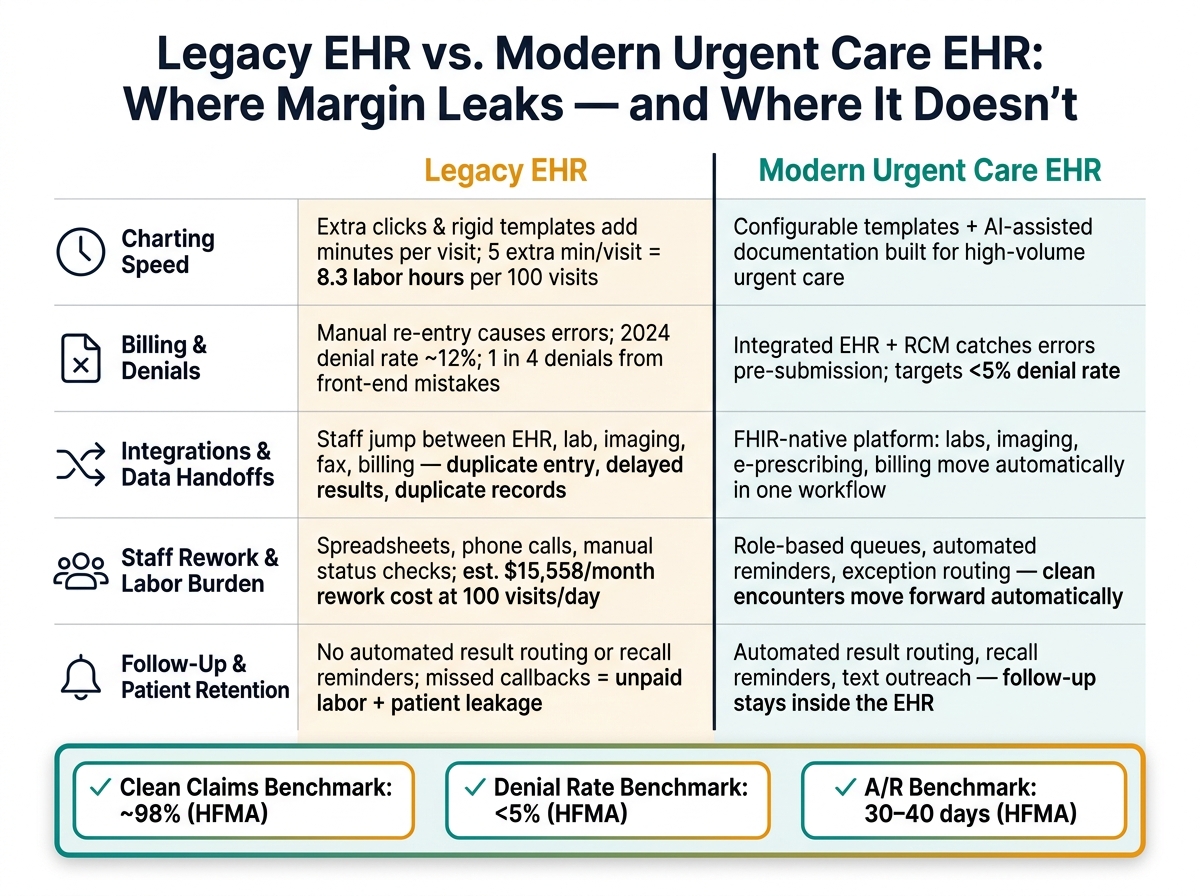
Legacy EHR vs. Modern Urgent Care EHR: Hidden Costs & Workflow Gaps
Legacy EHR costs pile up over time. Slower charting, extra rework, and added integrations can hurt the same visit twice: first through labor costs, then through lost revenue.
When you look at these workflow gaps together, the pattern is hard to miss. Legacy EHRs chip away at margin even when visit volume stays flat. The table below shows where older workflows lose time, staff effort, and revenue.
| Workflow Area | Legacy EHR | Modern Urgent Care EHR |
|---|---|---|
| Charting | More time per visit, less capacity per provider | Built for fast charting in high-volume urgent care |
| Integrations and data handoffs | Requires multiple third-party tools and manual data entry across systems | Keeps labs, imaging, e-prescribing, and billing in one workflow |
| Labor burden | More staff time spent on exceptions and cleanup | Less staff time per visit through automated, structured workflows |
| Total cost to operate | Higher license, add-on, and labor costs | Lower total cost from fewer add-ons, fewer handoffs, and less rework |
| Financial impact | Widens the margin gap as delivery costs rise | Helps protect margins by reducing overhead |
Use this comparison to spot the workflow with the most friction before applying the margin-protection framework below.
Use the workflow gaps above to measure where margin starts to leak.
Start by mapping the full patient visit from beginning to end: registration, eligibility verification, check-in, triage, provider evaluation, orders and rapid testing, documentation, coding, charge capture, claim submission, payment posting, discharge instructions, results notification, and follow-up and return visits. For each step, note who handles it, which system they use, what data gets entered, where handoffs happen, how long it takes, which exceptions come up often, and whether the task gets done more than once.
Then tie each step to the five cost areas covered in this article: slower charting, denials, duplicate entry, staff rework, and missed follow-up. That way, the map links straight to margin. A respiratory visit, for example, can still force staff to re-enter demographics, repeat symptom details during triage, attach a rapid-test result, and call the patient because notifications aren't automated. A simple one-page process map can make the problem plain. It shows where patient care ends and where avoidable clicks, repeated data entry, waiting, rework, and delayed revenue begin.
Next, choose a normal operating week and gather baseline data so hidden margin loss comes into view. Track volume, cycle time, charting time, rework, denials, payment lag, follow-up completion, and repeat visits. Pair system reports with direct observation. Watch 20 respiratory visits and record how many minutes staff spend on registration, triage, charting, coding, and result follow-up.
EHR reports often miss work that happens outside the system, like phone calls, spreadsheets, and side-process workarounds. So ask staff to log those tasks on their own.
Once you have the baseline, convert rework into dollars. For each problem type, multiply monthly event volume by minutes per event, divide by 60, and apply the fully loaded hourly cost, including taxes, benefits, and any overtime. If your clinic handles 1,800 visits per month and 35% need 4 minutes of duplicate data entry, that's 252 hours of rework each month. At a fully loaded labor cost of $32 per hour, the direct drain comes to $8,064 per month - and that's before you factor in slower throughput. Calculate clinician and non-clinician time separately. Five minutes of a physician's time does not cost the same as five minutes of a medical assistant's time.
After that, rank the biggest drains by monthly labor cost and by delayed or lost cash. Split permanent losses - denied claims, write-offs, underpayments, and uncaptured charges - from timing losses, such as clean claims that sit before submission or get held for missing information. Keep separate rankings for:
Review those rankings with your site manager, clinical lead, billing or revenue-cycle leader, and a front-desk representative. That step matters. Numbers on a report don't always match what staff deal with on the floor, and this review helps close that gap. Then use the ranking to pick the first workflow to pilot.
Test the highest-value fix in one repeatable, high-volume workflow first. Respiratory visits, rapid testing, occupational-health visits, and minor injuries are good places to start because they happen often enough to show measurable results within 2–4 weeks. When possible, keep the pilot to one site or one shift, define the baseline before making changes, and don't roll out several unrelated changes at once. If you do, you won't know what actually moved the needle.
Use a short scorecard built around the measures that show margin impact fastest: door-to-provider time, chart-completion time, duplicate data entry, denial dollars, and follow-up completion. After 60–90 days, compare actual results with the baseline using payroll, claim, and collection data - not projected estimates.
Legacy EHR costs don’t just show up on an invoice. They show up in slower patient throughput, more denials, duplicate entry, rework, and missed follow-up. Each issue chips away at margin. Put them together, and they can mark the line between a clinic that grows and one that gets stuck.
The margin squeeze isn’t theoretical. As the Urgent Care Association notes:
"Reimbursement is flat. The cost to deliver care keeps climbing. The gap is your margin."
The answer is operational, not cosmetic. The right EHR should cut charting time, help stop denials, remove duplicate entry, reduce rework, and keep follow-up from slipping through the cracks. Purpose-built urgent care technology can lower labor cost and improve workflow efficiency. That’s the bar an urgent care EHR should meet.
Use objective data, not intuition. Audit four areas: clinical efficiency, financial health, operational flow, and staff burden.
Track chart completion time, same-day close rates, denial rates, clean-claim rates, days in A/R, wait times, length of stay, and non-clinical data entry time.
If you keep seeing duplicate entry, slow charting, billing denials, or revenue per encounter below $250–$450, that can point to structural EHR problems.
Start with a short, honest audit of your operations using actual numbers, not gut feel. Look at the data and map your clinical and administrative workflows. That’s how you spot repeat bottlenecks like slow charting, duplicate data entry, or billing denials that keep popping up.
If your biggest gaps are operational, fix those first. That can mean workflow automation, template customization, or revenue cycle tools. But if those same bottlenecks keep showing up after those fixes, the problem is probably structural, and a full EHR replacement may be the next step.
A modern urgent care EHR should make day-to-day work smoother, strengthen financial performance, and improve the patient experience. The big shift is simple: replace manual, disconnected workflows with integrated, automated tools.
That means speeding up charting and patient flow, cutting billing and coding mistakes with revenue cycle automation, and supporting accurate point-of-service collections. It should also make visits easier for patients with tools like online scheduling, mobile intake, and SMS communication.

Tell us what you need and we'll get back to you soon.