
Sticker price hides major costs: data migration, dual systems, training, and revenue risk — plan five-year costs and a phased cutover.
Switching an urgent care EHR often costs far more than the software quote. In many cases, the bigger costs come from data migration, staff training, dual-system use, interface rebuilds, slower patient flow, and delayed claims.
If I were sizing up an EHR move, I’d focus on these points first:
Here’s the short version: before I sign, I’d look at five-year total cost, list every interface, test my own chart data, confirm payer enrollment, track revenue cycle baselines, and roll out in phases instead of flipping every site at once.
Quick comparison: where EHR switch costs usually show up
| Cost area | What it looks like | What it can hurt |
|---|---|---|
| Dual systems | Paying for old and new platforms at the same time | Budget drain, split staff focus |
| Data migration | Extraction, mapping, cleanup, deduping | Missing chart data, safety issues |
| Interfaces | HL7, FHIR, DICOM, NCPDP, X12 rebuilds | Lab, imaging, pharmacy, and claims delays |
| Training | Up-front sessions and follow-up refreshers | Slower visits, user errors, lower output |
| Revenue cycle | Payer setup, clearinghouse testing, charge flow | Denials, cash slowdown, A/R growth |
| Go-live support | Hypercare staffing, vendor support, parallel work | Longer downtime, chart backlog |
That’s the core issue: the contract price is only the starting number. What matters most is whether the clinic can keep visits, charting, and reimbursement moving during and after the switch.
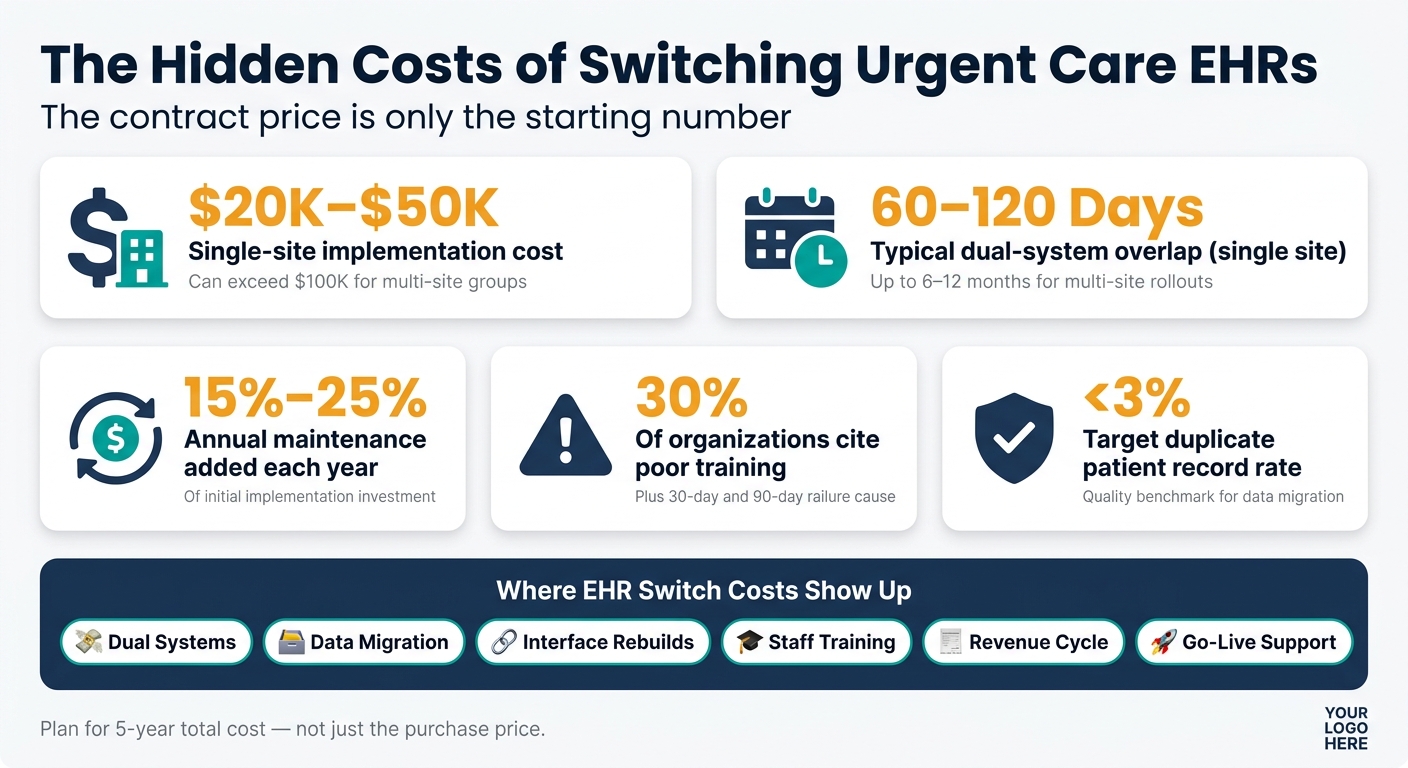
Hidden Costs of Switching Urgent Care EHRs: Key Numbers at a Glance
The biggest overruns usually show up after the contract is signed: migration work, staff training, downtime, and fewer patients seen per day.
During a switch, many clinics end up running two systems at the same time. That means paying for both while staff divides attention between the old setup and the new one. For a single-site urgent care, implementation often takes 60 to 120 days. For multi-site rollouts, it can stretch to 6 to 12 months. The longer that window stays open, the longer dual-system costs stick around.
Then come the extra line items that catch teams off guard: data extraction, data mapping, outside consulting help, and overtime for staff who need protected training time. It adds up fast. Implementation for a single-site urgent care usually lands between $20,000 and $50,000, while multi-site groups can go past $100,000. After go-live, annual maintenance usually adds another 15% to 25% of the initial investment each year.
Training has its own price tag too. Plan for 2 to 4 hours per user up front, plus refresher sessions at 30 and 90 days. That matters because 30% of organizations cite inadequate training as a primary implementation challenge. On top of that, clinics may face exit fees for exportable records and record exports, along with lower visit volume while the team gets up to speed.
Those are the direct budget hits. The next problem is what happens on the floor: slower visits and missing data.
When the system changes, patient flow often slows down. Urgent care runs on fast chief-complaint charting, so if the new EHR doesn’t fit that pattern, documentation time per patient can jump. It’s a small change on paper, but in a busy clinic, even a few extra minutes per chart can back things up.
Online check-in can also become a pain point. If that data doesn’t port into the new EHR, staff has to enter it again at arrival. That means front-desk slowdowns, longer intake times, and more room for mistakes.
The bigger risk is in the chart itself. Before go-live, clinics need to check:
If that data is missing or duplicated, safety issues can follow.
Data problems don’t stay in the chart. They spill into billing and security. During export and import, protected health information has to be handled with care at every step. If controls slip, the clinic can end up with HIPAA exposure.
Revenue cycle issues can hit just as hard. Payer enrollment and clearinghouse interfaces, including links to services like Change Healthcare or Waystar, have to be set up again in the new system. Until those connections are tested and live, claims can stall, charge capture mistakes can go up, and cash posting can slow down.
The post-go-live period can be rough too. Bugs, update glitches, and outages may force staff into manual downtime procedures.
These risks are manageable only with a phased migration plan.
The safest way to lower migration risk is to handle the work in a clear sequence: inventory every dependency, validate the data, and roll out the cutover in phases. That order matters. In urgent care, even a small miss can slow intake, interrupt lab routing, or break pharmacy connections.
Start by documenting the current state. Map the clinic’s day-to-day workflows for physician order entry, nursing vitals, and lab result routing. Then list every system connection the clinic relies on. Urgent care teams don’t have much room for delay, so intake bottlenecks, failed lab feeds, and broken pharmacy links can hit fast.
Lab feeds, imaging (DICOM), pharmacy links (NCPDP), and payer connections (X12) should all be logged and assigned to a named owner before the project begins.
| Task | Primary Owner | Key Responsibilities |
|---|---|---|
| Executive Sponsorship | Operations | Project funding, resource allocation, and go/no-go decisions |
| Workflow Mapping | Clinical | Urgent care intake, vitals, orders, and discharge workflow |
| Interface Inventory | IT | HL7, FHIR, DICOM, NCPDP, and X12 connections |
| Payer Enrollment | Billing/RCM | Fee schedules, claim rules, and clearinghouse setup |
| Security/Compliance | Compliance | HIPAA audits, BAA management, and RBAC review |
| Data Validation | IT/Clinical | Source-to-target field comparison and record counts |
| Staff Training | Operations | Protected training hours and super users in every department |
If payer enrollment isn’t complete, the clinic isn’t ready for go-live.
Once each owner and dependency is documented, the next step is field-level validation.
Put extra attention on patient demographics, allergies, medications, immunizations, and problem lists. If those fields are wrong or missing after cutover, the clinical risk goes up fast.
Map each source field to its target field, including code-set changes and any transformation rules. After that, test the mapping with anonymized versions of your own patient charts, not vendor sample data, so the test matches the messiness of actual clinic records. That’s how missing allergies, medications, and demographic details show up before visits and claims are affected.
Use a duplicate patient record rate of under 3% as the quality target.
For cutover, skip the big-bang launch. A phased rollout is usually the safer route:
After validation is done, lock down support coverage and get sign-off before launch.
The contract and governance setup matter just as much as the data and interface work. Before go-live, confirm written terms for uptime, recovery time, and data-loss limits. If those terms aren’t in the contract, get them added.
Inside the clinic, final launch authority should sit with a senior clinical leader, while billing and IT sign off on their own readiness. Payment terms should be tied to verified deliverables, not calendar dates.
During go-live and the first 90 days, patient visits and claims still need to move without a hitch. In urgent care, even a small slowdown can stack up fast. That’s usually where lost productivity and billing delays show up first.
Generic training usually falls flat in urgent care. People need practice that matches what they do all day.
Front desk teams should rehearse registration steps. Medical assistants should practice vitals documentation. Providers should work through complaint-driven documentation. Billing teams need hands-on time in denial work queues.
Clinicians also need protected training time. Not rushed learning between visits. Set aside training blocks before go-live, then run refresher sessions at 30 and 90 days. It also helps to place super users at front desk, clinical, and billing stations during go-live so staff can get help on the spot.
Before cutover, take a clear snapshot of current revenue cycle performance. That baseline makes it much easier to spot what changed after launch and where a drop started.
Focus on the revenue cycle points most likely to fail during an urgent care EHR switch. The most common breakpoints are below:
| Revenue Cycle Stage | Likely Transition Failure Mode | Financial/Operational Impact | Pre-Go-Live Safeguard |
|---|---|---|---|
| Registration | Web check-in fields fail to port to EMR | Increased front-desk labor; patient dissatisfaction | Field-mapping validation during pilot phase |
| Eligibility | Payer enrollment or interface lag | Immediate claim denials; high front-end rejection | Payer-specific interface testing 30 days prior |
| Coding/Documentation | Workflow mismatch and user resistance | Delay between service and charge entry; decreased daily visit volume | Role-based rehearsal with real urgent care charts |
| Claim Submission | Clearinghouse connectivity errors | Total disruption of cash flow | Parallel run with old system for validation |
| Follow-up/A/R | Reporting drill-down limitations | Invisible A/R bottlenecks; high days in A/R | Pilot analytics modules with real data before signing |
Before go-live, document metrics such as daily visit volume, days in A/R, denial rate, net collection rate, delay between service and charge entry, and clean-claim rate. If something slips after launch, those numbers give you a clear recovery target.
The first 30 days after go-live carry the most risk. Track core metrics every day on a go-live dashboard: charge capture, claims sent, eligibility pass rates, coding accuracy, and payment collection. Measure each one against the pre-migration baseline.
If a metric drops, act right away. Don’t wait for the problem to sort itself out.
For example, if patient flow slows down or claim submission falls below target, put a super user at that station or run a parallel process until the payer connection is fixed. That kind of quick response matters. Missed timely filing deadlines on denied claims can turn into permanent revenue loss. AI-assisted tools can also cut rework during hypercare.
Once go-live starts, the biggest costs usually don’t come from the software bill itself. They show up in rework, slower charting, and messy data cleanup. FHIR-native structure and AI tools can ease a lot of that strain.
FHIR-native EHRs store data directly in FHIR R4 or R5 instead of converting it from a proprietary database. That cuts down on mapping mistakes during migration. And that has a direct effect on costs: migration rework, interface failures, and billing delays tend to climb when data has to move through a conversion layer first.
There’s another payoff after go-live. FHIR-native architecture makes auditing easier because FHIR resources include provenance metadata, which helps teams trace and audit migrated records more easily. For compliance teams, that means a cleaner way to verify data integrity after cutover without tacking on yet another validation step.
Cleaner data structure also helps AI tools perform more consistently during the first few weeks after launch.
The biggest pain points during hypercare are usually the same ones: slower charting, coding backlog, and data-quality mistakes. AI tools can take some of that load off before it spills into the revenue cycle. Ambient AI scribes cut documentation burden while staff are still getting used to new workflows. AI-assisted urgent care charting can also help keep common visits moving during that adjustment period.
Coding support matters here too. ICD-10 assistance tied to the encounter note can help cut mismatches and support revenue cycle stability while providers learn the new system.
One more checkpoint: HTI-1 requires transparency for AI and predictive tools in certified health IT, so it’s smart to confirm vendor compliance before go-live.
"The sticker price of a healthcare IT system is the smallest part of its real cost." - Kinmed
These tools don’t replace disciplined migration work. They make the process less brittle. The contract price is only one piece of the total; retraining, mapping mistakes, billing disruption, and lost productivity often drive the bigger number.
An urgent care EHR migration usually takes 6–12 weeks when teams use a phased implementation approach. Some practices can get started on a faster overlay-style timeline of 6–8 weeks.
For more complex multi-site rollouts, especially those with more integrations and broader data migration, the process can stretch to 6–12 months.
Before go-live, check that data is mapped correctly, lands in the right fields, and is usable in the EHR for key records such as:
Also test web check-in field-to-EHR data transfer, compare record counts and field values across both systems, and finish patient matching and deduplication.
If you can, run anonymized workflow demos and do a parallel run with the legacy system. That gives your team a side-by-side view of how records move and where issues may still be hiding.
Focus on front-end accuracy, automated validation, and a phased rollout.

Tell us what you need and we'll get back to you soon.