
Software reduces urgent care delays by digitizing intake, AI charting, live tracking, and integrated billing.
If I want urgent care to run faster, I focus on four areas first: intake, room flow, charting, and billing. The article’s core point is simple: when I move forms online, use live patient tracking, cut note time with complaint-based EHR tools and AI help, and send billing straight from the signed chart, I can reduce delays across the whole visit.
Here’s the short version:
A few numbers stand out. The article notes that cutting triage time by 2.5 minutes can reduce average triage wait time by 26.17%. A 5-minute cut can lower it by 54.88%. It also cites one study where digital automation handled 92% of registrations and cut wait time by about 12 minutes. For charting, ambient AI tools were tied to 13.4 fewer EHR minutes per encounter and 16 fewer documentation minutes per visit.
My takeaway: software helps most when I use it to remove repeat manual work, fix data entry issues early, and keep clinical and billing steps connected from check-in to claim submission.
That’s what the article covers next, step by step.
Digital intake takes registration work out of the lobby and puts it in the patient’s hands before they arrive. When forms aren’t done ahead of time, front-desk staff get stuck typing while the waiting room starts to back up. That’s the main upside here: admin work happens before the visit, not during it.
One of the easiest ways to cut front-desk delays is to send patients a digital intake link before the appointment. They can fill out demographics, insurance, consent forms, and chief complaint details from home. For returning patients, a portal can prefill known details like name, date of birth, and payer information, so they’re mostly confirming details instead of entering everything all over again.
For walk-ins, a tablet or kiosk can handle the same job on-site. In both cases, staff spend less time copying handwritten forms and more time handling exceptions, like missing insurance details, an eligibility problem, or a patient who needs immediate clinical attention. That lightens the front-desk load and cuts data-entry mistakes that can lead to denials. Clean intake data also means less charting and billing rework later.
One study found digital automation handled 92% of registrations and cut wait time by about 12 minutes. Ottehr supports this with digital scheduling, electronic paperwork, and a patient portal that syncs intake data into the chart.
After check-in, the next bottleneck is usually rooming. Without a live status view, staff end up asking the same question over and over: where is each patient right now?
Real-time tracking boards show who is waiting, in triage, ready for a provider, or ready for discharge. That makes handoffs faster and room turnover easier to manage. It also helps staff spot patients who’ve been waiting too long before they get frustrated and leave. Ottehr includes a tracking board in its free plan.
If a clinic handles both walk-ins and online check-ins, the queue needs to reflect both groups. If it doesn’t, wait times become less accurate and staff lose sight of what’s happening on the floor. And when that happens, patient flow slows down fast.
| Manual Intake | Online Pre-registration | Kiosk/Tablet Intake | |
|---|---|---|---|
| Speed | High - staff enter all data manually | Lowest - data submitted before arrival | Medium - completed on-site at arrival |
| Accuracy | Lower - prone to data-entry errors | High - patient-entered or prefilled | High - patient-entered digitally |
| Staff time | High - front desk handles all entry and verification | Low - staff only review and confirm | Medium - staff may assist with device |
| Convenience | Low - waiting room paperwork | High - done from home or mobile | Medium - done in clinic |
Once intake is digital, the next delay usually shifts to charting.
Once intake and rooming are out of the way, documentation usually becomes the next choke point. And when charting drags, discharge drags with it. Billing does too. In a busy shift, it's easy for providers to get behind on notes, and that pileup often spills into after-hours work.
Generic EHR forms slow people down because they aren't made for urgent care. Complaint-based templates fix that by bringing up the right fields and orders for common visit types.
A cough template, for example, can pull up fields for duration, fever, sputum, and shortness of breath. It can also link straight to common orders like a chest X-ray or COVID/flu tests. A UTI template can prompt for dysuria, frequency, and pregnancy status, with fast access to urinalysis orders and antibiotic ePrescriptions.
That setup cuts down on small decisions during the visit. Instead of building each chart from scratch, providers move through a path that already fits the complaint. Complaint-driven templates can save 1–3 minutes per chart compared with free-text workflows. Over a full day, that time adds up fast. Discharge instructions and suggested ICD-10 codes also connect to the same template, which gives billing cleaner data and cuts back on follow-up addenda.
Ambient AI scribing tools listen during the visit and draft the note, including the HPI, exam, assessment, and plan, for the provider to review and sign. A JAMA study found ambient AI scribes cut total EHR time by 13.4 minutes per encounter and documentation time by 16 minutes per visit. In urgent care, where volume stays high, that can mean more charts finished before the shift ends and fewer notes waiting later.
AI-assisted coding works from the note itself. As the chart is completed, the system suggests ICD-10 and CPT codes based on the diagnoses and procedures that were documented. It also flags gaps before the chart is signed. The result is fewer billing questions, fewer edits, and cleaner first-pass claims.
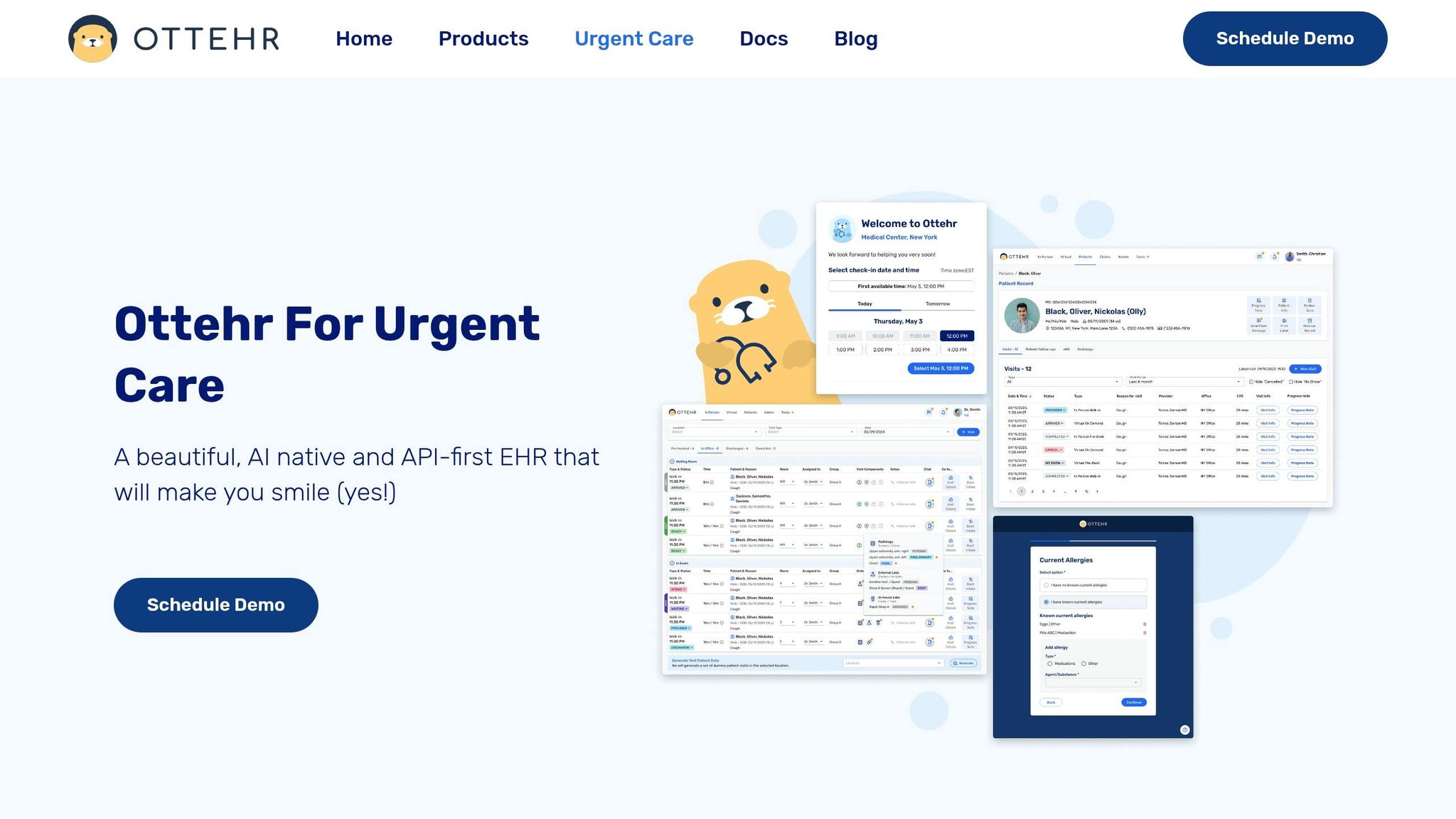
Ottehr brings these tools together in one platform, which cuts duplicate entry, speeds chart closure, and helps keep claims clean. Its AI HPI chatbot gathers structured history from the patient before or during the visit, so providers don't have to ask and type the same details again and again. The AI ambient scribe turns the exam room conversation into a draft note that drops right into the chart.
Because both tools write into the same EHR, there isn't duplicate entry across intake, charting, and billing. The AI coding assistant then reviews the completed chart and flags missing documentation before sign-off, helping the revenue cycle keep moving without adding extra back-end work.
Cleaner notes also speed coding and claim submission.
Once charting is done, the next big win comes from linking discharge, communication, and billing in the same system. If those steps live in separate tools, staff end up doing the same work twice, hunting for missing details, and piecing together tasks that software should handle on its own.
Efficient visits tend to follow the same path: check-in → triage → rooming → provider note → discharge → billing → follow-up. Embedded triage pathways help teams handle common visits the same way each time, including lacerations, sore throats, and urinary symptoms. Standing orders also let qualified staff begin routine tests or protocols before the provider walks in, which cuts delay and keeps rooms from sitting empty.
Real-time lab and imaging status updates show up right in the chart and on the tracking board, so the team can see when it's safe to close the encounter. Discharge templates can prebuild after-visit instructions and return precautions for common conditions. On top of that, automated patient communication can send visit summaries, follow-up reminders, and payment notices after discharge. That means fewer manual callbacks and fewer repeat status-check calls.
When the visit closes cleanly, the same system should move the record into billing without re-entry.
Manual revenue cycle work slows reimbursement too. Running those steps automatically, in order, helps cut denials and get payment in faster.
Insurance eligibility verification should kick off automatically at booking, so staff aren't checking coverage while a patient is standing at the front desk. Coding validation should review the finished chart before sign-off and flag missing documentation, modifier issues, or visit-level mismatches. After claim submission, automated follow-up should flag unpaid or rejected claims with the reason attached, then send exceptions to staff instead of forcing them to sort through spreadsheets by hand.
Ottehr's RCM plan covers that full sequence in one connected layer: claims submission, denial management, fee schedule application, patient billing, and RCM reporting. Because the billing module reads from the same record the provider signed, there is no re-entry between the clinical and financial sides of the visit.
| Workflow Area | Manual Approach | Automated/Integrated Approach |
|---|---|---|
| Eligibility verification | Staff check coverage at check-in, often under time pressure | Automatically triggered at booking; results available before the visit |
| Coding review | Coders review charts after sign-off; errors found late | Automated coding review flags missing documentation and code mismatches before sign-off |
| Claims submission | Manual entry from documentation into billing system | Claims built directly from the signed chart; submitted without re-entry |
| Denial management | Staff work denials case-by-case from a shared queue | Automated categorization, prioritization, and appeal workflows |
| Visibility into collections | Tracked in spreadsheets or separate billing software | Unified RCM reporting tied to clinical and scheduling data |
Track denial rate, staff time per claim, and reimbursement speed to decide where to start first.
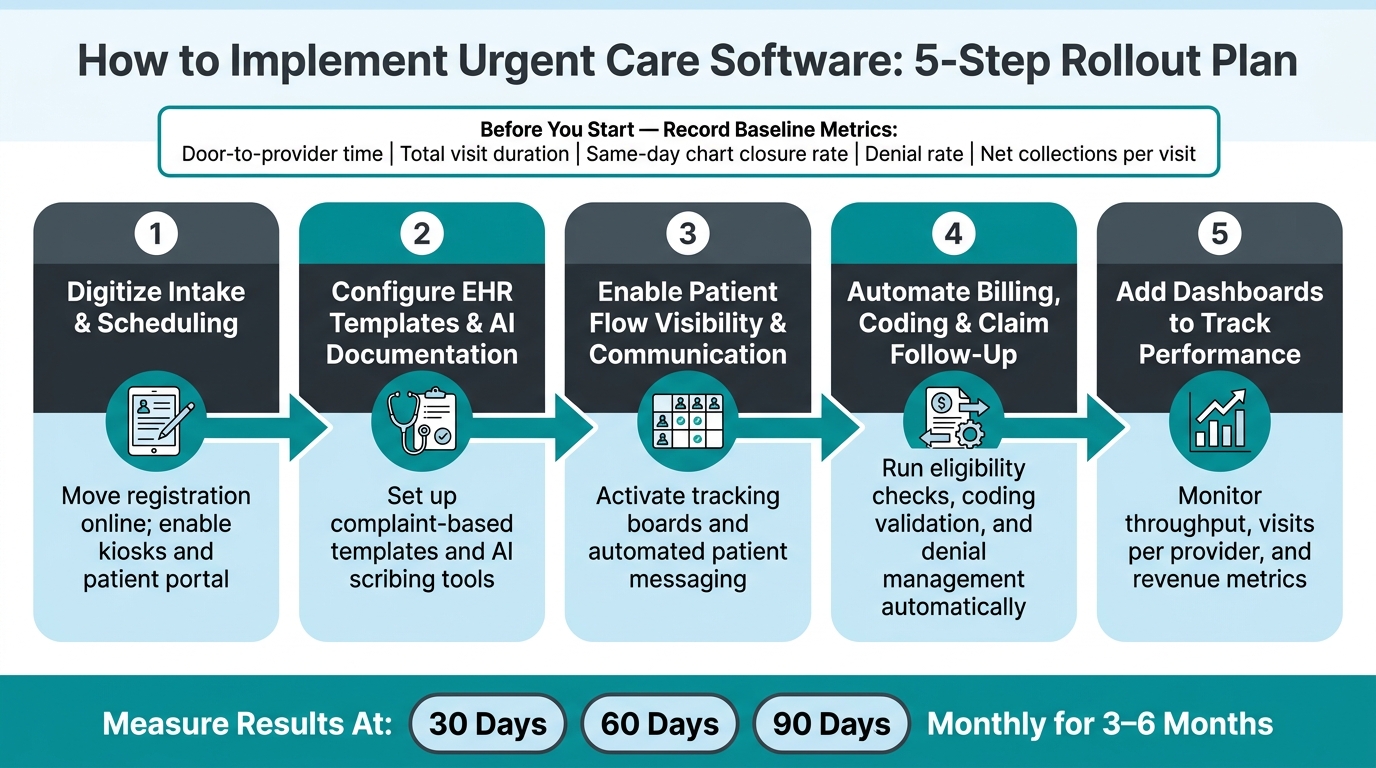
Urgent Care Software Rollout: 5-Step Implementation Process
Once you've mapped the core workflows, roll them out in the same order as the bottlenecks you found.
Before anything goes live, record your baseline numbers. That means:
If you skip that step, you won't be able to show whether the software made a difference.
Then move through the rollout in this order:
Train staff in that same order. Each team should learn only what it needs first, not the whole system at once. Keep training short. Use quick-reference guides. Put on-site super users in place during the first week.
Check results at 30, 60, and 90 days, then monthly for the first three to six months.
Not every clinic needs every feature on day one. Ottehr's modular setup lets you start with the part that solves your biggest pain point, then add more over time.
| Clinic Size | Recommended Starting Point | Key Bottleneck Addressed | Key Features to Prioritize |
|---|---|---|---|
| 1–3 providers | Ottehr Clinical | Front desk and intake delays | Scheduling, complaint-based templates, tracking board, patient portal, eRx, basic SMS reminders |
| 4–15 providers | Ottehr Clinical + Ottehr AI | Documentation and room utilization | AI scribing, tracking boards, telemedicine for follow-up visits, patient portal to reduce phone volume |
| Large multi-site network | Ottehr Clinical + Ottehr AI + Ottehr RCM | Billing, denials, and cross-site visibility | Full claims submission, denial management, RCM reporting across sites, SMS/fax, robust custom templates |
Smaller clinics often see ROI first from intake and documentation. Then they add RCM after the core workflows settle down. Pick the first module based on the number you need to improve most, whether that's intake time, charting time, or denial rate.
The biggest gains come from fixing the workflows that slow the clinic down the most.
Measure where time is being lost before you build anything. Digitize intake early so you can cut paper and front-desk friction. Use AI-powered templates and scribing to reduce charting time without hurting documentation quality. Improve flow visibility so staff know where patients are instead of guessing. Automate billing tasks so the revenue cycle can keep up with clinical volume.
Start with the biggest bottleneck, measure the result, then expand.
Start with your operational data - denial rates, intake times, and manual entry volume - to spot the biggest bottlenecks.
For most urgent care clinics, patient intake is the best place to begin. Automating scheduling, insurance verification, and forms can save staff 8–10 minutes per patient and cut down on errors.
If documentation or billing mistakes are the bigger problem, put AI scribing or claim scrubbing first instead.
Urgent care software can cut wait times right after implementation. Digital intake tools and kiosks automate registration, and some clinics have reported wait-time drops of up to 90%.
AI-driven predictive analytics can also reduce wait times by 30% to 35%. It does this by forecasting surges, helping teams schedule staff better, and making bottlenecks easier to spot in real time.
Track real-time metrics across three areas: operations, financial performance, and patient experience.

Tell us what you need and we'll get back to you soon.