
One connected EHR workflow for urgent care: pre-checkin, triage routing, single-screen charting, AI-assisted coding, and fast discharge.
If your urgent care flow is slow, the fix usually starts in the EHR. I’d map the visit into 7 steps - pre-arrival, check-in, triage, provider exam, orders, discharge, and follow-up - and tie each step to one clear EHR action.
Here’s the short version:
A few details stand out. The article points to AI tools such as ambient scribes, HPI chatbots, and coding support to help staff finish charts before discharge. It also calls out ESI 1–2 patients going straight to treatment rooms, while ESI 3–5 patients return to queue until space opens. And it notes that consent renewals often happen every 6 months.
What I like most is the core idea: one connected visit flow. Not a front-desk process here, a clinical process there, and billing somewhere else. Just one path that moves the patient forward and keeps data in sync.
Read this article if you want a plain-English map of how an urgent care EHR should handle each handoff from arrival to claim submission.
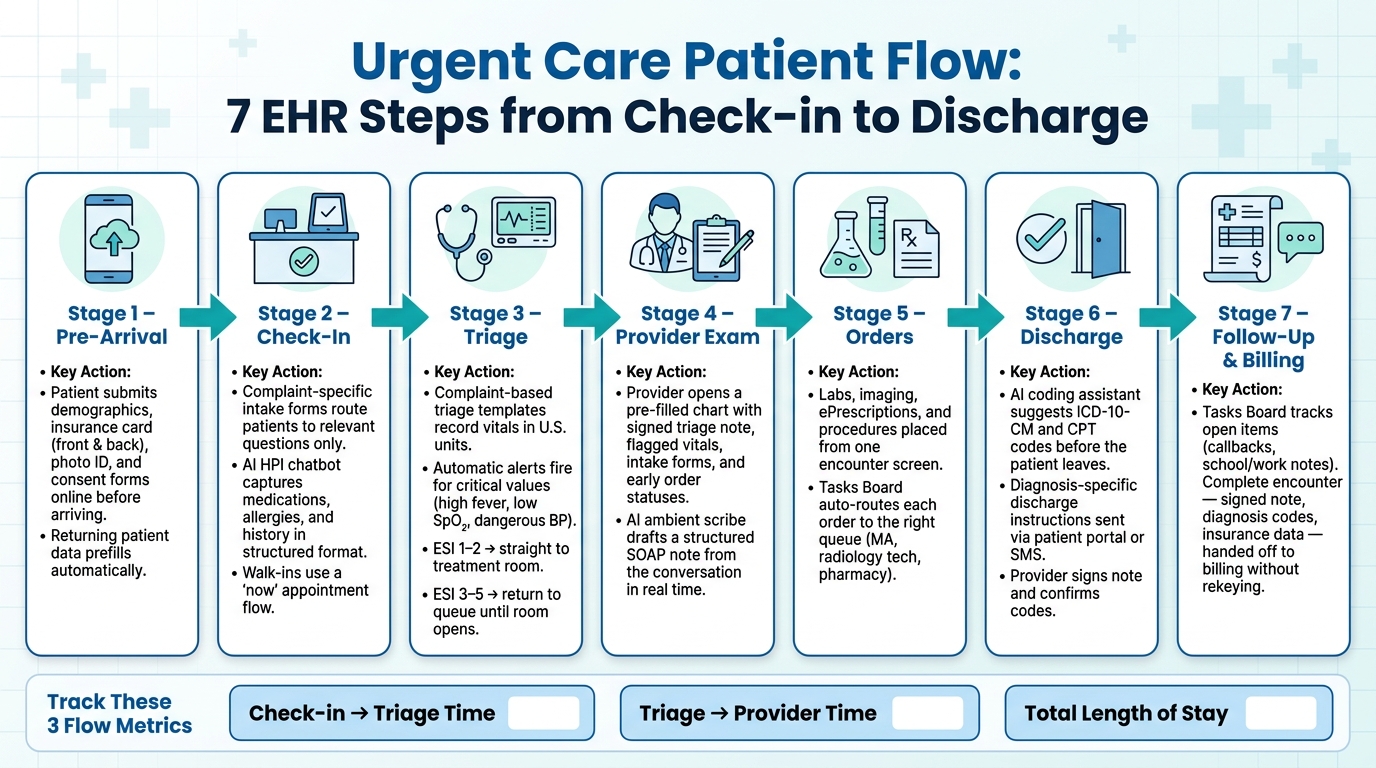
Urgent Care Patient Flow: 7 EHR Steps from Check-in to Discharge
The front desk is usually the first choke point in urgent care. A simple fix is to move intake earlier, before the patient even walks in. That cuts wait time at the desk and keeps the visit moving.
Have patients send demographics, insurance details, and consent forms before arrival. The EHR can collect uploads of the front and back of the insurance card and photo ID, so staff don't need to scan paperwork at check-in. For returning patients, demographic and insurance data should prefill on its own. The aim is simple: by the time the patient reaches triage, the chart should already be clean and complete.
Consent forms can also renew on a set cycle, often every 6 months. For walk-ins, a "now" appointment keeps the process the same as it is for scheduled visits. Same-day visits go through the same intake flow instead of a separate, messy workaround. That intake should then move straight into triage and rooming.
Not every patient should answer the same questions. Intake should follow the visit reason so people only see what applies to them. A patient with a laceration shouldn't get urinary symptom questions, and a patient with a respiratory issue shouldn't see injury-related fields.
An AI HPI and medical history chatbot can handle medications, allergies, and the parts of medical and surgical history that matter for that visit in a conversational format. It then turns those answers into structured chart data. So when the provider opens the encounter, the history section is already filled in instead of sitting there blank.
Conditional fields help here too. For auto accident visits, attorney contact details - name, fax, phone, and email - should appear as soon as the patient picks that visit reason. That keeps staff from chasing down missing details at the desk or finding out during billing that key info never made it into the chart.
Once intake starts, the tracking board should run the show. Front desk staff, medical assistants, and providers all need to work from the same live queue. Color-coded statuses make it easy to see where each patient is, from pre-registration and arrival to rooming and provider review.
Staff can click straight into a patient's appointment from the tracking board to open the record, begin intake, or check clinical notes. The board also makes it easy to spot patients who didn't finish pre-registration before they arrived. From there, the patient can move into triage and rooming without duplicate entry.
After digital check-in, triage should turn intake data into rooming, routing, and provider handoff. When intake flows straight into triage, staff can room the patient sooner and skip duplicate entry.
A triage template should collect only the details that matter for that complaint. Record vitals in standard U.S. units so abnormal values can trigger alerts right away. Set automatic alerts for critical vitals, such as very high fever, low SpO₂, or dangerous blood pressure. A laceration template should record injury details. A chest pain template should record cardiac risk and symptom pattern. Use checkboxes and picklists first, and save free text for nuance.
Once the template captures the complaint, the EHR should use status rules to move the patient ahead on its own.
Manual status updates eat up time. When triage is done, move the patient to Roomed. When rooming ends, switch the status to Ready for Provider and notify the clinician.
Route by acuity to cut delays. ESI levels 1–2 should go straight to a treatment room instead of sitting in queue. ESI levels 3–5 return to a waiting state until a room opens. Fast-track rooms can be auto-suggested for minor complaints, while procedure rooms stay reserved for sutures or orthopedic cases. On the tracking board, show room, provider, acuity, and wait time with color-coded rows so staff can read the situation at a glance.
By the time the provider gets the handoff, the chart should already be complete. The triage note is signed, vitals are entered and flagged if abnormal, intake forms are attached, and any early orders - such as rapid strep, flu, or COVID tests - are documented with their current status. Put all of that on one summary screen.
The handoff should feel clean and simple: the provider opens a chart that already shows what triage collected. Carry triage data into the provider note so the clinician can confirm the history instead of asking the same questions all over again.
With the chart ready, the visit can move into notes, orders, and coding.
With a provider-ready chart already open from the triage handoff, the aim is simple: keep notes, orders, and coding on one screen. That handoff should keep the whole visit inside a single encounter screen, instead of making the provider bounce from tab to tab.
Templates take care of the basic note structure. But the biggest time savings usually come from pairing those templates with an AI ambient scribe.
Instead of pausing the visit to type, the provider can stay focused on the patient while the scribe drafts a structured SOAP note from the conversation. Since intake already captured the core history, the provider doesn’t have to build the note from scratch. They can review what’s already there, confirm it, and make changes where needed.
The result is a note that starts pre-filled, which makes the whole process feel a lot less like clerical work and a lot more like patient care.
Once the note is in progress, order entry should happen inside the same encounter screen where charting is happening. Providers can manage ePrescriptions, diagnostic orders, and radiology integration without leaving the note.
That matters because every extra click adds friction. Keeping everything in one workflow makes it easier to move through the visit without losing momentum.
After provider sign-off, the Tasks Board sends each order to the right queue on its own - a strep test to the medical assistant, an X-ray to the technician. If pharmacy preference was collected during intake, it can pre-fill the ePrescribing workflow. And order status stays visible on the Visits Tracking Board during the visit .
Before discharge, use the AI coding assistant to suggest ICD-10-CM and CPT codes based on the note. The provider then reviews those suggestions, confirms or changes them, and signs off before the claim moves downstream.
That step helps catch missing details while the visit is still fresh. It also cuts down on billing rework later, which saves time for both the clinical team and the back office.
Once the provider signs the note and coding is confirmed, the visit moves into discharge, follow-up, and billing. At that point, the EHR should push the encounter from patient-facing wrap-up to back-office claim handoff. The aim is simple: finish these steps fast and cleanly, without dragging the clinical team back into the chart.
Discharge instructions can come from diagnosis-specific templates so next-step guidance stays consistent for each visit reason.
Those instructions can be sent through the patient portal or by SMS. If the practice collects each patient’s preferred contact method and messaging opt-in during registration, automated follow-ups are more likely to reach them through the right channel. The discharge workflow should also kick off the next follow-up task.
A centralized Tasks Board keeps school or work notes, callbacks, and other open items visible and assigned. That matters because small loose ends can pile up fast if no one owns them.
Use built-in messaging so follow-up stays documented in the chart. When the message thread lives inside the record, staff don’t have to hunt through inboxes or piece together what happened later.
A clean billing handoff starts with what was captured earlier in the visit. When registration collects responsible party details, insurance information, employer details, and accident-related data up front, the billing team already has what it needs before the claim is built.
From there, the signed note, diagnosis codes, and insurance data can be used to submit claims without rekeying. That keeps the encounter moving out of the exam room and into billing without delay.
Every stage of a visit - check-in, triage, charting, and discharge - creates data you can use to fix the next bottleneck. Put that data to work. A modern EHR makes it clear where time slips away.
Track three metrics: check-in-to-triage time, triage-to-provider time, and total length of stay. These numbers show where patients are waiting and which handoffs are slowing things down. Built-in analytics and dashboards make it simple to pull this data without building reports from scratch. Once you can see the numbers, you can zero in on the handoff behind the delay.
If check-in-to-triage time is long, review intake completion and AI-assisted history capture. If triage-to-provider time is long, review status rules and confirm the provider-ready chart is complete.
Use the tracking board to monitor live flow, and use reporting to spot trends over time. Then use what you find to refine templates, routing rules, and automation.
Start by pinpointing where your current process slows down. Focus on door-to-provider time first, because it has a direct link to patient satisfaction.
Then shift routine intake to self-service options like online registration or QR-code kiosks. That can reduce clerical handoffs, cut manual data-entry errors by up to 80%, and send patient-submitted information straight into structured EHR fields for registration, triage, and billing.
Before the provider steps in, the EHR and digital tools should handle registration, clinical data collection, and insurance checks. That cuts manual work and keeps the front desk from getting bogged down.
Patients can fill out mobile forms or use kiosks to enter demographics, insurance details, and e-signatures. The system then checks eligibility in real time, while an AI-powered history chatbot gathers symptoms and medical history so the key details are already in the record.
Track the flow metrics that tell you, in plain terms, whether patients are moving or getting stuck.
Watch door-to-provider time in real time, with a target of under 25 minutes. Keep check-in time between 2 and 5 minutes. Aim for a registration error rate below 5% and an LWBS rate below 5%.
It also helps to keep a close eye on:
Then, every 60 to 90 days, review the bigger-picture metrics: patient satisfaction, collection rates, and digital workflow drop-off points. That review cycle can show where patients lose momentum, where staff slow down, and where small fixes can ease pressure across the visit.

Tell us what you need and we'll get back to you soon.