
Reduce 3–7 minutes per visit by replacing generic EHR templates with complaint- and role-based charts, smarter intake, and AI notes.
If your urgent care charting adds even 3–7 extra minutes per visit, your schedule can start slipping before lunch. I’d fix that by cutting generic templates, reducing repeat entry, and setting up complaint-based, role-based, and intake-driven chart flows.
Here’s the short version:
If I were auditing an urgent care workflow, I’d focus on three questions first:
A generic EHR template doesn’t just make charting annoying. It can cut patients seen per shift, extend discharge time, and wear staff down over the day. This article explains where that drag starts and what to change first.
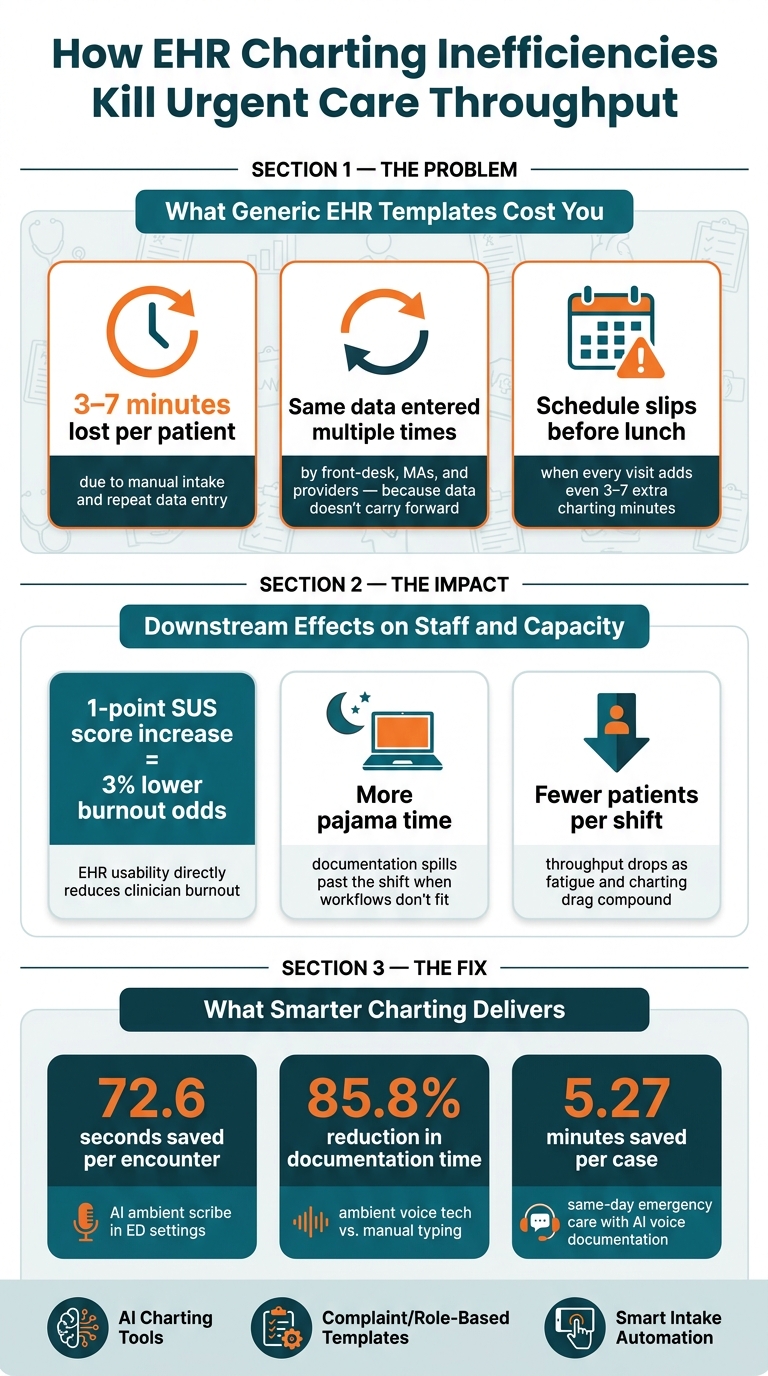
How EHR Charting Inefficiencies Kill Urgent Care Throughput (And the Numbers to Fix It)
Generic templates push very different urgent care visits into the same chart flow. In practice, that means UTIs, hives, lacerations, and sprains all get documented the same way.
That’s where things start to break down. A simple hives visit shouldn’t send a clinician clicking through organ systems that have nothing to do with the complaint. But that’s often what happens. Instead of moving through a chart built for the visit in front of them, clinicians get stuck working through extra fields and screens.
Generic systems also tend to make clinicians rebuild the same parts of the note over and over. For high-volume, straightforward complaints, they may still have to manually piece together the HPI, Exam, and assessment sections for each encounter. A minute here and two minutes there may not sound like much, but over a full shift, it adds up fast. And the problem doesn’t stop with visit type. It shows up again in how the system handles staff roles.
The same issue carries across the team. Legacy EHRs often don’t support the different needs of providers, nurses, and front-desk staff, so each role ends up working around the chart instead of being helped by it.
That creates a familiar mess. Providers retype details that were already entered during intake. Staff enter the same data more than once because it doesn’t carry forward. Handoffs take longer because the workflow doesn’t match what each role is supposed to do.
This isn’t about staff being careless or slow. It’s a system design problem. When the chart doesn’t fit the job, people spend their time patching gaps. And once that mismatch starts, the drag spreads through the whole visit.
The slowdown can start before the patient is even roomed. At intake, manual scheduling and phone intake can delay patients before triage begins.
During the exam, providers may have to jump between multiple screens just to find key fields. That pulls attention away from the patient. It also forces providers to build medical decision-making sections by hand instead of moving through a chart that already fits the visit.
At discharge, the same pattern shows up again. Discharge instructions and disposition details often aren’t prefilled, so staff have to type them out or search for standard guidance that should already be there.
When this happens on every shift, the template stops being “just documentation.” It becomes a throughput problem. The result is more charting time, more work after hours, and fewer patients seen per shift.
A few extra charting minutes per visit may not sound like much at first. But over the course of a shift, they stack up fast. Those lost minutes turn into longer waits in the lobby, bottlenecks in exam rooms, and a bigger backlog during busy hours.
Poor EHR design pulls time away from patient care. And that cost adds up all day long. Automated intake can save 3–7 minutes per patient. Across a full schedule, that can mean the difference between a clinic that keeps moving and one that falls behind by noon. The same wasted time also adds mental strain for the care team.
Documentation burden doesn’t just slow providers in the moment - it wears them down as the shift goes on. Cluttered templates, extra screens, and repeat data entry create mental fatigue. It’s death by a thousand clicks.
As fatigue builds, pace slows and the chance of mistakes goes up. That means throughput problems don’t stay fixed in one part of the day. They spread.
EHR usability has a direct link to burnout: each one-point increase on the Systems Usability Scale lowers the odds of clinician burnout by 3%. When providers are tired, they chart more slowly and often spill work into after-hours charting. That’s a clear sign the admin load has already outgrown what the schedule can handle.
Reducing clicks and duplicate entry is the next lever for improving throughput.
The fix is simple: make charting fit the visit, the staff role, and the intake process.
In urgent care, one of the fastest ways to save time is to stop building notes by hand. AI charting tools can capture the visit, draft the note, and let providers review it instead of starting from a blank screen.
The numbers back this up. An ambient AI scribe study in the emergency department found 72.6 seconds less documentation time per encounter. A same-day emergency care analysis found ambient voice tech cut documentation time by 85.8%, saving an average of 5.27 minutes per case compared with manual typing.
Ottehr's AI ambient scribe records the clinician–patient conversation and turns it into a draft note with HPI, exam findings, assessment, and plan. Its AI-powered HPI chatbot gathers structured symptom details based on the chief complaint before the provider even walks into the room. Put those together, and the provider spends less time typing and more time reviewing. That means less drag during the visit and less fatigue by the end of the shift.
AI cuts typing. But flow gets even better when the chart stops asking people to do work that doesn't matter for that visit.
Urgent care templates should match the complaint, the acuity level, and the person using them. They shouldn't force every visit through the same screen.
A provider handling a low-acuity medication refill shouldn't have to click past fields meant for chest pain. In the same way, an MA entering vitals doesn't need the same view as the physician finishing the assessment and plan.
That usually means:
Ottehr supports configurable workflows and a customizable template library, so urgent care teams can set up complaint-specific paths and strip out low-value fields without building everything from zero.
Once the chart gets tighter, the next step is obvious: collect routine data earlier so staff don't type it again later.
Every time staff re-enter details the patient already gave, time slips away. Smart intake tools fix that by moving data collection upstream, before the patient gets to the exam room.
With Ottehr, patients complete electronic paperwork and registration through the patient portal before arrival or at check-in. Structured symptom questionnaires feed straight into the clinician's HPI as discrete fields. That information then flows into the patient tracking board and the visit record, so front-desk staff and MAs don't have to enter the same facts twice.
From there, integrated diagnostic orders and results keep labs and imaging in view without making staff chase pending tests across separate systems. Ottehr's AI coding assistant checks the completed documentation before the note closes, which cuts extra discharge work.
Automation doesn't replace clinical judgment. It clears out the busywork between steps.
Start by finding the biggest charting slowdowns. Pull data on documentation time, repeat-entry rate, and the visit types that take the longest to chart. Then check after-hours charting - often called "pajama time" - to see how much work is spilling past the shift. When that number is high, it's a clear sign the workflow is pushing documentation outside normal hours.
Put your attention first on the visit types with the most friction, especially those linked to visit-type mismatch, role mismatch, and intake duplication. These are often complaints that don’t fit cleanly into a standard template, so providers end up clicking through irrelevant fields or building notes by hand. Review role-based screens at the same time. If front-desk staff or medical assistants (MAs) are working through screens built for physicians, that wasted time adds up on every single visit.
Use the same baseline metrics before and after the workflow change. Once go-live happens, measure what changed. The metrics that matter most are patients seen per day, note completion time, and discharge turnaround.
Track these changes:
| Metric | Pre-Implementation | Post-Implementation |
|---|---|---|
| Note Completion Time | Longer | Shorter |
| After-Hours Charting | Higher ("pajama time") | Lower (completion during the visit) |
| Patients Per Day | Baseline capacity | Higher |
If patients seen per day goes up while note time and discharge lag go down, the workflow is doing its job.
Better usability helps cut burnout and keeps charting inside the shift. The answer is smarter templates built for urgent care workflows.
Track a few key metrics, like charting time per encounter and same-day encounter close rate. Those numbers can tell you pretty fast if your workflow is helping or getting in the way.
A few warning signs tend to show up early:
It also helps to watch for day-to-day friction, like repetitive clicks, duplicate data entry, and trouble finding critical patient information. That kind of drag adds up fast.
One simple way to spot the problem: compare charting duration and after-hours logins before and after workflow changes. If those numbers get worse, generic charting may be slowing you down.
Customized templates make the biggest difference for high-volume urgent care visits like respiratory infections, urinary tract infections, minor injuries, sprains, and lacerations. They cut down on repetitive data entry and help clinicians document visits faster with condition-specific workflows.
For more complex visits with multiple complaints, providers can add AI-powered tools or set up extra custom sequences for cases like occupational medicine, pediatric care, or follow-up visits.
Move from manual charting to an automated, template-based workflow. AI-powered ambient scribes can record the HPI, diagnoses, and patient instructions as the visit happens, so you can finish notes faster without losing detail.
You can also use the command palette for macros like /vital, /dx, and /rx, along with specialty-specific global templates for common visit types. On top of that, automating intake to prefill forms and check clinical data cuts duplicate entry and makes it easier to close charts during clinic hours.

Tell us what you need and we'll get back to you soon.