
Cut urgent care revenue loss by verifying eligibility, collecting at point-of-service, submitting clean claims quickly, and tracking denials.
Most urgent care revenue problems start before the claim is sent. If I verify insurance at check-in, collect the right patient amount before the visit ends, send claims within 24–48 hours, and track denials by cause, I can cut rework, protect cash flow, and keep old A/R from piling up.
Here’s the article in plain English:
A few benchmark targets stand out:
| KPI | Target |
|---|---|
| Clean claim rate | >95% |
| Denial rate | <5% |
| Days in A/R | <35 days |
| Net collection rate | >96% |
| Point-of-service collection rate | >70% |
| Claim submission lag | 24–48 hours |
Bottom line: I’d treat urgent care RCM as one connected workflow - check in, verify, collect, document, code, bill, post, and review - because a small error at the front desk can turn into lost revenue at every step after that.
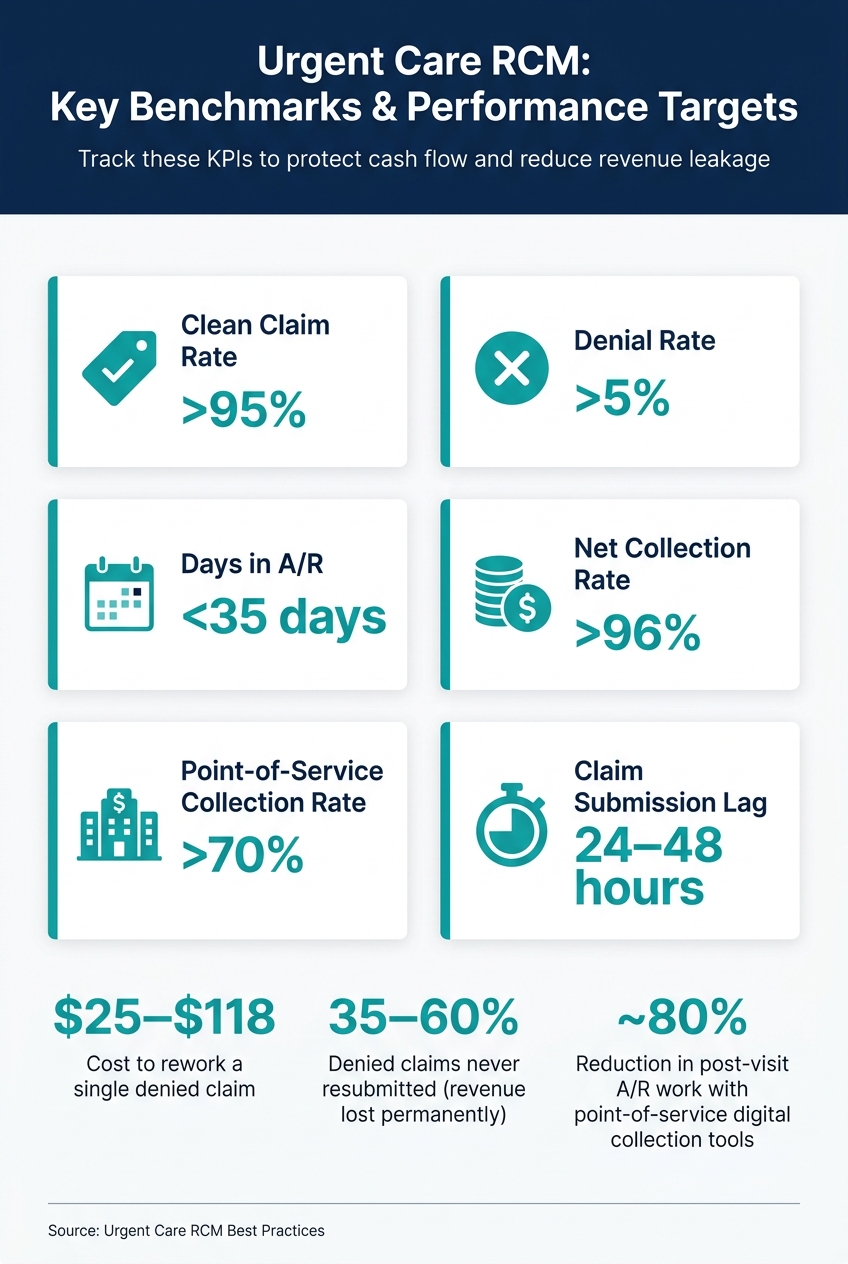
Urgent Care RCM KPIs & Benchmarks at a Glance
Front-end misses lead to denials and extra work. In urgent care, that problem shows up fast because visits are short, unplanned, and high-volume. When registration, eligibility, and point-of-service collections are handled well, you stop many denials before they start and protect cash flow.
Each visit should begin with the same core registration and benefits details. The goal isn't to collect everything under the sun. It's to capture the information needed to verify coverage, calculate what the patient owes, and avoid claim edits.
That includes:
A quick confirmation at every visit, not just the first one, helps cut down on claim rework.
Eligibility tells you whether coverage is active. Benefits tell you what the patient owes. You need both.
The best setup uses two checks: one at arrival and one before checkout. The first check happens during pre-registration or when the patient arrives. The second happens before the visit is closed, so staff can confirm patient responsibility and document the details right away. If coverage is inactive or incomplete, you want to catch that before services are rendered.
Manual checks drag down the front desk and leave more room for mistakes. Automation handles the same task inside the workflow and does it with less friction.
| Feature | Manual Eligibility Checks | Automated Real-Time Verification |
|---|---|---|
| Speed | Time-intensive; requires phone calls or portal logins | Instantaneous check within the workflow |
| Accuracy | Prone to human error and missed details | High precision; reduces likelihood of denials |
| Staff workload | Requires more staff for high patient volumes | Handles high volumes without adding headcount |
| Cost-to-collect | Higher due to labor and rework | Reduced by up to 27% |
| Timing | Often completed after the visit or delayed | Confirmed before services are rendered |
Automated real-time verification removes manual lookup and gives staff the information they need to collect the right amount before the patient leaves.
Staff need one clear rule: collect the system-calculated amount at check-in or checkout. If the system shows a copay or an estimated balance, collect it before the patient leaves.
Digital intake can also help by capturing a card on file. That way, the remaining balance can be charged automatically later. These tools can reduce post-visit A/R work by approximately 80%.
Once registration, eligibility, and collections are under control, the next margin risk shifts to documentation, coding, and charge capture.
The next revenue risk sits in documentation, coding, and charge capture. In urgent care, these three steps have to move together: note → code → charge. Visits are short, so there’s not much room to clean up the chart later.
Documentation should be complete and specific so the chart supports the billed E/M level and any procedures. The goal is simple: write the note so coding is supported the first time, without later edits. Clear notes cut down on coding changes and claim rework.
For urgent care visits, the encounter note needs to match what was actually done, including tests, imaging, injections, administered medications, and other performed services. Once the note is done, the next step is to match the chart to the correct code and modifier.
Coding checks should happen in the workflow, not after the claim has already been sent. Use diagnosis and procedure codes that the note supports. Modifier use matters a lot here, especially for same-day repeat procedures.
| Service | Modifier | When to Use | Required documentation |
|---|---|---|---|
| Same-day E/M + procedure | 25 | Significant, separately identifiable E/M service on the procedure day | Note must support both services |
| Repeat procedure, same provider | 76 | Same physician repeats the service on the same day | Document the medical necessity for the repeat |
| Repeat procedure, different provider | 77 | Different physician performs the repeat service on the same day | Document that a different provider performed it |
After coding, reconcile every documented service against the charge list before submission. That one step helps catch misses before they turn into lost dollars.
The last mid-cycle control is charge capture. This is where missed items turn into missed revenue. In most cases, missed charges come from weak reconciliation before claim creation. Add an encounter reconciliation step before the claim is created so every documented service has a charge tied to it.
Template-driven documentation and AI coding can build CPT codes as the note is completed. Fee schedules can update estimated patient responsibility as codes are added. That closed loop between documentation, coding, and charge capture helps keep claims clean before they leave the clinic.
Once coding is done, the back end decides how fast an urgent care visit turns into cash. This is where claims go out, denials get fixed, A/R gets worked, and patient balances move toward payment.
Set a firm daily cutoff so visits are coded before the claim batch runs. Then scrub each claim for POS 20, diagnosis-procedure mismatches, modifier mistakes, and timely filing limits before submission.
Your practice management/EHR system should use integrated payer edits to catch plan-specific rules early. When a claim gets rejected, correct it and send it back within 24 hours. That short turnaround matters. A rejected claim that sits for days can quietly turn into old A/R.
Daily reconciliation is the safety net here. Match visits logged, charges posted, and claims transmitted every day. If anything is missing, send it to an exception queue with a named owner. That simple step keeps missing encounters from slipping into aged A/R.
A denial can't be fixed well if no one knows why it happened. Each denial needs a root-cause code first.
Industry benchmarks put first-pass denial rates between 5% and 10%, and clinics on the high end often have front-end registration issues behind those numbers. Reworking one denied claim can cost between $25 and $118, and about 35% to 60% of denied claims are never resubmitted. That means the money is gone for good.
Each denial should point back to the step that broke down:
| Denial Category | Common Root Causes | Prevention Steps | Owner |
|---|---|---|---|
| Eligibility | Insurance inactive; not effective on date of service; patient not covered; wrong plan type | Verify eligibility at check-in; use real-time tools; confirm plan type | Front desk/registration with billing support |
| Coding | Invalid codes; diagnosis-procedure mismatch; missing or incorrect modifiers; services considered incidental | Use coding templates; embed coding edits; provide coder education; run regular audits | Coding team/billing |
| Documentation | Chart does not support billed level; missing procedure notes; lack of medical necessity evidence | Provider education; standardized documentation templates; concurrent documentation checks | Providers with clinical documentation improvement support |
| Authorization | Services requiring prior authorization under specific plans performed without approval | Maintain payer-specific authorization rules; add front-end checks for high-risk services; train staff | Front desk/pre-auth team and providers |
| Timely Filing | Delayed coding; claims stuck in work queues; rejections not corrected promptly | Daily reconciliation; timely filing alerts; monitor aging unsubmitted claims; escalation process | Billing supervisor/RCM leadership |
| Payer Processing | Payer system errors; incorrect COB; misapplied benefits; duplicate claim misflags | Monitor payer bulletins; submit timely appeals; verify EOB accuracy | Billing team with payer relations support |
High-dollar and high-volume denials should be worked within 3–5 business days. Everything else should move within 7–10 business days. Appeals also need to land inside the payer's filing window, which is often 30–60 days from the denial date.
A/R follow-up gets easier when balances are sorted by age: 0–30, 31–60, 61–90, 91–120, and 120+ days. For urgent care, a healthy A/R mix keeps 55% to 65% of balances in 0–30 days, 15% to 20% in 31–60, 8% to 12% in 61–90, 5% to 8% in 91–120, and less than 10% beyond 120 days.
The 31–90 day range needs weekly follow-up. That's the danger zone. If those claims sit too long, they start drifting toward write-offs.
Automated ERA posting cuts manual errors and speeds up reconciliation. It also helps separate contractual adjustments from write-offs caused by timely filing misses or bad debt. If a payment comes in below the contracted rate, flag it for underpayment review before the account is closed.
For patient balances, send the first statement within 7 to 14 days after payer processing is done. Then follow up every 30 days. After three statements, move the balance to a call campaign or collections review. Digital statements with one-click payment links, line-item detail, and payment plans can help money come in faster.
Those payment patterns should feed straight into the KPI dashboard in the next section.
Once claims, denials, and patient balances are in motion, reporting shows where cash still gets stuck.
Track a small set of KPIs so you can spot revenue leaks early. The table below covers the main urgent care RCM metrics, target ranges, and who should own each one. Use them to trace each leak back to the step that caused it.
| KPI | What It Means | Benchmark Target | Owner |
|---|---|---|---|
| Clean Claim Rate | % of claims paid on the first submission without edits | >95% | Billing/Coding Team |
| Denial Rate | % of submitted claims rejected by payers | <5% | RCM Manager |
| Days in A/R | Average days from visit to payment received | <35 days | A/R Follow-Up Team |
| Net Collection Rate | Actual revenue collected vs. the amount legally owed | >96% | Finance/Leadership |
| Point-of-Service Collection Rate | Percent of patient responsibility collected at check-in or checkout | >70% | Front Office Lead |
| Claim Submission Lag | Time from patient visit to claim submission | 24–48 hours | Billing Team |
Review clean claim rate, denial rate, and claim submission lag on a regular basis so front-end issues show up early, not weeks later. Then look at net collection rate and point-of-service collection rate to see if billing changes are holding over time.
Good RCM systems use automation to spot patterns in denied claims, which helps leaders connect back-end revenue loss to specific front-end process failures. That means your dashboard should show more than the total number of denials. It should also show where the problem began: registration, eligibility, coding, or claims submission.
A useful dashboard ties denials, collections, and A/R aging back to the source of the issue. In most urgent care settings, that source falls into one of these areas:
When you can see that link clearly, fixing the process gets much easier.
Verify eligibility up front for every patient. Collect point-of-service balances. Submit clean claims within 24–48 hours. Audit coding and modifiers. Track denials by root cause, and monitor A/R every week.
On the back end, use automated patient billing and payment reminders to cut manual staff labor and improve cash flow. The fastest gains usually come from connecting these checks inside one workflow instead of handling them as separate tasks.
Most urgent care claim denials come from three places: registration errors, coding mistakes, and documentation gaps.
A big share starts right at intake. Up to 50% of denials are linked to issues like wrong patient details or skipped insurance checks. Another 35% come from coding problems tied to modifiers, CPT, ICD-10, or HCPCS codes.
Denials also happen when the chart doesn’t back up the services billed. In many cases, that comes down to manual workflows where small mistakes slip through and turn into rejected claims.
To collect more at check-in, urgent care clinics need to move intake earlier and automate financial tasks. Send registration links by text or email 24 to 72 hours before the visit so patients can fill out demographics, insurance details, and consent forms ahead of time.
At check-in, use kiosks, tablets, or mobile tools with OCR to scan IDs and insurance cards and run real-time eligibility checks. Then staff can review the results, ask for payment upfront, and explain financial policies in plain language.
Start with baseline metrics for denial rates, days in A/R, and first-pass clean claim rates so you can see where performance stands today. These KPIs make it easier to spot bottlenecks, like registration mistakes or coding problems, that can slow cash flow.
It also helps to watch patient visit volume and average revenue per encounter. Those numbers give you a clearer view of financial stability and day-to-day efficiency.
Review these metrics on a steady basis to support accurate billing, faster reimbursement, and stronger denial management.

Tell us what you need and we'll get back to you soon.