
Reduce urgent care visit times ~30% by streamlining intake, standardizing triage, using AI charting and live flow tracking.
You can cut urgent care wait times by about 30% without hiring more people. In most clinics, the fix is not more staff. It’s fewer delays between check-in, triage, provider time, charting, and discharge.
I’d boil the article down to this: if your average visit is around 90 minutes, getting closer to 60 minutes usually starts with five changes:
The core idea is simple: wait times build up in small gaps. Front-desk work, uneven triage, slow charting, poor room visibility, and clunky checkout can push visits into the 60–120 minute range. But clinics that track the right numbers - like door-to-triage, door-to-provider, length of stay, LWBS, and chart closure time - can spot the slow step and fix it first.
A good starting target looks like this:
| Metric | Goal |
|---|---|
| Door-to-triage | 15 minutes or less |
| Door-to-provider | 30 minutes or less |
| Door-to-door | About 60 minutes during normal volume |
| LWBS rate | 2% or less |
| Chart closure | Same day or within 24 hours |
If I were putting this into one sentence, it would be: faster urgent care flow comes from fixing handoffs, not from adding headcount.
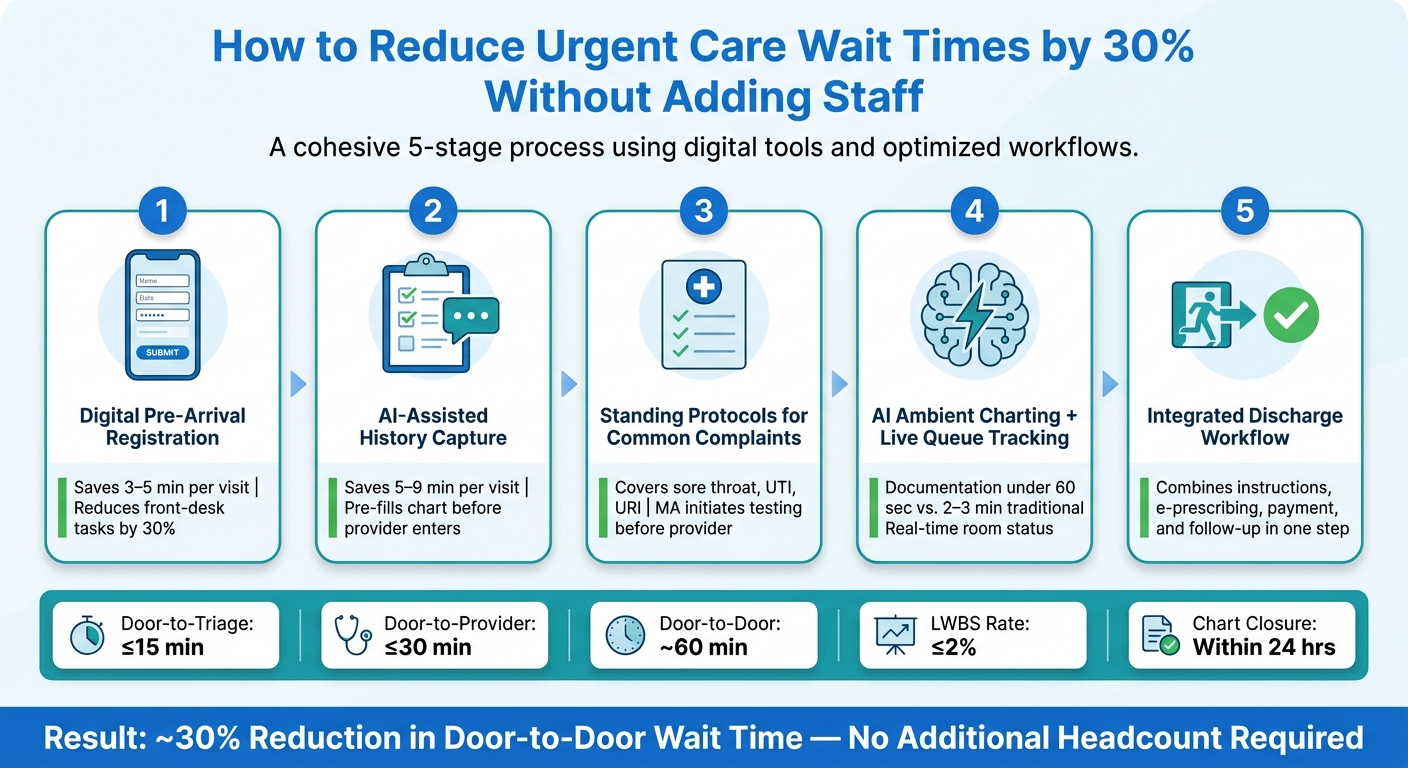
How to Reduce Urgent Care Wait Times by 30% (Without Adding Staff)
The front desk is usually the first urgent care bottleneck. Before triage even starts, staff are dealing with paper forms, manual demographic entry, insurance checks, and a waiting room that keeps filling up. Those steps eat time fast. Paper registration plus re-entry into the EHR often adds 5–10 minutes per visit, and insurance verification can add another 3–7 minutes.
That drag at check-in pushes up both door-to-triage and door-to-provider time. Cut 3–5 minutes from front-desk work per patient, and the whole visit tends to move faster.
The simplest fix is to move registration online instead of handling it all at the desk. When patients fill out demographics, insurance details, and consent forms before they arrive, the front desk has far less to do. In fact, pre-arrival registration through online check-in or SMS can shrink in-center registration to under 90 seconds.
The payoff can be pretty big. One urgent care clinic seeing 200+ patients per day reported a 40% decrease in wait times and a 30% drop in front-desk administrative tasks after switching to digital intake forms.
Insurance checks matter here too. When eligibility verification is built into the intake flow, staff no longer have to call payers or jump between separate portals. That removes a manual task that can add 3–7 minutes per visit.
Walk-ins don't have to break the system. QR codes or tablets can let them start intake as soon as they arrive. A practical target looks like this:
Check those rates every week. If adoption slips, tighten the process with text reminders, faster form links, or an express check-in lane for patients who already pre-registered. And keep a short paper backup for patients who can't use digital tools. That version should stay lean: name, date of birth, and chief complaint.
Once registration is handled up front, the next time saver comes from prefilled clinical history.
Digital registration covers demographics and insurance. AI-assisted history capture goes one step further by collecting structured clinical details before the patient is roomed.
Ottehr's AI medical history chatbot, available through electronic paperwork and the patient portal, gathers symptom details before rooming and auto-fills the chart. That means triage staff and providers can start with a prefilled history instead of building one from scratch. The result: 5–9 minutes saved per visit across triage and provider work.
With intake done before rooming, the next bottleneck is variation in triage itself.
Here’s what changes when intake shifts from manual steps to digital and AI-assisted workflows.
| Metric | Manual Intake | Digital + AI Intake |
|---|---|---|
| Average check-in time | 10–15 min (new patient) | 5–8 min; under 90 sec when completed before arrival |
| Staff touchpoints per visit | Multiple: forms, data entry, insurance calls, clarification | Fewer: identity check, verification, exception handling |
| Duplicate entry risk | High (paper + PM system + EHR re-entry) | Low (single-source auto-population) |
| Arrival-to-triage time | Longer; depends on queue length and staff pace | Shorter by 5–12 min on average |
Digital intake cuts duplicate entry and gives staff more time for work that needs a human touch.
Next, the same idea carries into triage protocols and common complaints.
After intake, the next thing that slows door-to-door time is inconsistent triage. A clinic can still get backed up after the patient checks in if the workup starts differently from one visit to the next. Maybe one staff member begins testing right away, while another waits for the provider. Maybe one patient follows a clear path, while another doesn't. That variation adds minutes fast.
The next step is simple: standardize the first clinical moves.
For visits like sore throat, UTI symptoms, and URI, the path is often predictable enough that nurses or MAs can start the first step without waiting for a provider.
A standing protocol makes that possible. It lays out who can start the test, which patients qualify, and when the case needs to be escalated. Clear inclusion and exclusion criteria help keep the process safe.
For example, an eligible sore throat visit can begin with a rapid strep test under protocol before the provider enters the room. Testing before provider evaluation cuts door-to-provider time and shortens the visit without changing staffing levels. The protocol should spell out:
Standardized triage speeds up the front end of the visit. After that, the next bottleneck is usually provider-side documentation and visibility into clinic flow.
Standing protocols only help if staff can act on them fast. That means the EHR needs to carry much of the load.
Ottehr's customizable templates and diagnostic order sets let clinics build complaint-driven workflows directly into the system. When a chief complaint is selected at intake, the related forms and workflows are already queued up, so staff don't have to start from scratch or dig through menus. When triage documentation is prefilled and order sets are one click away, the time between rooming and testing gets shorter.
The effect shows up most clearly in high-volume complaints that tend to follow the same path.
| Complaint Type | Door-to-Provider Time (Before) | Door-to-Provider Time (After) | Mean Visit Duration (After) | Testing Started Pre-Provider Entry |
|---|---|---|---|---|
| Sore throat / strep screen | Highly variable | Reduced via MA-initiated rapid strep testing | Shorter through testing before provider evaluation | High for eligible visits |
| UTI symptoms | Delayed until provider order | MA-initiated urine testing under protocol | Shorter through earlier testing | High for eligible visits |
| URI / cold symptoms | Inconsistent first steps | Standardized symptom checklist + vitals | More consistent flow for low-acuity visits | Depends on complaint and vitals |
With triage standardized, the next gains come from faster charting and clearer room-by-room visibility.
Once intake and triage are set up the same way every time, the next drag on door-to-door time usually comes from the provider side. And you don’t need to hire more people to fix it. In many clinics, the slowdown comes from three plain things: charting, orders, and room-status updates.
Old-school charting pulls the provider out of the conversation and back to the keyboard. An AI ambient scribe handles most of the note during the visit inside the EHR, while an AI coding assistant adds CPT and E&M codes on its own. That means charts get to claim-ready status with less back-and-forth.
For common visits, documentation drops to under 60 seconds instead of adding 2–3 minutes after the encounter.
That time savings matters. But it only helps if the team can also spot where visits are getting stuck.
Missed status updates can quietly jam the whole visit flow. A live tracking board shows each stall as it happens, so the whole team can see who’s:
When that view is shared across the floor, staff can act sooner instead of piecing things together from manual updates or static dashboards. And once those stalls are easier to spot, discharge becomes the next area to tighten up.
| Workflow Area | Traditional | AI-Enabled (Ottehr) |
|---|---|---|
| Documentation time per encounter | 2–3 extra minutes post-visit | Under 60 seconds for most common visits |
| Coding handoff | Manual entry, prone to errors and rework | AI coding assistant auto-attaches CPT and E&M codes |
| Live room and queue status | Manual tracking or static dashboards | Live tracking board with real-time room and task status |
Most urgent care teams look at intake and triage first when wait times creep up. That makes sense. But the end of the visit often hides a lot of lost time too.
Once intake, triage, and charting start moving faster, discharge often becomes the next choke point. Instructions, prescriptions, coding, payment, and follow-up messages all stack up at once. Without a standard process, that final stretch can turn into a bottleneck right before the patient leaves.
A lot of discharge delays come from routine admin work. Manual coding takes time. Duplicate entry slows checkout. Small handoffs add up.
Ottehr pulls checkout steps - instructions, prescriptions, payment, and follow-up - into one integrated workflow, which cuts down on handoffs at checkout. It also supports e-prescribing through Surescripts and patient payments through Stripe. For more involved visits, discharge templates help staff move faster because instructions, coding, and follow-up are ready in one click.
One-time workflow fixes usually fade. What tends to work better is a short weekly review cycle that keeps the team focused on one bottleneck at a time.
Use that weekly check-in to answer a simple question: where is the delay now? Is it checkout? Coding? Patient messaging?
A practical 30-day sequence looks like this:
The KPIs worth tracking each week are simple:
| Metric | Target |
|---|---|
| Median door-to-provider time | Under 20 minutes |
| Chart closure time | Within 24 hours |
| Discharge turnaround time | Measurable weekly reduction |
| Time spent on avoidable tasks per staff member | Under 1 hour daily |
A 30% drop in door-to-door wait time doesn’t depend on adding more people. It comes from cutting the gaps between steps.
The clinics that move fastest tend to do a few things well: smooth out intake, run triage the same way each time, cut documentation drag with AI charting, keep the whole team on the same live queue, and finish visits without manual last-mile tasks.
The core metrics are still straightforward: door-to-provider time, chart closure rate, discharge turnaround time, and time spent on avoidable tasks. Ottehr brings these workflows together in one place, which cuts the time staff spend switching between systems and helps the team move patients through.
Start by auditing your current workflow and pinpointing the manual tasks that eat up the most time. That gives you a clear place to start instead of trying to fix everything at once.
Next, focus on patient intake. Contactless forms and automated data entry can cut down front-desk work and feed information straight into your EMR, which helps reduce delays and duplicate typing.
It also helps to add real-time analytics dashboards so you can watch patient flow and arrival rates as they happen. When you can see where backups start, it's much easier to spot pressure points.
From there, test changes through small pilot programs before rolling them out across the board. That way, you can ease bottlenecks without dumping too much change on staff all at once.
You can start seeing measurable improvements almost right away after making workflow and tech changes. In some practices, the payoff shows up in as little as one week. That can include a 70% reduction in per-encounter charting time.
Real-time dashboards and steady before-and-after tracking make this much easier to see. They help you catch bottlenecks the same day, confirm where time is being saved, and keep fine-tuning results over time.
Cut wait times by moving admin work from staff to automation, so your team can stay focused on patients.
AI-powered intake can gather and verify patient details before arrival, which cuts paperwork and reduces errors. Automated charting helps providers document in real time. And patient-flow dashboards make it easier to spot delays and improve throughput without adding staff.

Tell us what you need and we'll get back to you soon.