
Cut urgent care check-in from 15–20 to 4–6 minutes using mobile/kiosk intake, OCR scanning, EHR sync, and automated eligibility checks.
You can cut urgent care check-in from 15–20 minutes to about 4–6 minutes when patients handle most intake on their phone or at a kiosk. That means shorter waits, fewer people leaving before treatment, and less front-desk work.
Here’s the core idea in plain English: patients enter their own info, scan ID and insurance, sign forms on screen, and get text updates instead of standing at a counter. Staff still help with red flags, minors, failed insurance checks, and patients who need support.
If I were breaking this down fast, I’d focus on these points:
A few numbers stand out:
This model is not about removing people from the lobby. It’s about removing slow handoffs. I’d treat it as a workflow change: self-service for routine intake, staff help for the cases that need a person, and direct data flow into Ottehr for charting, tracking, and billing.
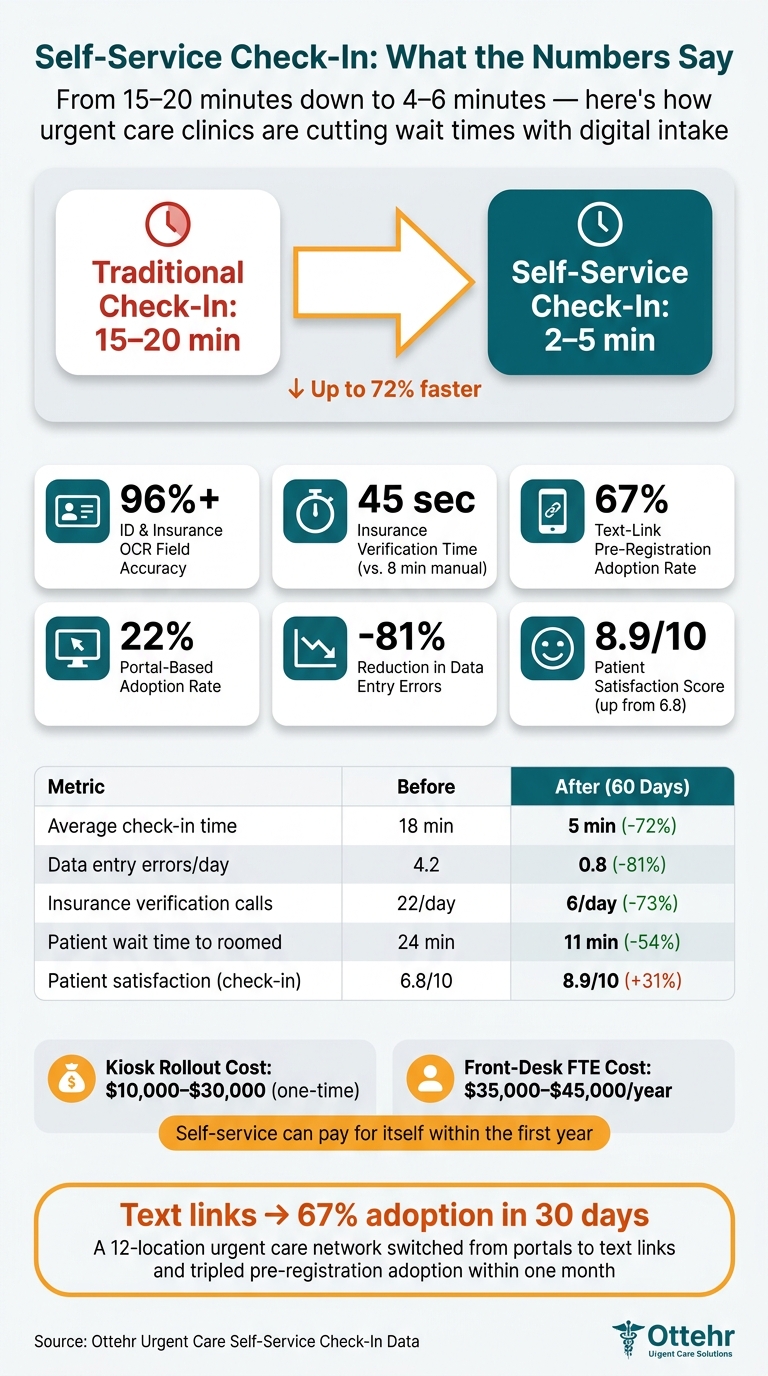
Self-Service Urgent Care Check-In: Key Stats & Time Savings
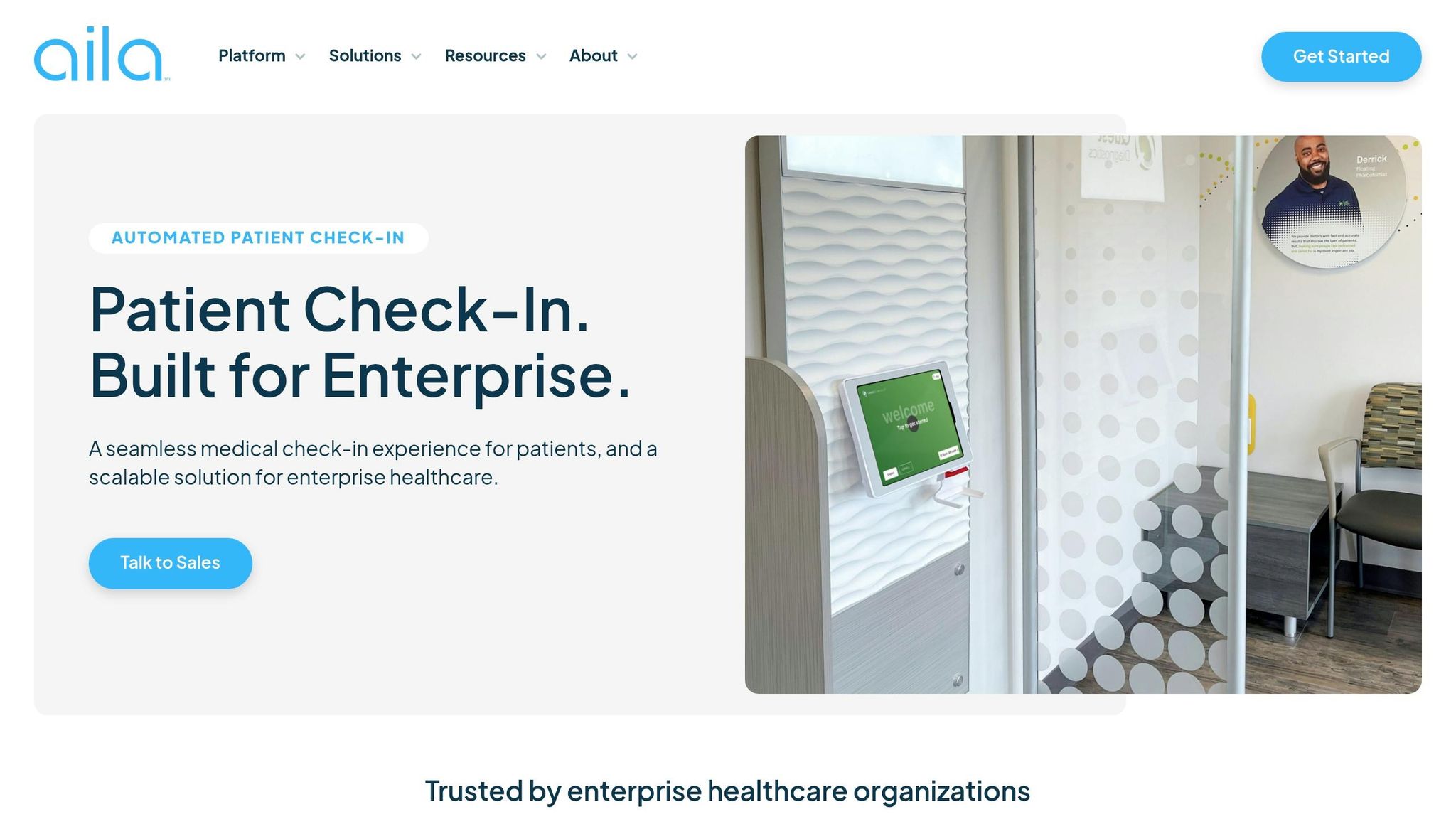
Removing the front desk cuts down on clerical handoffs. Patients take care of routine intake, while staff step in for exceptions, patient flow, and clinical support. After that, the job is simple: find the spots where the current process gets stuck.
Walk-in patients complete registration at a kiosk or wall-mounted tablet in the lobby. Patients who pre-register use a text-based mobile link, which means much of the intake is finished before they arrive.
That shifts routine work to self-service and leaves staff focused on the cases that need a human touch. In most urgent care settings, those exceptions are easy to spot: helping elderly patients or people with low digital literacy, fixing failed real-time insurance eligibility checks, and moving critical cases straight to a room, such as chest pain or severe bleeding.
Once you know which tasks patients can handle on their own, you can map the bottlenecks those steps are meant to remove.
After defining the self-service tasks, measure the handoffs they replace. Start with door-to-provider time. When that number climbs past 25 minutes, patient reviews often take a hit.
Then walk through the visit step by step:
Manual insurance verification by itself takes an average of 8 minutes per patient. That's the heart of the problem. The issue isn't that staff aren't working hard enough. It's that information moves too slowly, and speed alone won't solve a bad handoff.
Set target numbers before rollout. For most urgent care sites, a fair goal is check-in completed in 2 to 5 minutes. Registration error rates should stay below 5%, and high-performing clinics aim for left without being seen (LWBS) below 5%. Even small time savings can change the whole waiting room dynamic: cutting just 2.5 minutes per patient at check-in can reduce triage waiting times by 26%, while saving 5 minutes can cut them by 55%.
The setup depends on the site. High-volume clinics may lean toward kiosks. Tight lobbies may work better with wall-mounted units. Tablets give you more freedom to move stations around, and mobile check-in offers a hardware-free rollout.
Cost matters too. Kiosk systems usually run from $10,000 to $30,000 to deploy, while a front-desk FTE often costs $35,000 to $45,000 per year in total compensation. Those choices shape what arrival looks like for patients the moment they walk in.
Move intake upstream to cut lobby time. When a patient books online or saves a spot, send an SMS or email link 24 to 72 hours before a scheduled visit - or right after a save-a-spot booking - so they can finish intake before they walk in. That link opens a mobile form for demographics, insurance, visit reason, and consent.
No portal account required. That matters more than it may seem. Text-based intake links can see a 67% adoption rate, compared with 22% for old-school portals that make patients create an account. In one 12-location urgent care network in a mid-Atlantic metro area, switching from a portal to simple text links in April 2026 pushed pre-registration adoption from 22% to 67% within 30 days. It also cut insurance verification time from 8 minutes to 45 seconds.
For walk-ins, arrival starts at the door. A QR code at the entrance opens the same mobile intake form on the patient’s own phone. If they don’t have a smartphone, a kiosk or wall-mounted tablet fills the gap.
At the kiosk, patients confirm identity, then scan their insurance card and ID. OCR reads the data on its own, hitting 96%+ field-level accuracy and removing manual re-entry. After that, a short intake screen collects the reason for visit and chief complaint. Features like multilingual support, large print, and audio prompts make the process easier to use for more people.
Once identity and insurance are confirmed, the system shows electronic consent forms: HIPAA acknowledgment, financial responsibility, and any visit-specific treatment consents. Patients sign on the kiosk screen or on their own device - no clipboard, no paper. As soon as they submit, an automated API call checks insurance eligibility, co-pays, and deductibles in under a minute.
After check-in, patients get automated SMS updates about their place in line and estimated wait time. A message like "You're #2 in line" gives them the option to wait in their car, which helps cut lobby crowding. At the same time, staff can look at a digital flow board to see who is ready for triage and who is ready for provider.
Exceptions need to fit into the same flow, not blow it up. If a guardian is registering a minor, the form branches inside the same session to collect guardian details. If an insurance check fails, the system alerts a floor coordinator right away so they can step in before the patient gets to triage. Chest pain or severe bleeding moves the patient to the front of the queue automatically.
These handoffs work best when the same intake data feeds the EHR, flow board, and billing rules.
Once the workflow is set, the next step is choosing tools that collect patient data one time and pass it through the visit without staff typing it all over again.
The right setup depends on how many patients come in and when they show up. A busy walk-in clinic usually needs dedicated kiosks, whether that means freestanding units, wall-mounted screens, or tablet-based stations. Those tools should include a camera for ID and insurance scanning, e-signature, and intake.
The best fit often looks like this:
ADA compliance is not optional. Kiosks need large-print display options, audio help, and the correct physical height for wheelchair access.
When a high-volume clinic moves to full self-service check-in, waits tend to drop and the front desk has less work to handle.
Even if you remove the old front-desk setup, staff still need tools they can carry and use on the spot. Tablets give roving team members a way to help patients in the lobby and step in when someone needs support finishing check-in.
A digital form engine adds another layer of control. It can use conditional branching and e-signatures, which means staff don't have to re-key forms that patients already completed.
A digital tracking board gives staff a live view of patient status, such as registered, waiting, in triage, or ready. With those live updates, teams can move patients through the clinic without relying on lobby check-ins.
Lobby-facing displays also help with one of the most common friction points: repeat wait-time questions.
"30–50 per day"
can drop to:
"5–10 per day"
when automated queue communication is in place.
That same live status should also feed into the EHR so registration, triage, and billing stay in sync.
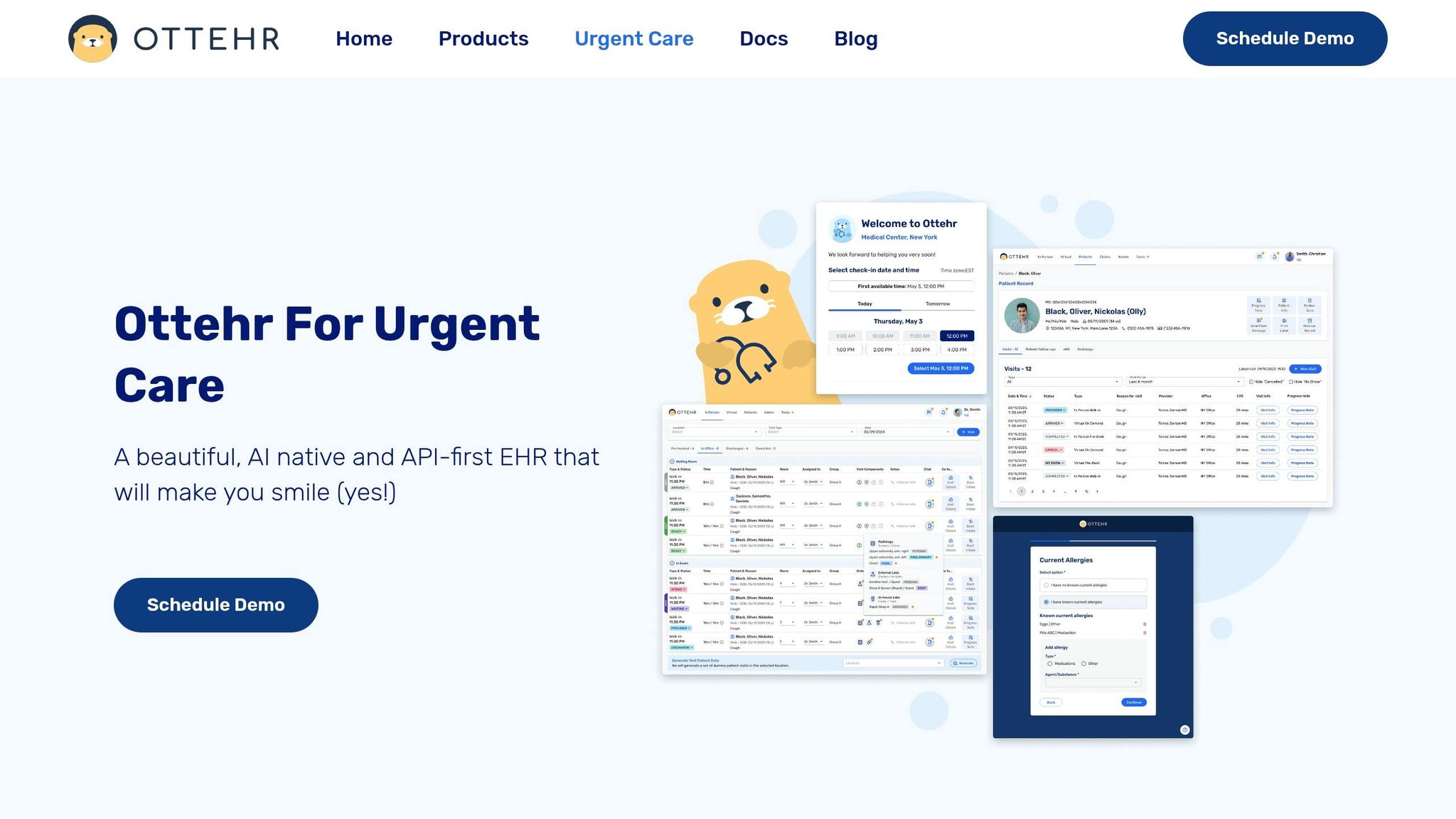
The workflow only works if intake data moves into the EHR without anyone retyping it. Once your self-service flow is live, the next step is connecting it to Ottehr so patient-entered details go straight into the chart. Ottehr is the system layer that turns self-service check-in into structured chart data.
Ottehr is built on FHIR, so digital form fields like demographics, insurance details, and chief complaint map directly to structured EHR fields. That matters because it cuts out the copy-and-paste mess that slows teams down.
When check-in is finished, the system creates a visit record automatically, which shifts staff work from data entry to verification. Instead of typing everything in from scratch, staff can focus on checking that the information is right. Digital pre-registration automation can cut manual entry errors by 60%–80%.
Ottehr’s modular front end ties kiosks, QR-code mobile check-in, and tablets into the same intake workflow. In plain English, no matter how the patient checks in, the data follows the same path. Government-issued ID scans are captured during the kiosk or mobile flow for staff review, and insurance information is checked against eligibility APIs as soon as the patient submits it.
Ottehr’s AI HPI and medical history chatbot gathers symptom onset, severity, and relevant history before the provider enters the room. That gives the care team more context up front instead of making them piece it together later. Conditional logic keeps intake shorter by showing only the questionnaires tied to the visit type, like respiratory screens for cough visits or musculoskeletal screens for injuries.
Front-desk accuracy doesn’t just help the chart. It also affects claims and billing. Captured demographics, insurance, and co-pays feed claims and billing, which helps cut denials. Automated eligibility verification returns results in seconds, and failed coverage checks alert staff before the patient is roomed.
| Ottehr Feature | Urgent Care Goal | Operational Impact |
|---|---|---|
| AI HPI/Intake Chatbot | Reduced triage time | Captures clinical context before the provider enters the room |
| Digital Tracking Board | Faster door-to-provider time | Real-time visibility into room utilization and patient wait status |
| Integrated RCM/Payments | Fewer denials, higher collections | Co-pays collected at check-in; eligibility verified before rooming |
| FHIR-Native Sync | Zero duplicate entry | Maps data directly to structured EHR fields, eliminating manual transcription |
With registration, consent, and billing connected, the next step is governance: privacy, risk flags, and staff roles.
Once intake data reaches the EHR, the job shifts to protection, exception routing, and performance tracking.
Self-service works only when privacy and patient safety are built into the check-in flow from the start. Use privacy filters, angled screens, session timeouts, and TLS 1.3 to protect patient data during check-in. E-signed forms should create time-stamped, logged records that are easier to audit than paper.
Clinical risk should move through that same intake path. Add a short acuity screen at the start of check-in. If a patient gives a positive response, the system should route that person to staff right away and move them ahead of routine arrivals.
Once those controls are in place, staff need to know how to handle the exceptions the system surfaces.
Self-service changes the front-desk job. Staff spend less time typing in data and more time guiding patients in the lobby and handling exceptions. That can mean helping someone use a kiosk, fixing an insurance flag before the patient is roomed, checking guardian signatures for minors, or stepping in when a patient triggers a clinical red flag.
Training should center on two things:
The same workflow data can also show where the process is slowing down, where patients abandon check-in, and where denial risk starts to creep in.
Track 60-day changes in these metrics: average check-in time, door-to-provider time, LWBS rate, self-service adoption rate, registration-related denial rate, point-of-service collection rate, and data accuracy.
For day-to-day operations, watch queue length, wait times, and error rates. For deeper reviews every 60–90 days, look at patient satisfaction scores, completion rates, and the points where patients drop off in the digital flow.
| Metric | Before Automation | After Automation (60 Days) | Change |
|---|---|---|---|
| Average check-in time | 18 minutes | 5 minutes | −72% |
| Data entry errors/day | 4.2 | 0.8 | −81% |
| Insurance verification calls | 22/day | 6/day | −73% |
| Patient wait time (to roomed) | 24 minutes | 11 minutes | −54% |
| Patient satisfaction (check-in) | 6.8/10 | 8.9/10 | +31% |
Review KPIs each week, fix drop-off points, and keep tuning the workflow.
Walk-in patients can check in without the usual paper-based registration in two main ways: by scanning a QR code when they arrive or by using a tablet kiosk in the lobby.
They fill out digital intake forms with their demographic details, insurance card photos, chief complaints, and e-signed consent forms. Once they submit everything, the data goes straight into the electronic health record, which cuts front-desk work down to simple verification.
If a patient needs help or can’t finish verification on their own, staff can jump in and assist. Self-service tools take care of routine registration, which gives your team more time for exceptions, patient questions, and support for people who aren’t comfortable with digital tools.
If an insurance eligibility check fails, the system alerts the front desk with the details so staff can fix the issue and keep the process moving.
Clinics measure ROI by tracking key business and financial metrics. That usually means looking at lower admin labor costs, higher daily revenue per patient, more recovered revenue from fewer claim denials, and fewer unbilled appointment slots.
They also track intake speed, wait times, walk-away rates, data accuracy, and how much manual rework staff still has to do. Real-time dashboards make it easier to monitor performance and fine-tune staffing and patient flow.

Tell us what you need and we'll get back to you soon.