
Six signs your urgent care has outgrown its legacy EHR — slow charting, poor integrations, billing gaps, and rising staff burden.
If your team is charting after hours, re-entering patient data, chasing claims, and leaning on phone calls for follow-up, your EHR may no longer fit urgent care.
I’d boil the warning signs down to six things:
The cost is simple: lower throughput, more staff strain, slower collections, more denials, and a worse patient experience.
A few numbers stand out:
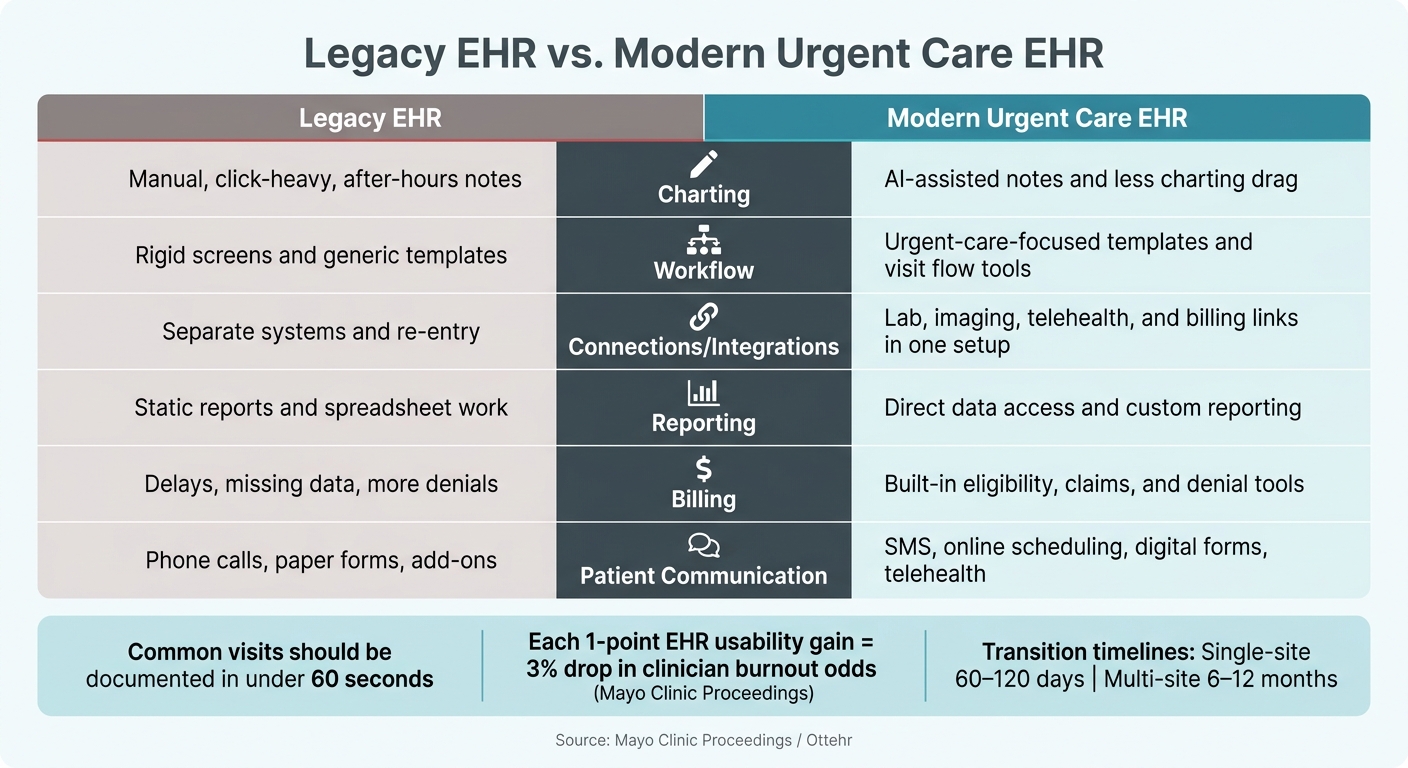
Legacy EHR vs. Modern Urgent Care EHR: Key Differences
| Area | Legacy EHR | Modern urgent care EHR |
|---|---|---|
| Charting | Manual, click-heavy, after-hours notes | AI-assisted notes and less charting drag |
| Workflow | Rigid screens and generic templates | Urgent-care-focused templates and visit flow tools |
| Connections | Separate systems and re-entry | Lab, imaging, telehealth, and billing links in one setup |
| Reporting | Static reports and spreadsheet work | Direct data access and custom reporting |
| Billing | Delays, missing data, more denials | Built-in eligibility, claims, and denial tools |
| Patient communication | Phone calls, paper forms, add-ons | SMS, online scheduling, digital forms, telehealth |
If I were reviewing this article fast, that’s the core point: when workarounds become part of daily work, patching the old EHR usually stops being enough.
One of the clearest signs shows up at the end of the day: providers are still finishing notes after the clinic closes. That’s not just a personal work habit. It usually points to a system issue. When charting drags during the visit, the work spills into evenings and weekends.
A simple gut check helps here. If common visits can’t be documented in under 60 seconds, charting is slowing the clinic.
All those extra clicks add up. Slow charting can push burnout risk higher, and when providers can’t stay caught up during clinic hours, after-hours work starts to chip away at throughput across the practice. Research cited in Mayo Clinic Proceedings found that for every one-point increase in an EHR's usability score, there was a corresponding 3% reduction in the odds of clinician burnout.
Legacy EHRs often come with a rigid, one-size-fits-all setup that doesn’t match the fast, complaint-driven pace of urgent care. You can feel that mismatch when your team has to bend the visit around the software instead of letting the software support the visit.
Here’s a common example: a patient completes web check-in, but staff still have to type the same details again at the front desk. That’s not a connected system. It’s a patchwork fix.
Once that friction spreads, reporting tends to fall apart too. If practice leaders have to export data into spreadsheets just to track visit volume or wait times, the EHR’s reporting isn’t doing enough.
The same drag often shows up in billing and collections. Billing bottlenecks tend to appear when billers can’t get the detail they need inside the system. That slows the revenue cycle and makes issues harder to spot early.
Patient communication can lag in the same way. If patients still depend on phone calls or paper follow-up, the process is too manual. Put those two problems together - billing friction and weak communication tools - and the result is more staff work and a patient experience that feels disconnected.
Those warning signs don't stay small for long. They show up in numbers your practice feels every day: lower throughput, less revenue collected on time, and more patients who don't come back.
These warning signs shrink capacity, put more strain on staff, and drag down daily output. The friction touches the whole visit. When routine tasks take longer than they should, one delay spills into the next.
Staff who spend their day on repeat data entry, manual workarounds, and bouncing between systems carry a heavier mental load. That can lead to more overtime and a higher risk of turnover.
Every extra click and every missing integration slows the team, adds frustration, and limits throughput.
Documentation delays don't just hit providers. They slow the whole billing cycle. When notes aren't finished until after hours, coding gets delayed, and billing holdups add more days to accounts receivable (AR).
When the EHR and practice management system don't share data cleanly, claims can go out with missing or outdated insurance and demographic information. That leads to more denials and more rework.
Patients can tell when a visit feels disorganized, even if they never see the EHR behind the scenes. Long wait times, a front desk that's stretched thin, and awkward follow-up steps all shape how a patient feels about the visit.
In urgent care, patients often have options. That means the feeling they leave with plays a big part in whether they return. A legacy EHR that slows front-desk work or holds up discharge hurts that experience directly, even when the clinical care itself is strong.
Those costs are often the clearest sign that your current EHR no longer fits the way urgent care works.
Once the warning signs are clear, the next step is pretty simple: find a system that fixes the bottlenecks urgent care teams feel every day. That usually means charting, patient flow, billing, and follow-up.
This isn’t about swapping in another generic platform. It’s about choosing an EHR built for urgent care, with tools that remove the same friction that slows visits, holds up claims, and creates extra work for staff.
A modern urgent care EHR should match the speed of urgent care. Generic primary-care templates usually don’t.
A real-time Visits Tracking Board lets staff see patient status at a glance. That means less back-and-forth, fewer status checks, and smoother throughput. Templates built for common urgent care complaints also help keep visits moving, without forcing teams to work around general-purpose forms.
Documentation is often where teams feel the biggest drag. That’s why tools like AI ambient scribing can make such a big difference. The note gets drafted during the visit, an intake assistant captures history, and AI-assisted coding review catches issues before billing. Put together, those features can cut after-hours charting and ease documentation load throughout the day.
API-first architecture also gives practices room to shape screens and workflows around urgent care visits instead of adjusting their process to fit the software.
Fast documentation only helps if the rest of the workflow keeps up.
A FHIR-native platform connects with labs, imaging, and telehealth without extra re-entry. That closes the gaps that often lead to errors and slow down care. On the billing side, integrated RCM brings eligibility checks, claims submission, denial management, and patient billing into one system. The result: fewer denials and faster collections.
Patient communication matters here too. Built-in SMS, online scheduling, electronic paperwork, and telehealth keep those touchpoints inside one platform. That makes follow-up easier and helps support patient retention.
Ottehr also gives practices direct access to their data, which helps with custom analytics and reporting.
Use this snapshot to tell the difference between surface-level features and a system that actually fits urgent care operations.
| Feature | Legacy EHR | Modern Urgent Care EHR |
|---|---|---|
| Documentation | Manual entry, high click counts, after-hours charting | AI ambient scribing, intake assistant, AI-assisted coding review |
| Workflow Fit | Rigid, one-size-fits-all templates | Customizable screens and urgent-care-specific workflows via API-first architecture |
| Integrations | Siloed, difficult third-party connections | FHIR-native, API-first connectivity for labs and imaging |
| Reporting | Basic, static reports with limited data access | Direct data access with custom analytics and reporting |
| Billing/RCM | Disconnected billing, manual eligibility checks | Integrated RCM, eligibility verification, and AI-assisted coding review |
| Patient Communication | Third-party add-ons for SMS and telehealth | Built-in SMS, online scheduling, electronic paperwork, and integrated telehealth |
Once the warning signs are hard to ignore, the next step is simple: figure out whether your EHR needs a fix or a full swap.
Start with a short, honest audit of how your practice runs right now. Use actual numbers, not gut feel. Look at average chart completion time, how much after-hours documentation falls on clinicians, how much time staff spend on non-clinical work and data entry, and how much of your billing process is still manual.
Those numbers tell you where the EHR is draining time, money, or staff bandwidth. Long chart closure times can limit throughput. Manual billing can slow cash flow.
It also helps to have clinicians score the EHR with a usability scale. Low scores often show up alongside friction, burnout, and turnover.
If the gaps are mostly operational, fix those first. If they’re structural, it’s time to look at replacement criteria.
Use incremental modernization only when the core system still does its job and the gaps are fairly narrow.
Go with full replacement when workflow fit or interoperability issues can’t be solved with add-ons. For multi-site operators, implementation timelines usually run 6 to 12 months, so planning ahead matters. Single-site practices can often finish a transition in 60 to 120 days.
Either way, bring your clinical staff into the review process. The interface has to fit how urgent care works in day-to-day practice, not just how polished it looks in a demo.
The decision gets pretty plain when the same bottlenecks keep showing up visit after visit. If your EHR still forces workarounds across charting, workflow, reporting, billing, and communication, it no longer fits your practice.
"Legacy EHRs have become rigid and often fail to meet the unique needs of different clinical environments... forcing [clinicians] to adapt to the system rather than the system adapting to them." - Ottehr
When patching the system stops closing the gap, replacement is the clearest next move.
Map your clinical and admin work, then look for bottlenecks that keep showing up - things like duplicate data entry, slow charting, or billing denials that happen again and again.
If those problems stick around even after you clean up templates, shortcuts, or day-to-day workflows, the issue is likely structural, not just a setup problem. That’s especially true when the system still can’t support interoperability, automated coding, or smooth patient flow.
Track performance in four areas: clinical efficiency, financial health, operational flow, and staff burden.
Look at metrics like average minutes per encounter, same-day close rate, and clinician “pajama time.” Then check the business side: denial rate, first-pass clean claim rate, and average days in accounts receivable.
On the day-to-day operations side, monitor patient wait times, length of stay, and real-time patient census. These numbers give you a clear way to compare your current system with your goals.
A newer urgent-care EHR can help cash flow in a few direct ways: it cuts claim denials, helps claims get paid sooner, and supports cleaner billing from the start. That usually comes from tools like real-time eligibility checks, AI-assisted coding and documentation, claim scrubbing, and more accurate registration data.
It can also make the patient experience smoother. Mobile check-in and pre-visit intake can trim wait times and cut down on repeated questions at the front desk. At the same time, verification and messaging can give patients clearer upfront out-of-pocket cost information, which helps set expectations before the visit even starts.

Tell us what you need and we'll get back to you soon.