
Reduce urgent care A/R by running eligibility at intake, showing a single patient amount, and integrating payments into the visit record.
Most urgent care collection problems start before the patient leaves the front desk. In plain terms, staff often don’t see the right amount soon enough, so money that could have been collected at check-in or discharge turns into patient A/R.
Here’s the short version: the fix is not a full EHR replacement. I’d focus on three things:
The article makes one point clear: when copays, remaining deductibles, prior balances, and payer rates are split across screens, staff guess, skip, or collect too little. And that gets expensive. According to the piece, better estimates can cut post-visit A/R work by about 80% and lift collection rates by about 70%.
If I had to sum it up in one line: urgent care collections fail when financial data shows up too late, too vaguely, or in the wrong place.
A few takeaways matter most:
| Issue | What I’d change |
|---|---|
| Staff can’t see patient share at check-in | Run eligibility during intake |
| Copays and deductibles are hard to read | Show one clear amount due with a short reason |
| Prior balances are hidden or delayed | Put old balances and same-day estimates on one screen |
| Payment happens outside the EHR | Let staff collect and post inside the visit record |
| Verification fails with no next step | Use a set fallback rule for Unknown coverage |
So the core lesson is simple: better collections come from better timing, better visibility, and fewer handoffs. When staff can verify, estimate, collect, and post in one flow, they miss fewer balances and patients get a clearer bill before they walk out.
In many urgent care settings, the eligibility check does little more than confirm that coverage is active. But that’s not enough at the front desk. Staff still need to see the urgent care copay, the patient’s remaining deductible, and whether the visit is in network so they can collect the right amount at check-in.
That shortfall shows up in three spots: eligibility, balance visibility, and payment capture.
Timing is only part of the issue. Even when the response comes back on time, it often shows up as raw eligibility data that isn’t easy to scan. A patient may arrive with active coverage, yet the EHR displays a general office-visit copay instead of the urgent care benefit code. That’s how staff end up collecting the wrong amount. Out-of-network visits add another snag. In raw eligibility responses, copays can appear as $0, and without a clear network flag, that can be read the wrong way.
Deductible data often comes back in separate benefit lines with labels such as “Remaining,” “Calendar Year,” and “Year to Date.” Those labels are driven by technical codes, and they don’t help a front-desk team member who needs a plain answer at check-in. For same-day collection, the line that matters most is the remaining deductible, but it’s often buried under those labels.
Prior balances create a second problem. Billing data may lag, so staff don’t get a live view of what the patient still owes. That makes real-time collection harder than it should be.
When it’s time to take payment, many standard EHR setups push staff out of the patient record. They have to jump to a separate payment tool or terminal, type in the amount by hand, and sort out the reconciliation later.
Here’s what that looks like side by side:
| Workflow Step | Standard EHR Workflow | Connected Workflow |
|---|---|---|
| Coverage and patient-share visibility | Buried in raw eligibility responses; limited to a shallow active/inactive view. | Real-time parsing of remaining deductible and UC-specific copays, surfaced directly on the registration and payment screen. |
| Staff Prompting | Staff must calculate or guess amounts manually. | Automated prompt that tells staff what to collect and why. |
| Collect and post | Separate terminal; amount keyed in manually; reconciled after the visit. | Integrated "Collect" button tied to the calculated estimate; immediate posting to the ledger upon successful transaction. |
| Patient Balance Access | Often outdated; requires delayed billing sync. | Real-time view of prior balances and same-day estimates. |
The result is pretty simple: more missed collections, more aging AR, and more billing follow-up. That’s the gap a connected collection workflow is built to close.
Fixing point-of-service collections does not mean replacing the EHR. In most cases, the fix is much simpler: verify earlier, show clearer prompts, and connect the payment tools your staff already need. The job starts upstream. Move verification earlier, then show the right amount when it's time to collect.
When eligibility runs automatically as soon as a patient submits insurance details during digital intake, front-desk staff walk into check-in with the key numbers already in hand. They should see a parsed summary of the patient share, including copay, remaining deductible, and the patient responsibility estimate.
If coverage can't be confirmed, the visit should be flagged as "Unknown" with a clear alert. From there, staff should be routed to manual verification or a self-pay path.
The screen should make the next step obvious. Staff need to know exactly what to collect, and why, before the visit closes.
For self-pay patients, prompt staff to collect a flat visit rate at check-in, then update that amount after CPT codes are entered at discharge. For insured patients with a flat visit rate, the system should suggest collecting whichever is lower: the remaining deductible or the flat visit rate.
Once the amount is visible, timing becomes the next issue. That's where prompts come in.
Configurable prompts fix the "when" problem. A well-set-up EHR can show a message at both check-in and discharge, such as "Collect $35 urgent care copay" or "Estimated patient responsibility based on remaining deductible", so staff don't have to stop and do the math themselves.
As the provider adds E&M codes and other CPTs during the visit, the estimate should update automatically. That way, the discharge prompt matches the visit that actually took place.
It also helps to connect the payment terminal to the EHR. Then staff can collect payment inside the visit record instead of bouncing between systems. Another option is to tokenize a card at check-in and charge the final balance at discharge.
None of this works well if the front desk has to hunt through billing tabs or open a second system just to answer a simple question. Remaining deductible, copay amounts, prior balances, and allowed charge amounts should all live on one screen.
When staff can see the full picture in one place, the conversation gets much easier. They can tell the patient what is due today because the numbers are right there, not buried three clicks deep.
The table below shows how each data point connects to a front-desk action:
| Patient Scenario | Data Surfaced | Staff Action |
|---|---|---|
| Insured, copay only | Urgent care copay (e.g., $35) from eligibility response | Collect copay at check-in |
| Insured, deductible not met | Remaining deductible + negotiated rate | Collect estimated responsibility at discharge |
| Self-pay | Flat visit rate from self-pay fee schedule | Collect flat visit rate at check-in; adjust at discharge based on CPTs |
| Multiple CPTs added during the visit | Negotiated rate + CPT codes added during the visit | Collect based on accumulated CPT codes at discharge |
Once verification, prompts, and payment posting are connected, the workflow is simple enough to repeat from visit to visit.
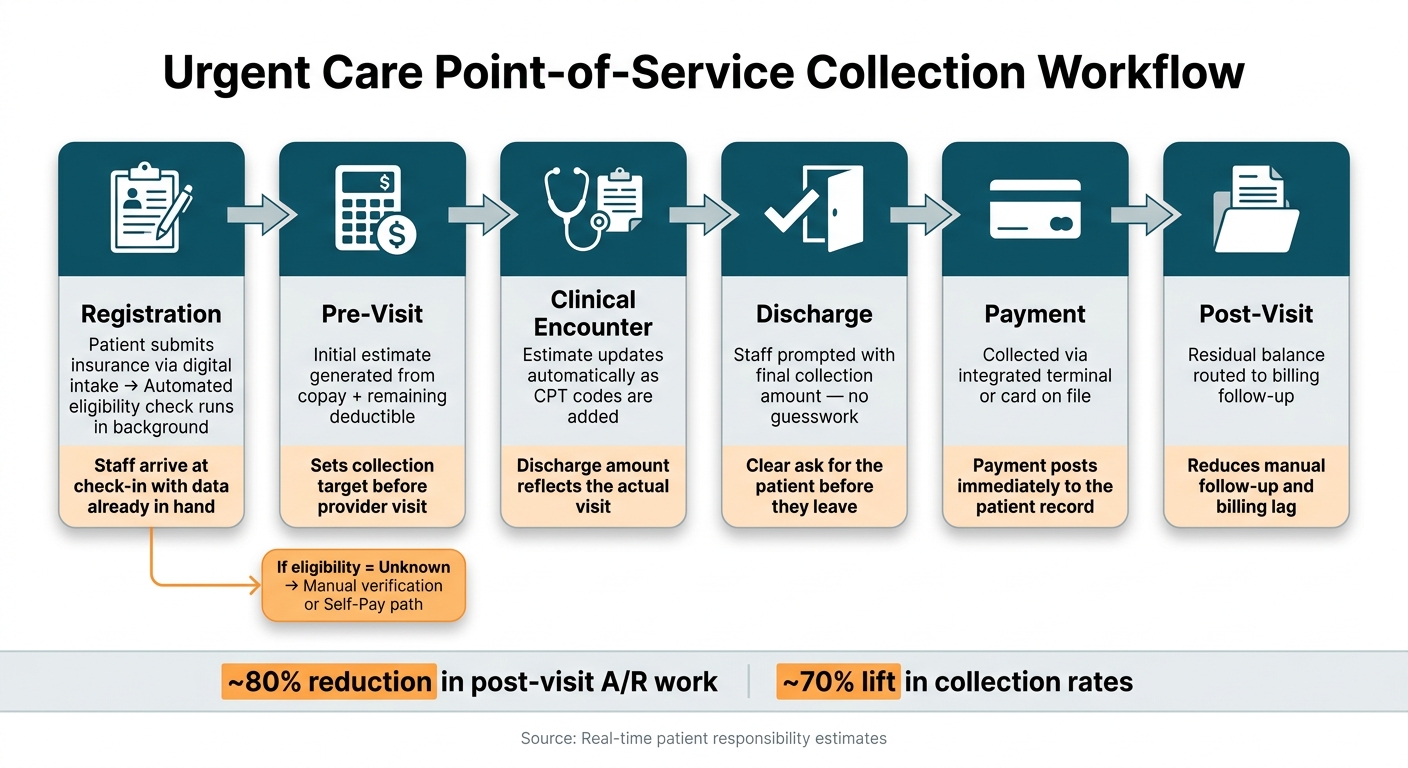
Urgent Care Point-of-Service Collection Workflow: Verify, Estimate, Collect, Post
A better workflow follows a simple path: verify, estimate, collect, post.
It starts at registration. The moment a patient submits insurance through digital intake, an automated eligibility check runs in the background. By the time check-in happens, staff can already see copay, deductible, and out-of-pocket status. If eligibility can’t be confirmed, the visit gets flagged, and staff move it to a manual check or self-pay path.
Next comes the estimate. The system creates an initial estimate, then updates it as the clinician adds CPT codes. That estimate is matched against the payer’s negotiated fee schedule, so by discharge, the final amount reflects the visit that actually took place.
Payment should happen inside the EHR. Staff can collect through an integrated terminal or charge the card on file. The payment posts right away to the patient record. If there’s still a balance left, it moves to billing follow-up.
That flow is much easier to use when staff can see each step at a glance.
| Workflow Stage | What Happens | Why It Matters |
|---|---|---|
| Registration | Eligibility check runs automatically | Staff arrive at check-in with data already in hand |
| Pre-Visit | Initial estimate generated from copay and deductible | Sets a collection target before the provider visit |
| Clinical Encounter | Estimate updates as CPT codes are added | Discharge amount reflects the actual visit |
| Discharge | Staff prompted with final collection amount | No guesswork; clear ask for the patient |
| Payment | Collected via terminal or card on file | Payment posts immediately to the record |
| Post-Visit | Residual balance routed to billing follow-up | Reduces manual follow-up and billing lag |
When the workflow is clear, the impact shows up fast in both collections and A/R. Real-time patient responsibility estimates can cut post-visit A/R work by about 80% and lift collection rates by about 70%.
That’s the big shift. Instead of chasing balances after the visit, staff handle more of the work while the patient is still present. It’s simpler for the team, and it gives patients a clearer picture of what they owe before they walk out the door.
Once the workflow is in place, leaders need rules, training, and a way to track missed balances.
After the workflow is connected, leaders need clear rules for what to collect, when to collect it, and what happens when something goes off track.
Collection rules fall apart when they're vague. A simple rule set should cover three situations:
That only works if staff know what to do the second verification fails. If eligibility comes back as "Unknown", the team should treat it as manual verification or self-pay. If real-time verification fails, move the visit down a self-pay path until coverage is confirmed. If the member ID is wrong or expired, the patient needs to fix it or choose self-pay before going to the exam room. And If an open-source EHR can't show a dependable amount to collect, staff need a fallback rule they can follow every time, not a guess in the moment.
Once those rules are in place, the next step is to see whether the front desk is following them. Track the amount the system prompts staff to collect against what was actually collected. Any gap should count as a missed balance. That kind of reporting shows where the process broke: the EHR prompt, the estimate, or the payment handoff. It doesn't just tell you that money was missed.
Collections get better when the right amount shows up at the right time. If the EHR displays the remaining deductible, allowed amounts by payer and code, and a clear prompt for collection, teams can collect more without adding front-desk work.
"In 95% of cases, this can eliminate patient AR. The entire patient responsibility can be collected at the visit." - Daniel Abrams, CEO, Ottehr
Pulling AI-powered eligibility checks, cost estimates that change as providers add codes during the visit, and built-in payment tools into one front-desk workflow gives staff what they need in one place. That means fewer missed balances, less post-visit A/R work, and a faster, clearer experience for patients.
No. Many urgent care providers can improve collections without replacing their entire EHR.
In a lot of cases, the fix is much simpler. Adding tools like real-time eligibility verification, patient responsibility estimates, and integrated payment terminals to the system you already use can give staff clearer information right at check-in.
That means fewer guesswork moments and better prompts to collect the right amount at the point of service.
Staff should manually rerun the eligibility check to make sure the system is pulling the most current insurance information.
If the result still comes back as Unknown due to technical issues or data errors, like a wrong member ID or expired coverage, staff should let the patient know that updates may be needed. If the issue can’t be fixed at that time, move the patient to self-pay so the visit can continue, and verify coverage later.
Urgent care can collect the right patient balance before coding is finished by using real-time eligibility verification and automated cost estimation.
At registration, eligibility checks pull the patient’s current deductible status and copays. Then, as clinicians document the visit, the EHR can use fee schedules plus any added E&M codes or procedures to refresh the expected patient responsibility in real time, so the front desk can collect it during the visit.

Tell us what you need and we'll get back to you soon.