
7 essential EHR features for high-volume urgent care: fast charting, real-time intake, integrated diagnostics, AI-assisted coding, and revenue protection.
Urgent care revenue cycle breaks when visits move faster than claims, codes, and eligibility checks can keep up.
Once charting speed is set, the next step is the set of workflows that decide whether patients keep moving or get stuck. These three areas shape how fast a visit goes from check-in to discharge.
Use chief-complaint templates for the visits you handle most often. The goal is simple: fewer clicks, faster notes, and less backtracking. Templates should be prebuilt, easy to edit, and set up to speed note completion.
During the demo, don’t settle for a polished overview. Ask the vendor to run a real urgent-care visit from start to finish. Then track the things that matter:
That gives you a much clearer picture of how the system works when staff are moving at full speed.
After charting, intake is usually where things start to bunch up.
Front-desk slowdowns often hit throughput first. If registration drags, everything behind it drags too. Intake should be fast, flexible, and patient-led.
Look for mobile, kiosk, and tablet check-in options with customizable forms that let patients enter their own data. That shift can take pressure off staff and move people through the door with less friction. Integrated insurance validation and eligibility checks, along with duplicate-patient prevention logic, help keep records clean and cut billing delays.
A real-time tracking board also matters. It should show statuses like scheduled, arrived, in room, completed, and cancelled in one place, with walk-ins and booked visits in the same view. In the demo, time the full intake flow: new registration, record lookup, and rooming. Then confirm that status updates move on their own from triage through discharge.
Once the patient is checked in, diagnostics need to stay inside the visit instead of bouncing between systems.
Disconnected diagnostics slow teams down and make follow-up tasks easier to miss. Orders, results, and prescriptions should stay inside the encounter.
Require e-prescribing with medication history, allergy checks, and interaction checks. The system should also support real-time lab and imaging ordering, along with results tracking. Automated result alerts help staff catch follow-up tasks on time and keep discharge from getting held up.
Use standards-based interfaces so staff don’t have to re-enter the same data across systems. In the minor-injury demo, verify that results and prescriptions stay in the chart and that no duplicate entry is needed.
Once visits are moving, the next bottleneck usually shows up in provider documentation.
Use AI where it saves time during urgent care visits: pre-visit intake, ambient note drafting, and post-visit coding. Patient-entered symptoms can prepopulate the chart before the provider walks into the room. An ambient scribe can draft a SOAP note in real time, and AI coding tools can suggest the right E/M codes before a claim is submitted.
That said, AI should help with documentation and coding, not replace clinical judgment. Providers need to review everything before it’s finalized. You also want a clear audit trail that shows the draft, the edits, and the timestamps.
It’s also smart to check that the AI works the same way for in-person and telehealth visits. If the ambient scribe only works in the exam room, you end up with a gap the moment a visit shifts online.
After documentation, the next growth challenge is keeping workflows steady across locations.
When one site is running well, the next test is simple: can that same workflow scale without falling apart when each location does things a little differently? A single-site setup is usually manageable. Add a second site, and inconsistency starts to creep in fast - different triage steps, different discharge instructions, different order sets. That’s when configurable workflows stop feeling optional.
Admins should be able to update forms, triage steps, discharge instructions, and permissions without waiting on the vendor. If every small change turns into a support ticket, your team loses the ability to move when one location needs something different.
The same idea applies to visit types. Telehealth, pediatric walk-ins, and standard adult visits shouldn’t all get pushed through the same rigid path. Workflows should shift based on visit type, and those changes should be managed from one central dashboard.
A multi-site pediatric group used a configurable EHR to build a custom behavioral health intake workflow with scheduling, eligibility checks, and direct EHR integration.
One practical question to ask: how do site-specific triage steps and order sets hold up after system updates?
Configurable workflows help teams stay on track. But that only gets you so far. If the back end can’t turn finished visits into clean claims and clear financial data, the system starts leaking money and time.
Once workflows are set, the next question is simple: does a completed visit turn into a clean claim without staff having to fix things by hand?
Fast charting sounds great. But it only matters if it leads to claims that go out right the first time. In a busy urgent care setting, revenue slips away when charges get missed, codes are off, or eligibility isn’t checked at registration.
At a bare minimum, your EHR needs to support ICD-10-CM and CPT coding. It should pull charges straight from the clinical encounter, not force staff into a separate manual step. And real-time eligibility checks at registration aren’t optional. Catching a coverage problem before the visit is far less expensive than dealing with a denial later.
The claim workflow matters just as much. You want automated claim validation before submission, a denial work queue where staff can find, fix, and resubmit in one place, and built-in support for workers' comp and self-pay workflows. Patient billing and payment posting should also happen inside the EHR.
During a demo, run the "clean claim" test. Complete a standard urgent care visit, like a level 4 encounter with a rapid strep test, and watch what happens next. The system should suggest the right ICD-10-CM and CPT codes, flag problems before submission, and send the claim on its way without manual workarounds. If that process feels clunky, it’s going to slow people down once volume picks up.
After billing, the next check is visibility. Leadership needs to see throughput issues and denial problems as they happen, not days later.
Track two sets of metrics:
Real-time dashboards help teams act in the moment. If triage starts backing up, staff can spot it before wait times get out of hand. Trend reporting helps leaders make longer-range calls on staffing, scheduling, and site performance.
For multi-site groups, filtering is where reporting either helps or falls flat. You should be able to filter every report by provider, location, visit type, payer, and date range. Otherwise, you’re staring at noise. A dashboard that only shows systemwide totals won’t show whether one clinic keeps missing door-to-provider targets while another is staying on pace.
So yes, require reporting that filters by provider, location, visit type, payer, and date range. Without that, the data is too broad to guide staffing decisions or denial management.
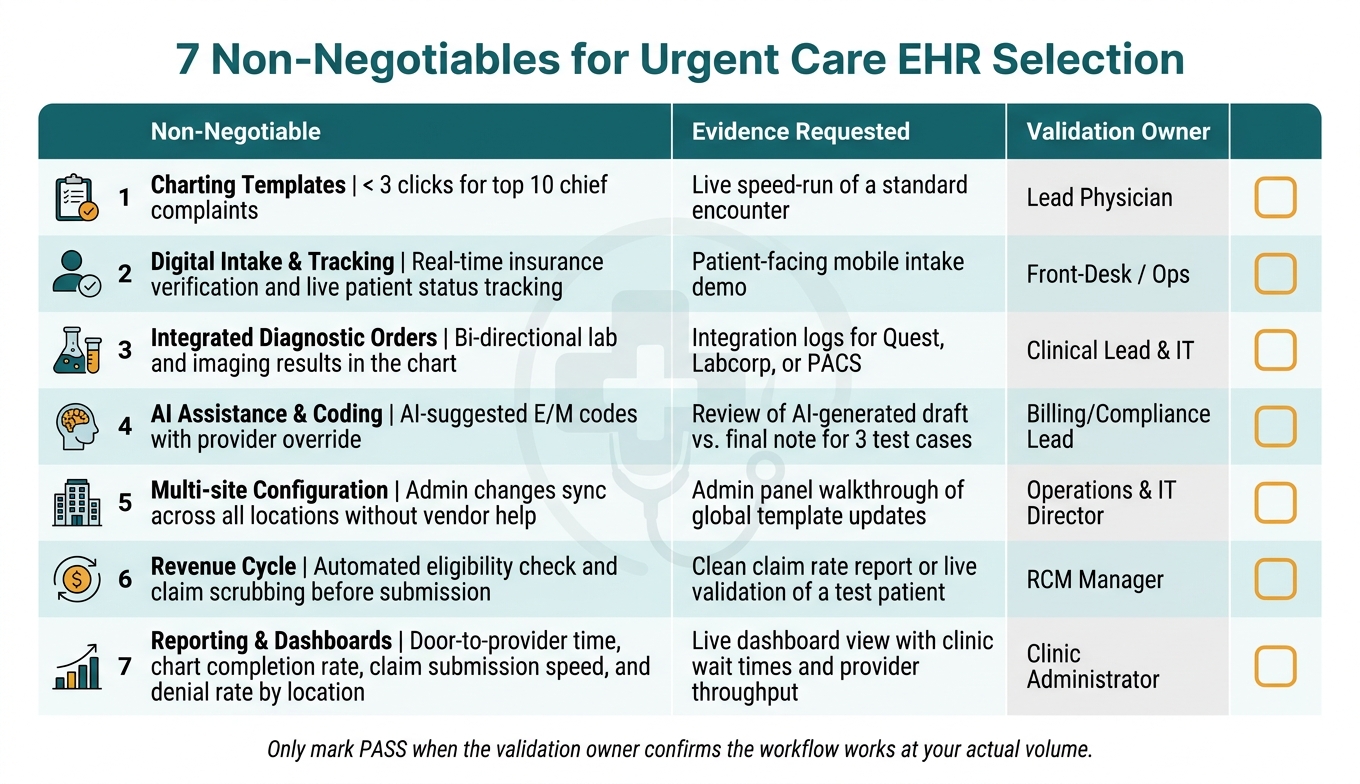
7 Non-Negotiables for Urgent Care EHR: Scorecard at a Glance
Feature lists are easy to make look good. A live, pass/fail test of actual urgent care work is much harder to fake.
Before you sign a contract, test each of the seven non-negotiables from this guide against a real workflow. And don't leave the verdict vague. Put one person on your team in charge of each area, and have that person call it: pass or fail.
That changes the dynamic fast. When a lead physician owns charting validation and a billing manager owns the revenue cycle test, you get straight answers. Not polished demos that slide past weak spots. Set those owners before the demo begins.
Then turn the seven non-negotiables into a simple scorecard for the final demo. The table below gives you the structure. The Evidence Requested column tells you exactly what to ask the vendor to show.
| Non-Negotiable | Pass/Fail Target | Evidence Requested | Validation Owner | Pass/Fail |
|---|---|---|---|---|
| 1. Charting Templates | < 3 clicks for top 10 chief complaints | Live speed-run of a standard encounter | Lead Physician | |
| 2. Digital Intake & Tracking | Real-time insurance verification and live patient status tracking | Patient-facing mobile intake demo | Front-Desk / Ops | |
| 3. Integrated Diagnostic Orders | Bi-directional lab and imaging results in the chart | Integration logs for Quest, Labcorp, or PACS | Clinical Lead & IT | |
| 4. AI Assistance & Coding | AI-suggested E/M codes with provider override | Review of AI-generated draft vs. final note for 3 test cases | Billing/Compliance Lead | |
| 5. Multi-site Configuration | Admin changes sync across all locations without vendor help | Admin panel walkthrough of global template updates | Operations & IT Director | |
| 6. Revenue Cycle | Automated eligibility check and claim scrubbing before submission | Clean claim rate report or live validation of a test patient | RCM Manager | |
| 7. Reporting & Dashboards | Door-to-provider time, chart completion rate, claim submission speed, and denial rate by location | Live dashboard view with clinic wait times and provider throughput | Clinic Administrator |
Only mark a capability as passed when the validation owner confirms the workflow works at your actual volume and IT confirms the deployment model fits your infrastructure. If a system can't clear these bars in a controlled demo, it won't clear them when the clinic gets slammed.
Put it to work against the pressure points your urgent care team deals with every day. Time how fast staff can handle intake, registration, insurance verification, and an encounter note. If charting keeps taking more than a few minutes, that’s a red flag.
Then run through urgent-care-specific workflows from start to finish: lab and imaging orders and results, e-prescribing, patient status updates, charge movement, claim scrubbing, and real-time reporting - without manual re-entry.
Start with a phased approach. First, validate digital intake and registration, because registration mistakes often lead to billing exceptions. Add real-time insurance eligibility checks so you can catch coverage issues before treatment begins.
Next, validate scheduling and patient tracking. After that, review clinical documentation to spot charting bottlenecks and duplicate entry. Then align clinical and billing workflows to cut down on manual re-entry and claim delays.
Leadership should track daily KPIs tied to patient flow, documentation, and revenue cycle performance.
That includes metrics such as:

Tell us what you need and we'll get back to you soon.